On this page
An AI customer service agent is judged by how often a customer's request ends resolved, and by how cleanly it moves to a human when it cannot. Response time, tone, and conversation volume are symptoms of that, not the standard. The metric most teams report first, deflection, counts how many inquiries never reached a person. It says nothing about whether the customer got what they came for.
This guide covers the four standards a competent agent has to meet, what it can realistically do, what has to stay with your team, and how the customer-facing surfaces it works from can be built and put online.
What an AI customer service agent is, and what it is not
The labels vary — an AI customer support agent, an AI agent for customer support, a customer service AI agent — and so does what vendors mean by each one. The useful distinction is not vocabulary. It is whether the system can understand a request in context, reason about the next step, and act within permissions you set.
Salesforce, which sells one of these platforms, defines AI agents as autonomous, proactive applications built to execute specialised tasks: they use large language models to read the context of a customer interaction, reason through the next step, and produce responses grounded in trusted business data, operating around the clock and escalating when a request goes beyond their scope. That is a vendor describing its own product, but the definition is a fair working bar, because it separates three generations of automation that customers experience very differently.
| Approach | How it handles a request | Where it fails |
|---|---|---|
| Scripted menu | Matches keywords to a fixed tree of options | Anything outside the tree, and customers who pick the wrong branch to escape it |
| Retrieval assistant | Surfaces an article that may contain the answer | Questions about one specific order, account, or entitlement |
| Agent with actions | Reads the request, retrieves grounded data, performs the permitted action | Requests that need judgement, or an action it has no permission to take |
A traditional IVR menu sits in the first row. The third row is the thing worth building, and it is also the thing that fails most visibly, because it is allowed to change something.
What a good agent can actually do
Four jobs separate a useful agent from a demo. The second column is what the customer notices; the third is what you have to own before the agent can do it.
| Job | What the customer experiences | What you have to provide |
|---|---|---|
| Answer from your own material | An answer that matches your policy, not a plausible guess | A maintained source of truth the agent is allowed to quote |
| Carry out an action | An order status, an address change, a refund, a rescheduled appointment | Action permissions, and a system the agent can actually write to |
| Follow a case over time and across channels | Picking up where the last conversation stopped, in chat, email, or voice | Persistent state, and a reliable way to identify the customer |
| Hand the case to a person | A human who already knows the problem | Escalation rules, and a context payload that travels with the case |
Salesforce's own task list for a service agent reads the same way: resolving an open case, drafting a follow-up email, escalating to a specialist, routing an incoming call, pulling customer history, logging notes. The same page describes agents pursuing goals across days and weeks while retaining context, which is the part most teams underestimate. A single exchange is easy. A case that spans three days, two channels, and one refund is where the design work lives.
Standard 1: it resolves, and you can prove it
Anyone can claim resolution. The useful definition is narrower, and Zendesk publishes one in its AI agent documentation. It separates automated outcomes into three tiers.
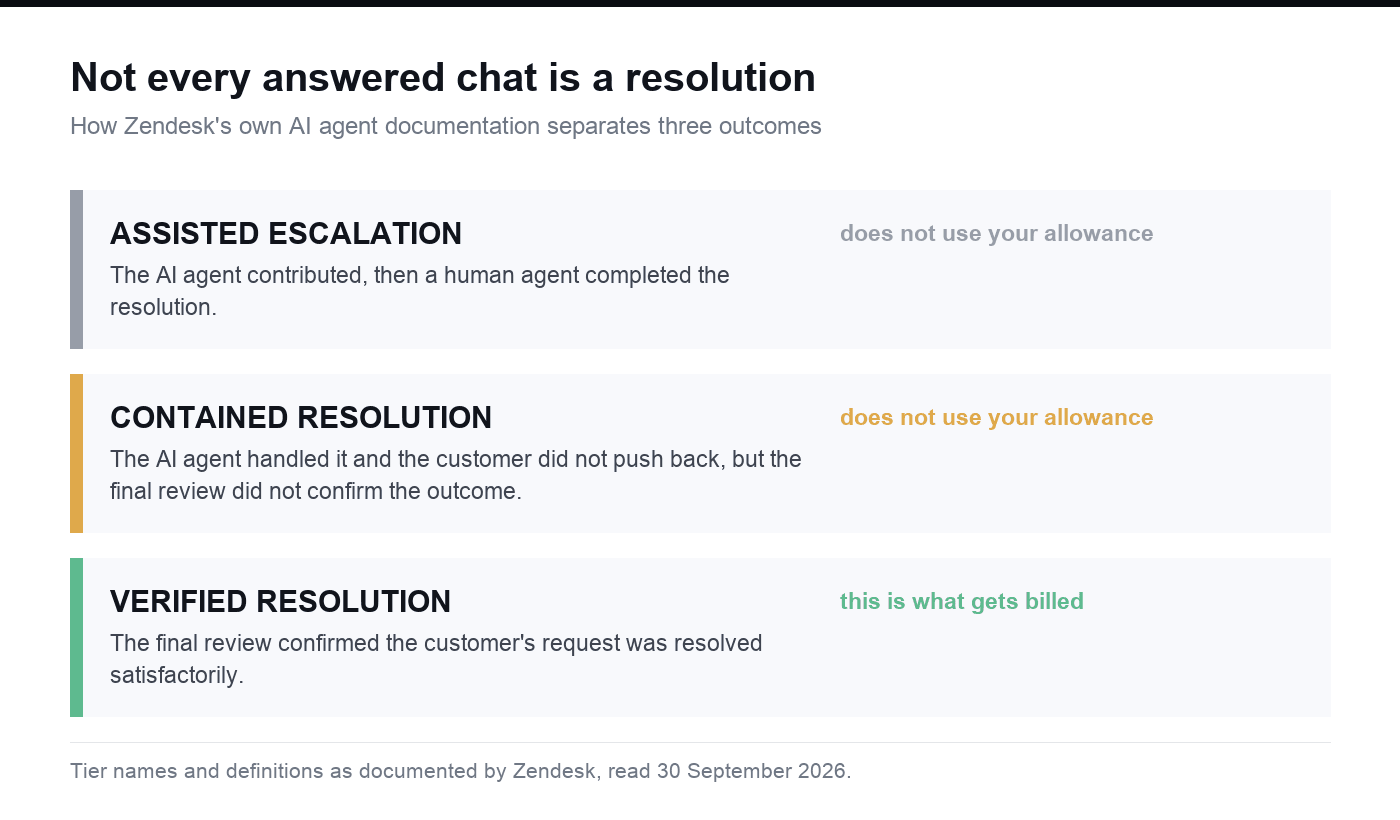
Tier names and definitions as documented by Zendesk, read on September 30, 2026.
| Resolution tier | Definition in Zendesk's documentation | How usage is counted |
|---|---|---|
| Assisted escalation | The agent contributed to the interaction before a person completed the resolution | Outside the resolution allowance |
| Contained resolution | The agent handled the exchange to completion and the customer did not request further help, but the closing review did not confirm the outcome | Outside the resolution allowance |
| Verified resolution | The closing review confirmed the request was resolved satisfactorily | The tier usage is billed on |
Two things in that table deserve attention. First, "the customer did not ask for more" is not the same as "the customer was satisfied" — Zendesk treats a conversation that ends without complaint but fails its own review as contained, not verified. Second, the definition is not self-reported. A review step reads the conversation afterwards, which is the only way to tell a resolved case from an abandoned one.
Resolution also needs a window, because a case is not over when the chat closes. Zendesk defines the end of a conversation by channel: 72 hours after the first email, two hours after the last message in a messaging thread by default, and immediately on hangup for voice. Without a window like that, an automated resolution rate measures your agent's confidence, not your customers' outcomes.
Zendesk revised its own accounting in May 2026 — announced on May 14, rolled out from May 18, completed by June 1 — and the change is a fair warning for anyone reading a vendor dashboard. It retired a single automated resolution figure for the contained and verified split, and moved the reported rate from counting only verified resolutions to counting both. The headline rate went up without any change in agent behaviour. Zendesk's stated reason is worth quoting in spirit: the old statuses were built before agentic AI agents existed, and no longer described the work. If an AI agent for customer support arrives with a resolution number attached, ask which tier it counts and when the conversation is considered over.
Standard 2: it hands off at the right moment, with the right context
The handoff is where these systems break, and it usually breaks twice: the customer repeats themselves, and the agent starts from zero. A contact-centre vendor's guide on the topic draws the line between a cold transfer, where the receiving agent picks up with no context, and a warm transfer, where the agent gets the picture before connecting to the customer.
Four situations warrant a handoff, according to that guide. Requests outside the defined workflows, or ones that need nuanced judgement. Requests that need empathy, negotiation, or trust — billing disputes, cancellations, complaints. Requests the agent understands but cannot act on, because the action needs authentication, a permission, or a system it cannot touch. And any request where the customer explicitly asks for a person: phrases like "talk to someone" or "transfer me" should trigger an escalation with no exceptions, because a customer who cannot find the door will not try again.
What travels with the case matters as much as when it leaves. Five things have to arrive ahead of the customer.
| What has to travel | What breaks without it |
|---|---|
| The full transcript plus a written summary | The customer re-explains the problem from the beginning |
| The live customer record | The agent opens with questions your system already answered |
| The escalation reason and the customer's sentiment | The agent misreads urgency and re-triages the case |
| Everything the agent already tried | The same troubleshooting runs twice, and trust drops with it |
| The authentication already completed | The customer answers the same security questions again |
That last row is the one customers notice most; re-verification after a transfer is a standing complaint in contact centres, and it is entirely self-inflicted. Voice raises the difficulty further: a phone handoff has to hold the audio together while the agent reads a private summary of the case, which is why a customer service AI agent that works well in chat will not automatically work on the phone.
Standard 3: it says it is AI
Disclosure is no longer only a matter of taste. The EU AI Act — Regulation (EU) 2024/1689 — puts systems that interact with people in its transparency tier, and the European Commission's own description of that tier is direct: when AI systems such as chatbots are used, people should be made aware that they are interacting with a machine, so they can make an informed decision. The transparency rules take effect in August 2026, the Act applies from 2 August 2026, and from the same date the AI Office and national authorities are responsible for enforcing it.
Read that as a floor rather than a legal opinion; the Commission's page is a policy explainer, not the consolidated text, and it says nothing about your specific product. The practical reading is simpler anyway. If an AI agent for customer service serves EU users, disclosure is not optional. If it does not, an agent that hides what it is still loses the argument the first time a customer guesses wrong about who they are talking to.
Standard 4: it stays operable after launch
Launch is the start of the measurement problem, not the end of it. The escalation moment is where the useful numbers live, and they are not the ones on the standard support dashboard.
| Signal | Question it answers |
|---|---|
| Escalation rate | How much work reaches a person, and whether the cases that reach them were the right ones |
| Post-handoff satisfaction | Whether the handoff preserved the experience, compared with cases the agent finished |
| First-contact resolution after transfer | Whether the human could finish it, or the customer had to come back |
| Customer effort | How much work the customer did, including abandonments during the transfer |
| Handle time on escalated cases | How much of the agent's time was spent finding context |
Read them together, because any one of them alone misleads. A low escalation rate with poor post-handoff satisfaction usually means customers gave up rather than got served. A high escalation rate with fast first-contact resolution after transfer usually means the rules are too conservative and the agent is handing over routine work.
Then close the loop. Escalated cases are the best description of what your agent does not know, and they only improve it if the reason for escalation and the eventual fix flow back into the knowledge source and the rules. Salesforce sells near-real-time monitoring and tuning for exactly this step, and it is the part to insist on in any platform: an AI support agent that gets better only when someone remembers to retune it will plateau within a quarter.
What stays with humans
This is the section teams skip, and it is the one that decides whether the deployment survives its first bad week.
| Decision or check | Why it stays with people | Owner |
|---|---|---|
| Refunds, credits, and goodwill | The amount is a commercial judgement, not a lookup | Support or finance lead |
| Interpreting policy in a dispute | The answer depends on facts the transcript does not contain | Support lead |
| Actions behind identity or permission | The agent cannot verify what the action needs | Security or platform owner |
| Accessibility, security, integrations, and performance before launch | The agent cannot review the surface it runs on | Whoever ships the product |
| The escalation rules themselves | The rules are the policy, and policy is a business decision | Support lead |
Two of those rows come from the vendor guides read for this article rather than from any rule: system and permission limits are named as a standard escalation trigger, and pre-launch review of accessibility, security, integrations, and performance is stated as an expectation for generated products. Both are the kind of thing that gets quietly dropped when a pilot is going well.
What Atoms provides, and what you can use today
The standards above describe the agent. The customer-facing half — the help centre, the order and ticket lookup, the intake form, the dashboard your team watches — is a product you have to build, and that is the part Atoms covers directly.
- A natural-language brief becomes a working website or web application with a coherent structure and visual experience, rather than a mockup or a fragment of code.
- Changes come through conversation: adjust a layout, replace an image, tighten a form, and keep iterating on the same project.
- Images and video can be generated and placed directly into the experience, so a help centre is not a wall of text.
- Three-dimensional scenes and browser games are supported when an experience calls for them.
- For products that need more than a frontend, Atoms provides application infrastructure such as persistent data, authentication, and deployment workflows.
- SEO and advertising agents cover the growth side once the product is live.
Mapped to this article, that means the surfaces an AI for customer service deployment depends on: a help centre that answers the questions your agent is not allowed to guess at, an order or ticket status page with login, an intake form that captures the fields your triage rules need, and an internal dashboard for the queue that reaches your team.
Three boundaries, stated plainly. Atoms does not claim to run a specific support platform or a specific model, and this article makes no claim about which model sits behind any agent you compare. Atoms builds the customer-facing product; it does not replace your helpdesk or your CRM, and the agent still needs wherever your data actually lives. And generated output should be reviewed by a person for accessibility, security, integrations, and performance before it goes live.
Starting cost and the first three steps
Atoms publishes a free plan at $0 per month, described as forever free, with paid tiers beginning at $20 per month and higher tiers from $100 per month. Every account also carries $26 in free Cloud and AI balance, split as $25 for cloud infrastructure and $1 for AI usage. Those are Atoms' own published figures, not third-party measurements.
Three steps get you to something you can evaluate, in order:
- Build the surfaces first. Write the brief for the help centre, the status lookup, and the intake form, and put them online. An agent with nowhere to send a customer is a chatbot again.
- Write the four standards into the product, not the pitch. Decide which tier counts as resolved for you, how long the window is, which triggers force a handoff, and what travels with the case. These become rules and fields, not paragraphs.
- Rehearse with real questions. Take the last fifty conversations from your team and run them through the version you built. Watch how many end verified, how many escalate, and what the receiving person had to ask for that should have arrived automatically.
Cases: the surfaces customers actually reach
These four are live builds from the Atoms library. They are storefronts rather than helpdesks, which is the point: they are the front doors where the questions an agent has to answer first get asked.
Noise-cancelling Headphone Store Website SILENT PRESS, a premium headphone storefront built around one-tap noise cancelling, and the product-compatibility questions that follow an electronics purchase.
Running Shoe Brand Store FEATHERSTEP, an ultralight running-shoe storefront for zero-impact cushioning shoes, where sizing and delivery questions start.
Snacks Online Store A snacks storefront whose order-status and returns questions have to be answered from the same data the page displays.
Streetwear Clothing For Gen Z VAGUE, a streetwear storefront for a young audience, the kind of page where customers ask what a policy means before any ticket exists.
Conclusion
Set the bar before you shop. A resolved case is one that passed a review, over a defined window, without a person. Everything else is activity. Once you can measure that, the platform decision gets easier, because you are comparing vendors on the same number instead of on their own.
Then decide what you are building. If the agent is the product, that is a knowledge and rules project first. If the surfaces around it are the gap, that part can be built now: describe the help centre, the status lookup, and the intake form, put the first version online, and run your own last fifty conversations through it.
Start building in Atoms with the free plan, and check the pricing page and the post on the free Cloud and AI balance for the current terms while you decide what ships.
Frequently asked questions
01Q1: What is an AI customer service agent, and how is it different from a chatbot?
A chatbot matches keywords to a fixed set of options. An AI customer service agent reads a request in context, retrieves the data it needs, reasons about the next step, and can carry out an action within permissions you set — an order status, an address change, a rescheduled appointment. It also escalates when a request needs judgement or a permission it does not have. The difference shows up in the second row of that work: answering is table stakes, acting is the part that changes your support volume.
02Q2: What can I safely hand to it, and what stays with my team?
Hand it repeatable questions grounded in your own material, and actions with clear rules and a defined blast radius. Keep commercial judgement, policy interpretation in disputes, and anything behind identity or permission with people. That split is not a limitation of the technology; it is how these systems are designed to work, and the escalation path is the mechanism, not the failure mode.
03Q3: How do I measure whether it is working?
Count confirmed resolutions, not conversations. Zendesk's own AI agent documentation separates assisted escalations, contained resolutions, and verified resolutions, and counts a case as verified only when a review step confirms the request was resolved satisfactorily after the conversation ends. Track the escalation rate and the post-handoff experience alongside it, because a low escalation rate with unhappy customers after transfer usually means people gave up rather than got served.
04Q4: When must it hand off, and what should be ready before it does?
Four situations: requests outside the defined workflows, requests needing empathy or negotiation such as disputes and cancellations, requests needing an action or permission the agent does not have, and any request where the customer asks for a person. Before the connection is made, the receiving person should have the transcript and a summary, the customer record, the escalation reason and sentiment, everything the agent already tried, and the authentication already completed.
05Q5: Does it have to tell customers it is AI?
In the European Union, yes. The EU AI Act places systems that interact with people in its transparency tier, and the European Commission's description of that tier says people should be made aware that they are interacting with a machine so they can make an informed decision. The transparency rules take effect in August 2026. Treat disclosure as the default everywhere, and not only because of the rules.
06Q6: What does it cost to start?
The agent is usually the smaller line. Platforms price it in different shapes — per resolution, per credit, or per user licence — which is why the resolution definition matters more than the list price. The customer-facing surfaces are cheaper to start than most teams expect: Atoms publishes a free plan at $0 per month, described as forever free, and every account carries $26 in free Cloud and AI balance, split as $25 for cloud infrastructure and $1 for AI usage. Those are Atoms' published figures.
07Q7: What can Atoms build for this, and what can I use today?
A help centre that holds the answers your agent is allowed to quote, an order or ticket status page with login, an intake form with the fields your triage rules need, and a dashboard for the queue that reaches your team. A natural-language brief produces a working website or web application, images and video can be generated and placed into it, and persistent data, authentication, and deployment workflows are available when the product needs more than a frontend. Anything generated still needs a human review of accessibility, security, integrations, and performance before launch.
