On this page
Codex pricing in 2026 starts at $0 and ends at $500 a month, and the tier you pick matters less than most buyers expect. Everything above the free plan is metered by tokens: the credits behind your subscription are spent by the files the agent reads, the reasoning it does, and the code it writes. The DevDay announcements on September 29 did not change that meter. They changed what the meter buys — cloud tasks that keep running while your laptop is closed, automatic code review, scheduled security scans, and a premium speed tier billed at up to eight times the standard rate.
This article covers the Codex pricing that exists today: the current plans and their prices, the credit rates for the GPT-6 model family, what an ordinary task costs, what you get without paying, and how to stop the bill from surprising you.
Codex pricing plans after DevDay 2026
Codex does not have a standalone subscription. It rides on your ChatGPT account, so the OpenAI Codex pricing question is really a question about which ChatGPT plan you are on.
| Plan | Price per month | What the tier is for |
|---|---|---|
| Free | $0 | Exploring Codex on quick coding tasks |
| Go | $8 | Lightweight coding tasks |
| Plus | $20 | A few focused coding sessions each week, with cloud integrations |
| Pro | From $100 (tiers at $100, $200, $500) | Sustained daily use; Astra Ultrafast sits on Pro $500 |
| Business | $20 per user (2+ users, billed annually; $25 monthly) | Teams that need a shared workspace and admin controls |
| Enterprise / Edu | Contact sales | Organization-wide deployment with enterprise security and controls |
Two details in that table do more work than the prices. First, Codex is available on the web, in the CLI, in the IDE extension, and on iOS from Plus upward, and cloud-based features such as automatic code review and the Slack integration come with those tiers rather than as separate purchases. Second, Astra Ultrafast — the speed tier OpenAI added at DevDay — is not available on every plan. It is bound to the $500 Pro tier and to eligible Enterprise and Edu plans.
Prices move. Treat the numbers above as the state of the published rate card on September 30, 2026, and check the official page before you commit budget.
How the Codex credit meter works
The billing model changed in April 2026, and that change is the reason two developers on the same $20 plan can have completely different experiences. On April 2, 2026, OpenAI moved Plus, Pro, and Business off per-message billing and onto token-based credits; legacy Enterprise, Edu, Health, and Government plans followed on April 23, 2026.
Once a plan is on the credit model, three token types drive the meter: fresh input, cached input, and output. Output is the expensive half. Here is the standard-speed Codex rate card for the current GPT-6 family, in credits per million tokens, as OpenAI publishes it:
| Model | Credits per 1M input | Cached input | Output |
|---|---|---|---|
| GPT-6 Astra | 250 | 25 | 1,250 |
| GPT-6.1 Sol | 50 | 2.5 | 250 |
| GPT-6 Sol | 50 | 5 | 250 |
| GPT-6 Luna | 2.5 | 0.25 | 12.5 |
Read the cached-input column against the input column and the leverage becomes obvious. GPT-6 Astra bills cached input at 25 credits against 250 for fresh input; GPT-6.1 Sol bills 2.5 against 50. Reusing context instead of reloading it is the single largest lever you control, and Codex credit billing carries no separate cache-write charge.
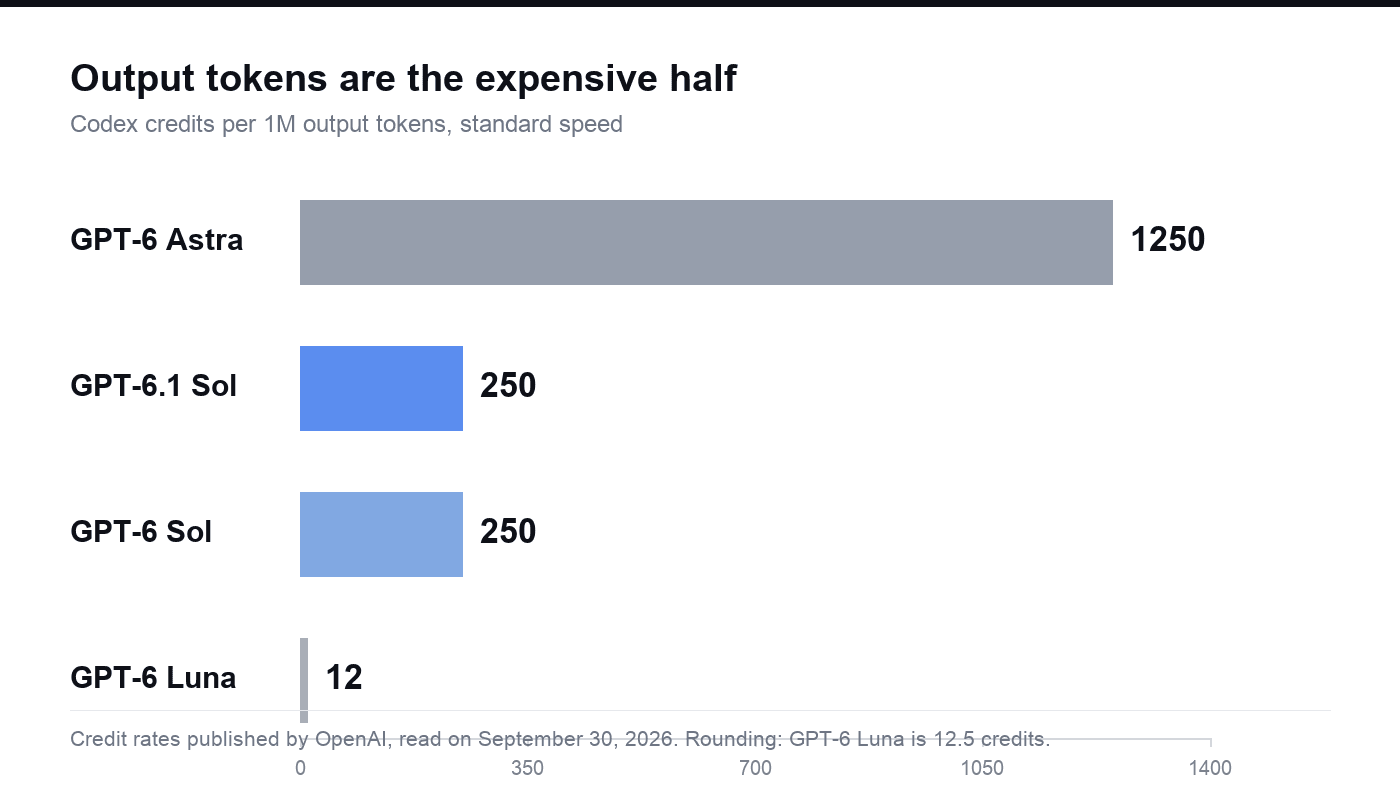
Credit rates published by OpenAI, read on September 30, 2026.
Note the shape of that family. GPT-6.1 Sol writes output at a fifth of Astra's credit rate, which is the same five-to-one relationship OpenAI described when it launched the model at DevDay. Choosing the model is a pricing decision, not just a quality decision.
What a typical Codex task actually costs
If the question you started with is how much does Codex cost to run, the honest answer is a range rather than a number. OpenAI's published Codex rate card lists a typical GPT-5.6 Sol task at 5 to 30 credits. That is a wide band on purpose. Usage depends on the model you select, the size of your context, the reasoning effort, the tools and retrieval you enable, and how much of the context is cached — which is why OpenAI's own documentation warns that two tasks which look similar can consume very different amounts.
The practical reading is this: a small fix in a file you already have open is a rounding error against a Plus allowance; a long agent session that reads a repository before it writes anything is a different order of magnitude. If you are trying to predict a monthly bill, do not multiply a task count by a per-task price. Watch the usage dashboard for a week and let it tell you your own distribution.
Free, Go, and the API key route
The free parts of Codex are real, and so are their limits.
- Free ($0) covers quick coding tasks, with GPT-6 Luna at Standard speed in the desktop app, subject to rollout. Image generation is not available on the Free plan.
- Go ($8) is scoped for lightweight coding tasks.
- The CLI is not a separate line item. The software itself is not what you are paying for; the plan behind it is, and a heavy CLI session and a heavy web session draw on the same allowance.
- An API key is a different meter. Running Codex with your own API key bills at standard API rates and gives you a different set of trade-offs.
| Common assumption | What the plan actually says |
|---|---|
| "If I hit my limit, I have to upgrade." | Plus and Pro users can buy additional credits and keep the plan they have. |
| "The agent stops mid-task at the limit." | During an active turn the agent can finish that turn, subject to fair use limits. |
| "An API key unlocks the cloud features." | The API key route runs Codex in the CLI, SDK, or IDE extension with no cloud-based features such as GitHub code review or Slack. Model availability follows the API models your key can reach. |
| "Extra sessions cost extra on top of my plan." | Any user can run additional local chats with an API key, charged at standard API rates. |
Usage limits and what happens when you hit them
Limits are estimates, not quotas, and OpenAI publishes them as ranges per five-hour window for Plus and Standard Business. Pro plans currently have no five-hour limit.
| Model | Local messages per five-hour window on Plus and Standard Business |
|---|---|
| GPT-6 Astra | 5 to 45 |
| GPT-6.1 Sol | 15 to 160 |
| GPT-6 Sol | 15 to 150 |
| GPT-6 Luna | 350 to 3,000 |
Local messages and cloud chats share the same allowance, weekly limits may also apply, and the agentic features you turn on draw from the same pool. To see where you stand, use the usage dashboard, or run /status during an active Codex CLI session. OpenAI's advice is to check the dashboard every week or two so you notice a change in pace before it becomes a billing surprise.
Fast, Ultrafast, and why speed changes the price
Speed modes are billed as multipliers on the same model, and the multiplier depends on whose allowance is being spent.
| Speed mode | Included subscription usage | Purchased credits and pay-as-you-go usage |
|---|---|---|
| Fast | 2.5x | 2x |
| GPT-6 Astra Ultrafast | 8x | 6x |
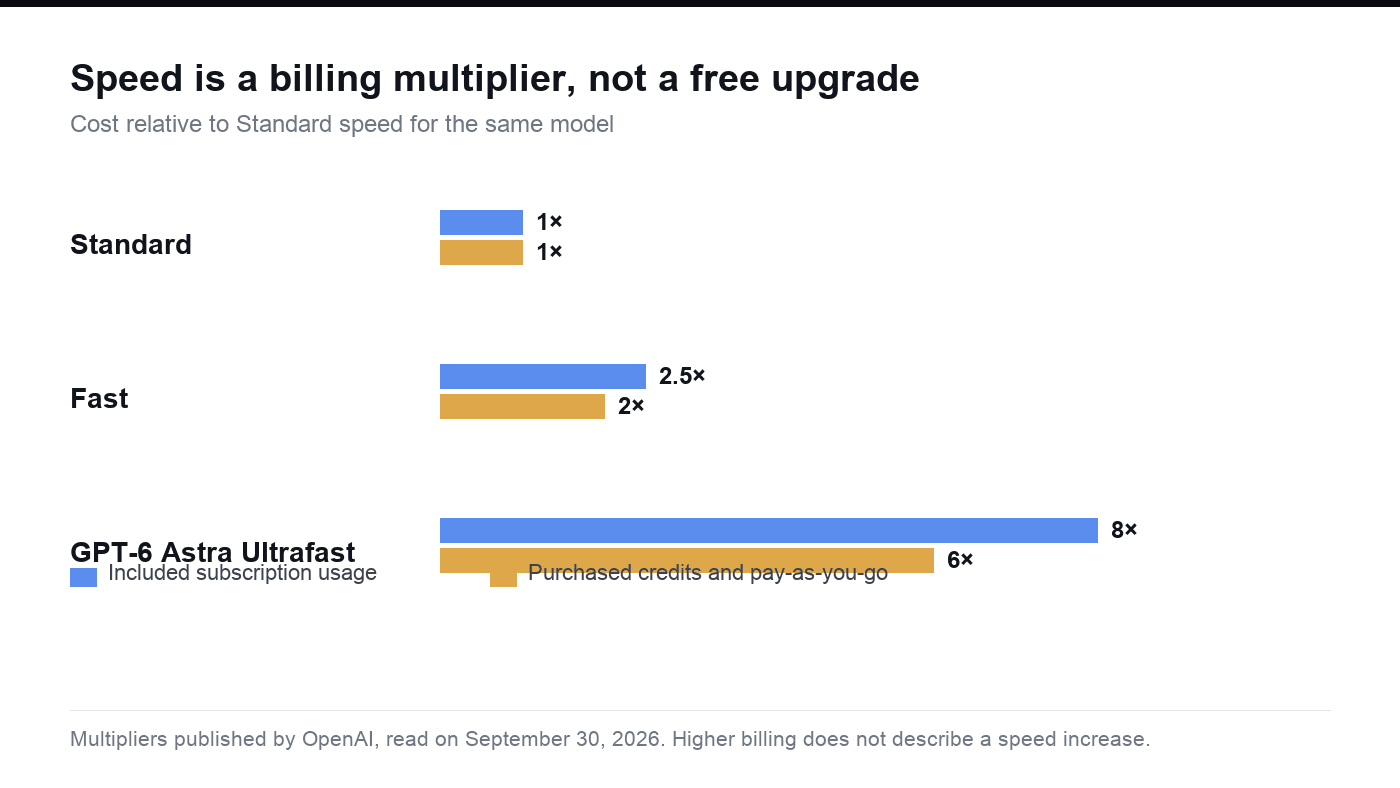
Multipliers published by OpenAI, read on September 30, 2026.
Two things get confused here. First, these multipliers bill usage — they do not describe how much faster the model generates tokens, and a higher multiplier does not mean a proportionally faster experience. Second, Ultrafast is a paid tier with restricted access, tied to Pro $500 and eligible Enterprise and Edu plans. OpenAI reports up to eight times faster token generation in Codex and six times in the API for Astra, and it says a Sol version of Ultrafast is coming, not shipped. If latency is why you were considering the $500 plan, wait for that version before you buy.
How to keep your Codex bill down
OpenAI publishes its own list of habits, and all five are free:
- Control the size of your prompts. Be precise about the instruction, and drop context the agent does not need.
- Limit source material. Provide only relevant files, and narrow the sources or the date range where you can.
- Match the output to the need. Define audience, format, and length, and separate required work from optional improvements.
- Shrink your AGENTS.md. Every token in that file loads on every task, so a bloated one taxes all of your requests rather than the big ones.
- Limit the number of MCP servers you keep enabled. Each one adds context to your messages and consumes allowance you may not need to spend.
The rate card explains why these matter more than they look. Fresh input is billed at 250 credits per million tokens on Astra and 50 on GPT-6.1 Sol, while cached input is a fraction of that, so the difference between a lean session and a padded one compounds across every turn.
What DevDay 2026 changed in Codex
The OpenAI DevDay 2026 announcements on September 29 did not change how Codex is billed. They changed how much of your work lands in the same metered pool.
| What shipped at DevDay | What it does | What it means for the bill |
|---|---|---|
| Codex Cloud | Runs tasks while your laptop is closed, with access across devices | Cloud tasks draw on the same allowance as local ones |
| CLI update | Two-way voice and an /agents view, plus changes to prompt editing, session resumption, and worktree workflows | Voice in the desktop app is billed inside your Codex usage budget |
| Code Review | Summaries, diffs, and questions in the review interface; automatic reviews can run in the cloud | Reviews run through GitHub count as Code Review usage; local reviews count toward general limits |
| Codex Security Cloud | Scans for vulnerabilities, investigates findings, removes duplicates, and prepares fixes, on a schedule | Scheduled scans are recurring usage rather than one-off work |
| Pro 500 | 25x the Plus usage allowance and Ultrafast access | The top tier exists because heavy users were outgrowing $200 |
| GPT-6.1 Sol | Near-Astra behaviour at a fifth of Astra's token price, available in Codex on day one | The cheapest way to do the same work moved down a tier |
One scheduling note: GPT-5.5 leaves ChatGPT, ChatGPT Work, and Codex on all plans on October 14, 2026, while the API is unaffected. If you have built a habit around a model that is retiring, migration is a pricing decision as much as a technical one.
Where Atoms fits: build the product instead of renting the tokens
Every number above prices one thing: the process of writing code. If what you actually want is a finished product, that is a different purchase, and it is worth pricing it as one.
Atoms turns a natural-language brief into a working website or web application rather than billing you per turn of an agent loop. You describe the product — audience, purpose, pages, visual direction, primary action — and Atoms coordinates agents across the lifecycle to produce a version you can iterate on in conversation. It generates images and video and places them directly into the experience, supports 3D models and browser games when the idea calls for them, and can provide application infrastructure such as persistent data, authentication, and deployment workflows for products that need more than a frontend.
The starting cost is the part that contrasts most sharply with a token meter. Atoms publishes a free plan at $0 per month, described as forever free, with paid tiers beginning at $20 per month, and every account carries $26 in free Cloud and AI balance — $25 for cloud infrastructure and $1 for AI usage — as Atoms announced on its own blog. Those are Atoms' published figures, not third-party measurements, and the balance is the kind of runway that a per-token plan cannot offer: you are not watching a meter while you decide what the product should be.
Four builds from the Atoms library show what that path produces:
Luxury Evening Wear NOCTURNE, an evening-wear storefront built around an elegant late-night shopping experience.
California Surf & Swimwear TIDEBREAK, a surf-and-swim storefront for ocean-lifestyle swimwear and surf apparel.
Running Shoe Brand Store FEATHERSTEP, an ultralight running-shoe storefront for zero-impact cushioning shoes.
Technical Outerwear Brand Store STORMLINE, a technical-outerwear storefront for all-weather shells.
Two boundaries, stated plainly. These cases show what the platform produces; they do not claim that Atoms runs Codex or any specific model, so check the current model selector if that matters to your decision. And anything generated still needs human review of accessibility, security, integrations, and performance before it goes live.
If you want the wider picture, the Atoms pricing page carries the current plan terms, and the post on the free Cloud and AI balance explains what the balance covers and where to check it.
Conclusion
Codex pricing is not complicated once you separate the two halves. The plan sets your ceiling, and the token meter inside it decides how fast you reach that ceiling. Free and Go cover occasional coding, Plus is the practical default for daily use, and the $500 tier exists for people who need cloud concurrency and Ultrafast more than they need a smaller bill. Pick the tier that matches how often you actually run the agent, not the one that sounds like the safest upgrade.
Then decide what you are buying. If you are paying to write code faster, the rate card is your spreadsheet. If you are paying to end up with a product, start building in Atoms instead: describe the brief, review the first version, iterate in conversation, and use the free balance while you decide what ships. The meter is optional; the finished product is the point.
Frequently asked questions
01Q1: Is Codex free?
Partly. There is a Free plan at $0 per month for quick coding tasks, with GPT-6 Luna at Standard speed in the desktop app subject to rollout, and image generation is not included. The CLI itself has no separate price — what you pay for is the plan behind it — and any user can run additional local chats with an API key at standard API rates.
02Q2: How much does a typical Codex task cost?
OpenAI's Codex rate card lists a typical GPT-5.6 Sol task at 5 to 30 credits. The spread is wide because model choice, context size, reasoning effort, tool use, retrieval, and caching all change consumption, so the same request can cost different amounts on different days. Watch your usage dashboard for a week before you budget from a task count.
03Q3: Does the Codex CLI cost extra?
No. The CLI is not a separate line item; a heavy CLI session draws on the same allowance as a heavy web session. The costs that do attach to the CLI route are the plan behind it, or standard API rates if you run it with an API key.
04Q4: What are Codex credits, and how much is one worth?
Credits are the unit used to pay for eligible usage on credit-based plans, and after you reach your included limits they let you keep working. Token rates are published as credits per million input, cached-input, and output tokens — GPT-6.1 Sol at 50, 2.5, and 250 respectively. OpenAI publishes the credit rates but not a fixed dollar price per credit, and purchase prices depend on your plan or agreement, so convert credits to cash from your own plan terms rather than from a rule of thumb.
05Q5: What did DevDay 2026 change about Codex pricing?
Not the billing rules. The September 29, 2026 announcements added Codex Cloud, an updated CLI with two-way voice, Code Review, and Codex Security Cloud, plus the Pro 500 tier and the Ultrafast speed mode. The effect on cost is indirect: more of your work — cloud tasks, GitHub reviews, scheduled security scans — now draws on the same metered allowance.
06Q6: Can Codex pricing tell me what building a product costs?
Only partly, because a coding meter prices the process rather than the outcome. If the goal is a finished website or application, a build platform prices that result directly: Atoms runs a free plan at $0 per month and gives every account $26 in free Cloud and AI balance, with paid tiers starting at $20 per month. Compare the two the way you would compare any other build-versus-buy decision — by what you end up holding.
