On this page
A commercial cleaning calculator is useful when it connects a building's service requirements to labor hours, your actual costs, and a clearly defined profit target. Start with the cleanable area and the agreed tasks, estimate labor hours per visit, multiply by the scheduled visits, then add supplies, equipment, travel, and allocated overhead. Divide that cost by one minus your target margin to calculate a selling price. The example below shows the arithmetic for routine office cleaning using illustrative inputs you can replace with your own. You will also get a complete build brief for a quoting app with editable costs, service options, and a customer proposal preview.
What a commercial cleaning calculator should tell you
If you manage a facility, you need a budget estimate with its assumptions visible: which areas receive service, how often, and which tasks are included. A number becomes useful when you can compare it with a contractor's written scope. Ask whether restroom restocking, interior glass, periodic floor care, and an initial deep clean are included in the same price.
If you run a cleaning business, you also need to know what delivering that scope will cost. A commercial cleaning cost calculator should expose labor hours, the loaded hourly cost, other job costs, and the allowance for business overhead. It should let you change those assumptions before presenting a quote.
Record the units beside every output. A price per square foot per visit describes a different service quantity from a price per square foot per month. A monthly number without frequency cannot support a useful comparison. For the same reason, keep the customer's scope beside the calculation rather than on a separate note that can be lost during revisions.
Turn that worksheet into your own quoting app with Atoms: describe the inputs, calculation rules, and proposal view, then review the generated app in its preview. Your version can use the costs and service packages you specify. The worked example below gives you a reference for checking the calculation, and the build brief later in this guide gives you the complete requirements to copy.
Turn your pricing worksheet into a quoting app with editable costs and service options.
Define the scope before entering square footage
Use the area the crew will actually service. During a walkthrough, identify inaccessible rooms, storage areas outside the contract, floor types, restroom fixtures, occupancy, and access arrangements. Put every recurring task on a list with its frequency. Trash removal might happen each visit while detailed dusting follows a different schedule.
Build the estimate around that task list. You can divide area by a production rate, measured in square feet per labor-hour, or enter labor hours from a timed trial. An area-based estimate works best when the assumed production rate represents the same tasks and conditions. Add separately estimated labor for work that the rate excludes. If the rate already includes restrooms, adding all restroom hours again would count them twice.
Labor-hours measure the total crew effort. Two cleaners working two hours each deliver four labor-hours. Entering two hours in a labor-cost calculation would cover only half that labor. Keep elapsed time separate when planning access windows and crew schedules.
Choose a loaded hourly rate that includes the employer costs you actually incur beyond wages. If your input is already loaded, do not apply a second burden percentage. Record what the rate includes so insurance, supervision, or similar allowances do not appear in two places.
For an early budget, label unmeasured time as an assumption. Before issuing a firm quote, replace important unknowns with walkthrough notes, a trial, or comparable job records. Treat specialized cleaning requirements as a separate scope review rather than applying an ordinary office estimate unchanged.
Calculate an explainable monthly quote
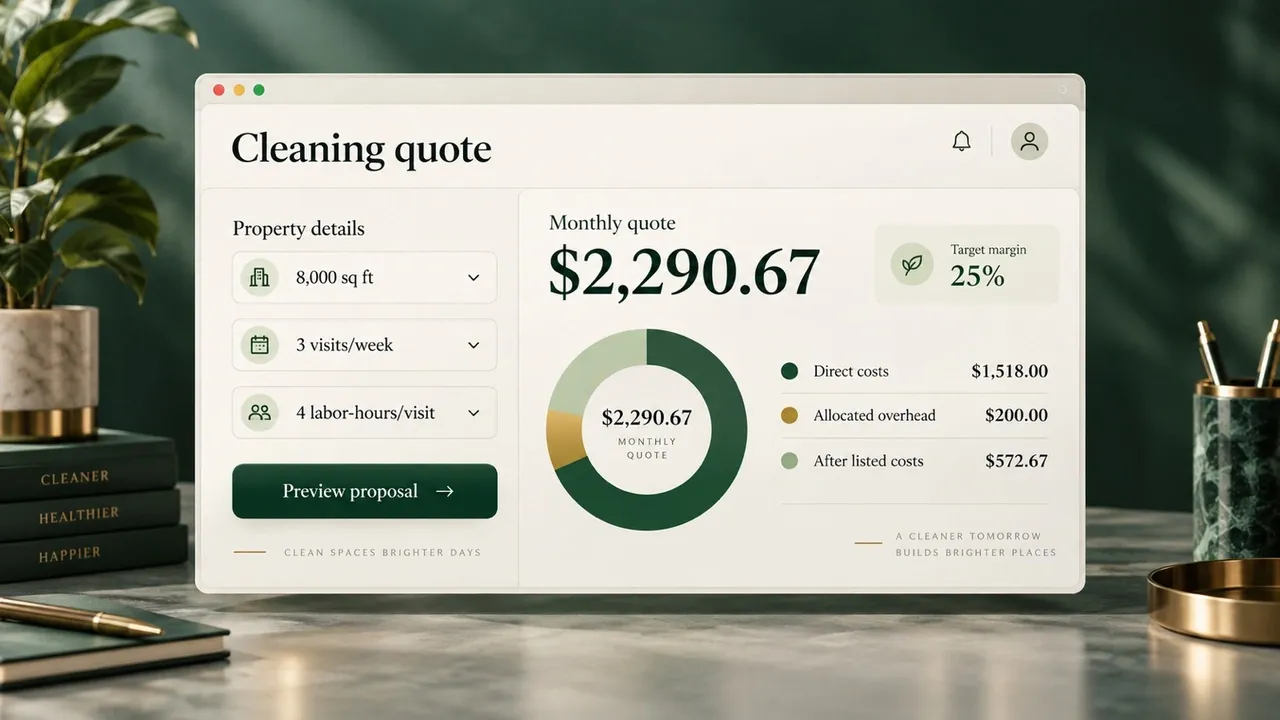
AI-generated concept of a quoting app using the illustrative inputs in this guide; not a screenshot of a deployed app.
Use one time period throughout the worksheet. For planning, weekly service can be converted to an average month using 52 weeks ÷ 12 months. That convention spreads a weekly schedule across a year; the actual visits in a calendar month depend on service days, holidays, and the agreement.
Here is the calculation sequence:
The following is an invented worksheet example, not a local market price. Assume an 8,000-square-foot office, a production rate of 2,000 square feet per labor-hour, three visits weekly, and a loaded labor cost of $25 per hour. Assume supplies cost $100 monthly, equipment allocation is $40 monthly, travel costs $6 per visit, and allocated overhead is $200 monthly. The pricing target is 25% after those listed costs.
| Worksheet line | Calculation | Average-month result |
|---|---|---|
| Labor-hours each visit | 8,000 ÷ 2,000 | 4 hours |
| Visits | 3 × 52 ÷ 12 | 13 visits |
| Labor | 4 × 13 × $25 | $1,300.00 |
| Supplies | Assumed monthly amount | $100.00 |
| Equipment | Assumed monthly allocation | $40.00 |
| Travel | 13 × $6 | $78.00 |
| Direct job costs | Labor + supplies + equipment + travel | $1,518.00 |
| Allocated overhead | Assumed monthly amount | $200.00 |
| Cost used for pricing | Direct costs + allocated overhead | $1,718.00 |
| Selling price | $1,718 ÷ 0.75 | $2,290.67 |
| Amount remaining after listed costs | Selling price − $1,718 | $572.67 |
Keep precision through the calculation and round currency at the end. The exact calculated price is a planning result; a customer-facing price also needs an agreed service schedule, billing terms, and any applicable charges identified separately.
Margin, markup, and overhead answer different questions
Margin divides the amount remaining by selling price. Markup divides it by cost. Adding 25% to the example's $1,718 cost produces $2,147.50, which leaves a 20% margin against that cost base. Dividing by 0.75 produces the intended 25%.
Name the cost base when reporting a margin. In this worksheet, the 25% target includes allocated overhead, so label it margin after listed costs. If gross margin is measured using only the $1,518 direct job costs, the same selling price produces approximately 33.73%. Those percentages answer different questions. A worksheet should show both the included costs and the label, rather than treating every remaining dollar as net profit.
Compare service options and pressure-test labor time
Frequency changes the work delivered, not just the price. Make each option a small service package with an explicit task list. Revisit labor time when fewer visits mean more buildup or when a higher frequency allows some tasks to rotate. Dividing the monthly quote by visits alone assumes the workload per visit stays the same.
For a simple comparison, keep the example's four labor-hours per visit and $25 loaded rate. Leave equipment at $40 and overhead at $200 monthly, keep travel at $6 per visit, and deliberately vary the supplies allowance. These are illustrative assumptions, including the constant time per visit.
| Service option | Weekly visits | Monthly supplies assumption | Average monthly cost including overhead | Quote at 25% after listed costs |
|---|---|---|---|---|
| Reduced-frequency plan | 2 | $80 | $1,238.67 | $1,651.56 |
| Base plan | 3 | $100 | $1,718.00 | $2,290.67 |
| Higher-frequency plan | 5 | $140 | $2,676.67 | $3,568.89 |
Test the assumption with the largest effect on delivery. If the base plan takes five labor-hours each visit rather than four, labor rises to $1,625 monthly. With the other assumptions unchanged, total listed costs become $2,043. At the original $2,290.67 selling price, approximately $247.67 remains, or 10.81%.
That result tells you where to investigate: confirm the task time, improve the work plan if feasible, revise the scope with the customer, or recalculate the price. Keep an initial deep clean and periodic services visible as separate items. Spreading occasional work across a monthly contract can be reasonable when the agreement specifies the work and its frequency; the worksheet needs to carry that allowance.
Turn the estimate into a quote the customer can check
A customer-facing quote needs the service promise alongside the price. The internal worksheet can retain wage assumptions, overhead allocations, and target margin. The proposal should make it easy to check what the customer is buying.
Include the site and cleanable areas, included tasks, service frequency, access arrangements, responsibility for consumables, the recurring charge, and separately priced work. State how changes to the agreed scope will be priced. Record who confirmed the assumptions and when you should review them.
Use these checkpoints before sending the proposal:
| Checkpoint | Contractor's review | Information the customer receives |
|---|---|---|
| Scope | Match labor assumptions to the walkthrough task list | Included areas, tasks, and exclusions |
| Frequency | Reconcile weekly planning with the actual schedule | Service days and treatment of missed visits |
| Costs | Check loaded labor, allowances, and duplicate entries | The agreed recurring price and separate items |
| Stress case | Recalculate with a slower service visit | Any revised scope or price |
| Revision | Save the accepted assumptions and version | A dated proposal with clear terms |
Use a cleaning invoice template after the commercial terms are agreed to describe the charge for the relevant billing period. Keep its service description consistent with the accepted quote. A tidy invoice cannot resolve an unclear scope.
Create a reusable quoting workflow with Atoms
Use Atoms' AI App Builder to build a reusable quoting app around your worksheet. Atoms lets you describe an app in everyday language, review what it builds in a preview, and request focused changes. Specify a scope editor, visible cost calculations, service-package comparison, and a customer proposal view in the same brief. Those are the requirements for your app; the estimator supplies the cleaning assumptions and checks the pricing logic.
- Build through conversation: give Atoms the inputs, formulas, and screens together so the app reflects your quoting workflow.
- Review in the preview: try the form, comparison view, and proposal layout as you develop the app.
- Refine with specific instructions: ask for clearer labels, an additional cost allowance, or a more useful customer view, then check the revised result.
Copy the complete brief below. Open Atoms with the button after it, paste the brief into the project chat, and start building your quoting app. The brief includes the example's expected output so you can compare the first build with the worksheet.
Copy the complete brief above and build your quoting app in Atoms.
Check the generated result against the worked example, including the slower-labor scenario. Test a blank input, a negative cost, a zero production rate, and a margin at or above 100%, where the pricing formula cannot produce a valid positive quote. Define what zero service visits should show. Verify that choosing manual labor-hours overrides the area calculation consistently. Atoms' getting-started guidance explains how to review and develop the first result.
Conclusion
Start with a scope you can explain and a labor estimate you can check. Use your own costs, name the margin's cost base, and compare service packages before choosing a price. Keep the accepted assumptions so actual job time can inform the next revision. When you are ready to make that worksheet reusable, describe your quoting workflow in Atoms and validate the first build against your calculations.
Build a quoting app for your service scope, costs, and customer proposal workflow.
Frequently asked questions
01Q1: Can I use the calculator before a walkthrough?
Yes, for a preliminary budget with visible assumptions. Identify the area, visit frequency, task scope, and unmeasured labor time. Confirm the assumptions that materially affect delivery before committing to a firm quote.
02Q2: Should I enter hourly wage or loaded labor cost?
Use the input the worksheet expects. If it accepts a wage and a burden percentage, it must calculate loaded cost. If it accepts an already loaded hourly rate, enter that rate directly and avoid applying the burden again.
03Q3: Why does monthly cost change even when square footage stays the same?
Frequency, tasks, labor time, supplies, and access arrangements can change while area remains constant. Compare the service scope first, then calculate the cost of delivering each option.
04Q4: How should I handle a month with extra service days?
Choose the billing convention with the customer and state it in the proposal. An average-month planning calculation spreads weekly service across a year. Billing for actual visits requires counting the visits in that specific period and applying the agreed terms.
05Q5: How do I build my own commercial cleaning calculator with Atoms?
Copy the build brief into Atoms and replace the example assumptions with your quoting requirements. Review the form and calculation output in the preview, then ask for changes to the comparison or customer proposal view. Use the worked example and the slower-labor scenario to check the app's arithmetic before preparing a customer quote.
