On this page
Meta description: GPT-5.3-Codex is OpenAI’s newest Codex model. It’s faster, more capable across the full software lifecycle, and explicitly positioned for long-running, tool-using work. This guide breaks down what OpenAI claims, what that means in practice, and how to adopt it without fooling yourself.
The short version (for people who will read the long version anyway)
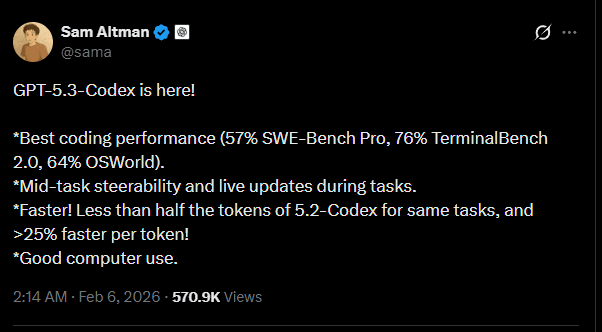
OpenAI has released GPT-5.3-Codex, describing it as its most capable “agentic” coding model and stating it runs 25% faster than prior Codex in their stack, while combining strong coding performance with broader professional knowledge work capabilities in one model (Introducing GPT-5.3-Codex). OpenAI also says it’s the first model that was instrumental in creating itself, used internally to debug training, manage deployment, and analyze evaluations (Introducing GPT-5.3-Codex).
That’s the headline. The more important change is architectural in workflow, not syntax in prompting: OpenAI is pushing Codex from “write code” toward “operate a computer and complete work end-to-end” (Introducing GPT-5.3-Codex). If you treat it like a smarter autocomplete, you’ll miss what it’s for—and you’ll also pay for mistakes you could have prevented.
This article is a practical read: what it is, what OpenAI claims, what to test, and how to keep results honest.
What is GPT-5.3-Codex, exactly?
GPT-5.3-Codex is a new model in the Codex line. OpenAI frames it as a single model that:
-
improves frontier coding performance (relative to earlier Codex),
-
carries reasoning and professional knowledge capabilities associated with the broader GPT-5.2 line,
-
runs faster in their production environment,
-
and is built for long-running tasks that involve “research, tool use, and complex execution” (Introducing GPT-5.3-Codex).
The way OpenAI describes it matters: they are not selling a better code generator; they’re selling a worker that does things on a computer while you supervise. That’s why the Codex app experience—steering while it works, getting progress updates, iterating without losing context—shows up as a first-class feature, not a footnote (Introducing GPT-5.3-Codex).
If you’ve ever watched an AI assistant nail a function, then waste 30 minutes circling the real problem (integration, environment, tests, deployment), you already understand the real gap. GPT-5.3-Codex is aimed squarely at that gap.
What’s new in GPT-5.3-Codex (based on OpenAI’s release)
1) Faster—specifically called out as 25%
OpenAI states GPT-5.3-Codex is 25% faster, enabling longer-running tasks and faster interactions for Codex users (Introducing GPT-5.3-Codex).
Speed isn’t just comfort. In agent workflows, speed changes behavior:
-
You check in more often (reduces silent drift).
-
You can afford more verification loops (tests, lint, compile, run).
-
You can run narrower iterations instead of “big bang” changes.
If you adopt GPT-5.3-Codex, treat faster iteration as budget for verification, not budget for scope creep.
2) “Agentic” isn’t marketing here—it’s the product boundary
OpenAI keeps using “agentic” because the model is evaluated as an agent: terminal use, computer-use benchmarks, multi-step work, and long context sessions (Introducing GPT-5.3-Codex).
This changes what “good” looks like. A strong agent doesn’t only write correct code—it:
-
chooses the right place to change it,
-
avoids breaking unrelated parts,
-
keeps the build green,
-
and leaves a trail you can audit.
That last part is why Codex is described as interactive: you steer it while it works, without losing context, and it provides frequent updates so you can supervise decisions (Introducing GPT-5.3-Codex).
3) It’s positioned beyond coding: PRDs, monitoring, copy edits, user research
OpenAI explicitly says GPT-5.3-Codex supports “all of the work in the software lifecycle—debugging, deploying, monitoring, writing PRDs, editing copy, user research, tests, metrics, and more” (Introducing GPT-5.3-Codex).
This matters because most engineering time is not spent writing net-new code. It’s spent reading, aligning, explaining, instrumenting, and fixing.
If your team’s bottleneck is “we can’t type fast enough,” you’re solving the wrong problem. The bottleneck is usually decision quality under uncertainty, plus the cost of validating those decisions. GPT-5.3-Codex aims to lower that cost.
4) Better defaults for underspecified web work
OpenAI claims GPT-5.3-Codex better understands intent for day-to-day website requests, and that “simple or underspecified prompts now default to sites with more functionality and sensible defaults” (Introducing GPT-5.3-Codex).
This is a double-edged improvement:
-
For prototyping, better defaults save time.
-
For production, “sensible defaults” can smuggle in unwanted product decisions.
The fix is not to fight the model. The fix is to be explicit about constraints and acceptance criteria (we’ll get to a concrete checklist).
5) OpenAI says it set new highs on specific benchmarks
OpenAI states GPT-5.3-Codex “sets a new industry high on SWE-Bench Pro and Terminal-Bench, and shows strong performance on OSWorld and GDPval” (Introducing GPT-5.3-Codex).
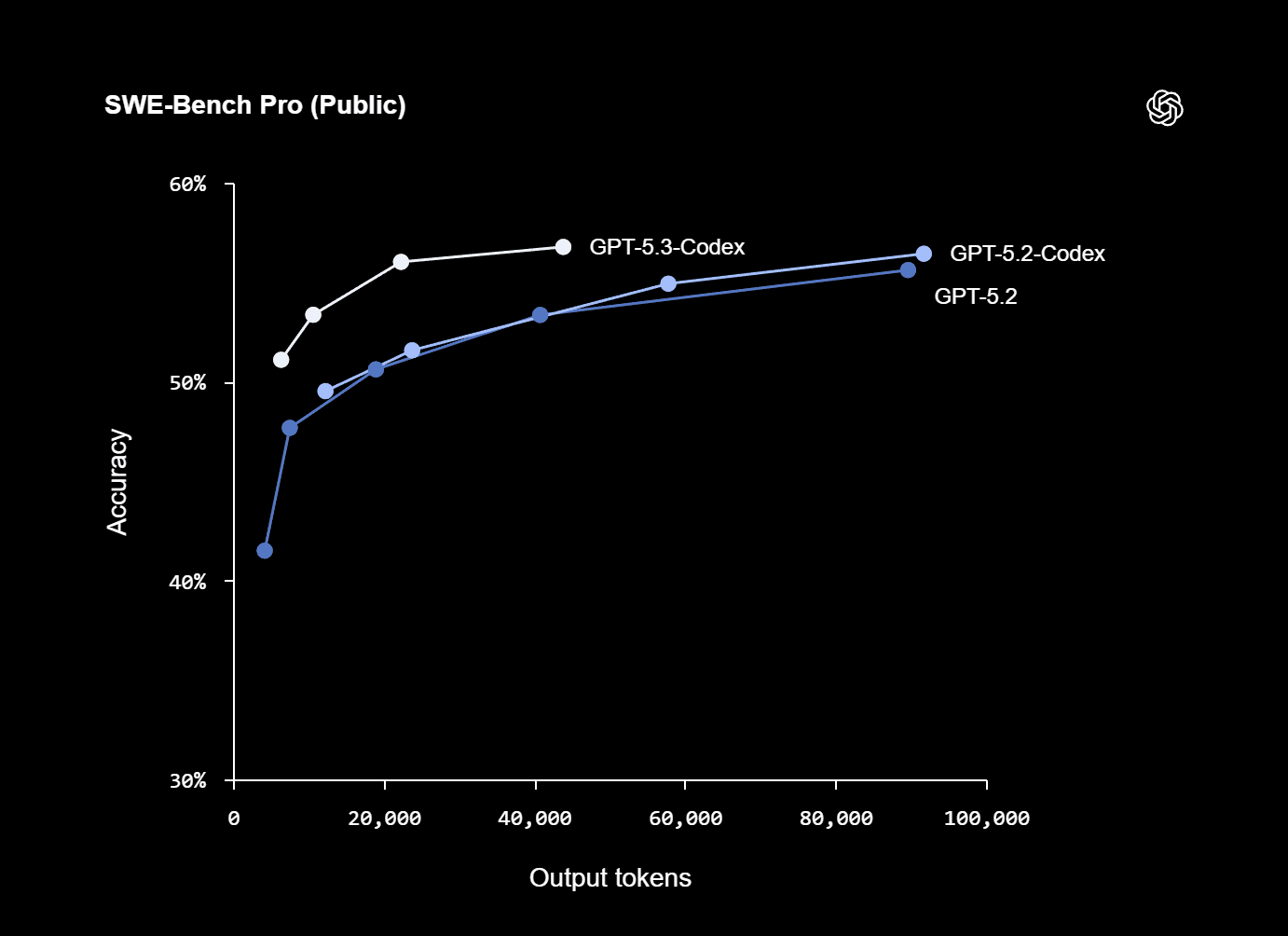
They also publish an appendix table with their numbers and comparisons (all run with “xhigh reasoning effort”) (Introducing GPT-5.3-Codex).
Here are the figures as OpenAI reports them:
Benchmark (OpenAI appendix)
GPT-5.3-Codex
GPT-5.2-Codex
GPT-5.2
SWE-Bench Pro (Public)
56.8%
56.4%
55.6%
Terminal-Bench 2.0
77.3%
64.0%
62.2%
OSWorld-Verified
64.7%
38.2%
37.9%
GDPval (wins or ties)
70.9%
—
70.9% (high)
Cybersecurity Capture The Flag Challenges
77.6%
67.4%
67.7%
SWE-Lancer IC Diamond
81.4%
76.0%
74.6%
Source: Introducing GPT-5.3-Codex
Two observations that are easy to miss:
-
The standout jumps are not in SWE-Bench Pro (which is already strong), but in terminal and computer-use style evaluations. That aligns with the “operate a computer” framing.
-
Benchmarks are not your workload. Use them as a directional signal, then run your own evaluation harness.
The “it helped build itself” claim: why you should care
OpenAI says GPT-5.3-Codex is “our first model that was instrumental in creating itself,” used to debug training, manage deployment, and diagnose evaluations (Introducing GPT-5.3-Codex). That claim is echoed in mainstream coverage, including NBC News.
Don’t get distracted by the sci-fi framing. The operational meaning is simpler:
-
The model is being used as tooling inside the organization that produces the model.
-
That implies the workflow is mature enough to trust it on real engineering systems—under supervision, with guardrails.
You don’t need “self-improvement” to take a lesson from this. The lesson is that the best use of GPT-5.3-Codex is not asking it to be clever. It’s asking it to be useful inside a controlled process: logs, tests, diffs, rollbacks, monitoring, and explicit scope.
Availability: where you can use it now (and what’s “soon”)
OpenAI states GPT-5.3-Codex is available with paid ChatGPT plans, and “everywhere you can use Codex: the app, CLI, IDE extension and web,” with API access being worked on “soon” (Introducing GPT-5.3-Codex). Coverage from Thurrott matches that availability framing.
If your current workflow depends on API integration, treat GPT-5.3-Codex as an adoption you can pilot in interactive environments now, then formalize once API access is available.
What GPT-5.3-Codex is good for (when you stop pretending prompts are specs)
Most teams fail with coding agents in a predictable way: they treat a prompt as a spec, then blame the agent when it fills in missing requirements with something plausible.
GPT-5.3-Codex is explicitly described as better at “underspecified prompts” for websites (Introducing GPT-5.3-Codex). That means it will guess better. It does not mean it will guess what you meant.
Here are the best-fit categories where this model should pay for itself.
1) Codebase navigation and change planning
The fastest way to waste an agent is to hand it a task before it understands the codebase shape.
Instead, ask for:
-
a map of relevant modules,
-
the most likely integration points,
-
test entry points,
-
the smallest change that proves the idea,
-
and the risk list (what might break).
Then approve a plan. Then let it change code.
2) Debugging with evidence, not vibes
GPT-5.3-Codex is reported to do strong “terminal skills” work via Terminal-Bench gains (Introducing GPT-5.3-Codex). If your environment allows it, that translates to a clean debugging loop:
-
reproduce,
-
isolate,
-
instrument,
-
fix,
-
test,
-
verify.
But the key is: require artifacts. A debugging session without reproduction steps is just storytelling.
3) Tests and regression harnesses you’ll actually maintain
Agents can produce tests quickly. The trap is useless tests:
-
assertions that mirror implementation details,
-
snapshot spam,
-
flaky timing dependencies,
-
or “tests” that never fail even when the feature breaks.
Your prompt should name the invariant you care about, not the function you want to call. Keep tests small, and force the model to explain why each test would fail if the bug returned.
4) Refactors with diff discipline
Refactors are a natural agent task because they are repetitive and easy to mess up by hand.
The price of refactoring is review. GPT-5.3-Codex can help by producing:
-
mechanical diffs,
-
consistent naming,
-
updated docs,
-
and migration notes.
Your job is to keep the refactor bounded and reviewable. A refactor that touches 60 files for “cleanliness” is not cleanliness. It’s debt.
5) Docs, PRDs, and operational checklists (the “boring” work)
OpenAI explicitly lists PRDs, copy edits, user research, metrics, and monitoring as supported work (Introducing GPT-5.3-Codex). This is where you can win quickly because:
-
the output is legible,
-
the review surface is smaller,
-
and the impact is immediate.
The rule: don’t ask it to invent. Ask it to synthesize what you provide, then ask it to list unknowns.
The adoption playbook: how to use GPT-5.3-Codex without gaslighting yourself
You don’t “integrate” a model. You integrate a process around a model.
Here’s a process that survives contact with reality.
Step 1: Define “done” as executable checks
If “done” can’t be tested, it can’t be delegated.
Before you ask GPT-5.3-Codex to implement a feature, write acceptance checks like:
-
“Given X input, return Y output.”
-
“This endpoint latency must stay below N.”
-
“This UI must preserve keyboard navigation.”
-
“This change must not increase bundle size over M.”
If you can’t define the check, you don’t have a spec. You have a wish.
Step 2: Force a plan, and approve it
Ask for:
-
the intended approach,
-
files to touch,
-
tests to add/update,
-
and rollback plan.
Then approve or correct it.
This is not bureaucracy. It’s you keeping your architecture from becoming a scrapbook.
Step 3: Require diffs and rationales, not just “here’s the code”
Whether you’re using Codex in an IDE extension or a CLI, insist on:
-
what changed,
-
why it changed,
-
and how it’s verified.
GPT-5.3-Codex is positioned as an interactive collaborator that provides frequent updates and can be steered mid-task (Introducing GPT-5.3-Codex). Use that interactivity to keep the chain of reasoning visible enough to review.
Step 4: Build a small internal benchmark suite
OpenAI’s benchmark table is helpful, but your work is not SWE-Bench Pro.
Create a private suite of:
-
20–50 real bugs and small feature requests,
-
each with a reproduction script,
-
and a gold standard for success.
Then compare:
-
time-to-first-correct,
-
number of tool steps,
-
regressions introduced,
-
and review effort.
If the model makes you faster but increases regressions, you didn’t get faster. You moved cost downstream.
Step 5: Treat “underspecified” as a risk flag
OpenAI says GPT-5.3-Codex gives stronger defaults for underspecified prompts in web work (Introducing GPT-5.3-Codex). If you are building product, “defaults” are decisions.
When you must be vague (early prototyping), do this:
-
Tell it to generate two distinct approaches.
-
Make it list tradeoffs and assumptions.
-
Pick one explicitly.
-
Lock scope.
Otherwise, the model will pick for you. It will pick confidently. That’s not the same as picking correctly.
Prompting patterns that work (without turning your prompt into a novel)
You do not need a 200-line prompt. You need a prompt that behaves like a good ticket.
Here are patterns that produce predictable output.
Pattern A: “Map first, then change”
Ask for a short inventory:
-
“List the files/modules most relevant to X.”
-
“Explain how data flows from A to B.”
-
“Identify where tests live and how to run them.”
-
“Propose the minimal change set.”
Only after that, ask for implementation.
Pattern B: “Make assumptions explicit and editable”
Add one sentence:
- “If you must assume something, list it under ‘Assumptions’ and do not proceed until I confirm.”
This single rule stops most silent misalignment.
Pattern C: “Write tests first” (but only if you mean it)
If you want reliability, ask it to:
-
write a failing test that reproduces the bug,
-
show the failure output,
-
then fix,
-
then show the test passing.
If you can’t run tests in the environment, at least demand a crisp test plan.
Pattern D: “Constrain the blast radius”
Explicit constraints prevent accidental architecture changes:
-
“Do not change public APIs.”
-
“Do not add new dependencies.”
-
“Keep changes within these files unless necessary.”
-
“Prefer a small diff over a clever one.”
Agents are capable of scope drift because they can do more. You prevent it the same way you prevent a human from rewriting the system during a bug fix: constraints.
Safety and cybersecurity: what OpenAI is signaling
OpenAI devotes a section to cybersecurity and states GPT-5.3-Codex is the first model they classify as “High capability” for cybersecurity-related tasks under their Preparedness Framework, and the first they’ve “directly trained to identify software vulnerabilities” (Introducing GPT-5.3-Codex).
That’s not a feel-good paragraph. It’s a signal to serious users:
-
The model is strong enough in security-adjacent capabilities to warrant stricter controls.
-
OpenAI is framing mitigations as part of the product, not a separate policy layer.
If you’re adopting GPT-5.3-Codex in an organization, treat this as your cue to tighten your own controls:
-
Separate environments for untrusted code execution.
-
Avoid pasting secrets into prompts.
-
Use scoped tokens if tools are involved.
-
Log and review changes like you would for any privileged automation.
Security isn’t a feature. It’s an operating stance.
What to watch for: predictable failure modes
A sharper model fails in sharper ways. These are the ones that will cost you time.
Failure mode 1: Beautiful code that violates the system constraints
Agents are good at producing “nice” local solutions: clean architecture, consistent naming, tidy patterns. That can be wrong if it breaks:
-
performance constraints,
-
compatibility,
-
deployment assumptions,
-
or product behavior that users rely on.
Your defense is explicit constraints and acceptance checks.
Failure mode 2: Correct implementation of an incorrect understanding
This is the most common failure. The model reads your prompt and builds what it thinks you want.
Solve it with:
-
a plan step,
-
explicit assumptions,
-
and a quick “confirm before proceeding” gate.
Failure mode 3: Output that looks verified but isn’t
You’ll see language like “tests pass” even when tests weren’t run. Don’t argue with the model. Require evidence:
-
command used,
-
output snippet,
-
artifact link (if available),
-
or explicit statement: “I did not run tests.”
Failure mode 4: The agent does too much because it can
OpenAI describes long-running tasks and multi-step execution (Introducing GPT-5.3-Codex). The temptation is to hand it an epic. That’s how you get:
-
sprawling diffs,
-
tangled reviews,
-
and fragile merges.
Keep tasks small. Chain them. Treat the model like a strong junior engineer with infinite energy and zero product context.
Where GPT-5.3-Codex fits in a modern dev stack
If you already use AI for coding, GPT-5.3-Codex shifts the center of gravity from “assistant” to “operator.”
A practical way to think about it:
-
Autocomplete / inline suggestions: speed on local edits.
-
Chat-based code help: explanation, snippets, planning.
-
Agentic Codex-style workflows: multi-step execution across tools, codebase, tests, docs, and deployment.
OpenAI’s own positioning is clearly in the third category: Codex doing work “across the full spectrum of professional work on a computer” (Introducing GPT-5.3-Codex).
This is why speed and computer-use benchmarks matter more than another small bump in code generation quality. The bottleneck is workflow closure: turning intent into shipped, verified change.
A grounded checklist: “Should my team adopt GPT-5.3-Codex?”
Adopt if you can answer “yes” to most of these:
-
You can define acceptance checks for typical work.
-
You have CI that runs fast enough to be part of the loop.
-
You can review diffs and require test evidence.
-
You have a way to sandbox tool access if the agent uses terminals or environments.
-
You have enough routine work (tests, refactors, docs, bug triage) that acceleration compounds.
Hold off if:
-
your work is mostly exploratory research with no evaluation harness,
-
your deployment pipeline is fragile and undocumented,
-
or your org can’t agree on what “done” means.
GPT-5.3-Codex doesn’t fix process debt. It makes the cost of process debt show up sooner.
FAQ (SEO-friendly, but written for humans)
Is GPT-5.3-Codex only a coding model?
OpenAI describes it as going beyond writing and reviewing code to doing nearly anything developers and professionals do on a computer, including PRDs, monitoring, tests, metrics, and more (Introducing GPT-5.3-Codex).
What does “25% faster” mean in practice?
OpenAI states they are running GPT-5.3-Codex 25% faster for Codex users due to infrastructure and inference improvements, resulting in faster interactions and results (Introducing GPT-5.3-Codex). Practically: shorter loops, more verification, less idle time.
Where is GPT-5.3-Codex available today?
OpenAI says it’s available with paid ChatGPT plans everywhere you can use Codex: app, CLI, IDE extension, and web (Introducing GPT-5.3-Codex).
Is GPT-5.3-Codex available via API?
OpenAI says they are working to safely enable API access soon (Introducing GPT-5.3-Codex). Treat that as “not yet” unless you see an official API announcement.
What’s the security angle?
OpenAI says GPT-5.3-Codex is the first model they classify as “High capability” for cybersecurity-related tasks under their Preparedness Framework and that it has been directly trained to identify software vulnerabilities (Introducing GPT-5.3-Codex). Mainstream coverage also highlights the self-development and security implications (see NBC News).
Final take
GPT-5.3-Codex is not “a better prompt.” It’s a stronger worker inside a loop—faster, more capable across the lifecycle, and explicitly built for long-running, tool-using work (Introducing GPT-5.3-Codex). If you adopt it with discipline—tight scope, explicit checks, evidence-based verification—you’ll get real gains. If you adopt it like a toy, you’ll get expensive surprises.
And yes: Atoms already supports using GPT-5.3-Codex.
