On this page
A useful restaurant website should help a guest answer four questions quickly: What kind of place is this? What can I eat or drink? When and where can I visit? How do I reserve or inquire?
This guide walks through a practical restaurant-site workflow using KŌRI, a modern Japanese omakase concept built with Atoms, as the main example. You can inspect the finished result, copy the original prompt, and adapt it to your own restaurant before you build.
What you can make: a focused restaurant website with a clear concept, menu or dining experience, reservation path, practical visit information, and mobile calls to action.
What to prepare: your restaurant concept, menu structure, location and hours, reservation method, visual direction, and contact details.
Start here: View the KŌRI live site or open the AI Restaurant Website Builder.
1. See the finished restaurant website first

KŌRI is a CMS-verified restaurant example built with Atoms. View the live site.
The KŌRI site is designed around one specific dining experience rather than a generic hospitality template. Its live build presents:
- a clear modern Japanese omakase identity;
- a seasonal-menu path;
- a reservation-first call to action;
- the approximate duration of the experience;
- dietary-requirement guidance;
- cancellation information;
- a separate private-buyout inquiry path.
The lesson is not to copy KŌRI's cuisine or visual style. It is to make the website reflect the way your restaurant is actually discovered, evaluated, and booked.
Primary action: View the KŌRI live site
2. Prepare the information the website needs
Before opening a builder, gather the information guests repeatedly ask for. A compact source document is enough.
Restaurant identity
- restaurant name;
- cuisine and concept;
- city or neighborhood;
- atmosphere and price position;
- short reason to choose the restaurant;
- logo, colors, typography, and photo direction if available.
Menu and service
- menu sections and representative items;
- whether prices should be displayed;
- seasonal or market-price notes;
- dietary and allergen guidance;
- dine-in, takeaway, delivery, or private-event options;
- whether the experience is à la carte, tasting-menu, counter service, or another format.
Visit and conversion details
- address and map destination;
- opening hours and holiday-hour policy;
- phone and contact email;
- reservation or table-request method;
- online-ordering destination, if one is genuinely connected;
- private dining, catering, or group-inquiry method;
- cancellation and deposit policies where applicable.
Do not let an AI invent current prices, awards, reviews, addresses, reservation availability, or payment connections. Use placeholders until each business fact is confirmed.
3. Define the website's main job
A restaurant website can support several actions, but one should lead the page.
| Restaurant model | Best primary action | Useful secondary action |
|---|---|---|
| Reservation-led dining room | Reserve a Table | View Menu |
| Tasting menu or omakase | Reserve the Experience | View Seasonal Menu |
| Fast casual or takeaway | Order Online | View Menu |
| Bakery or dessert atelier | Start an Order | Request a Custom Commission |
| Event-led venue | Plan a Private Event | View the Space |
| Neighborhood bar or bistro | View Tonight's Menu | Reserve for a Group |
KŌRI correctly gives reservation the main role because the experience is seating-limited and reservation-only. A dessert atelier such as MAISON LUNE needs a different path: ordering and private commissions matter more than table booking.
Choose the primary action before writing the prompt. Otherwise the generated site may give equal visual weight to reservations, delivery, events, newsletter signup, and social links—and make every path weaker.
4. Write a prompt tied to the restaurant
The original CMS prompt used for KŌRI was:
That short prompt establishes the business, category, and desired level of presentation. For your own build, add the operational details that determine the information architecture and conversion path.
Reusable restaurant website prompt
Use it: copy the prompt, replace every bracketed field, then start with the Atoms restaurant builder.
5. Generate the first version in Atoms
A practical first-build workflow is:
- Open the AI Restaurant Website Builder.
- Paste the customized prompt.
- Generate the first version.
- Review the homepage before polishing individual sections.
- Check whether the first screen communicates the restaurant type, location, and primary action without scrolling.
- Replace placeholders and generated business facts with approved information.
- Refine one requirement at a time—for example, “Make the tasting menu easier to scan on mobile” or “Move private dining below the main reservation section.”
Treat the first generation as a working draft, not a finished business website. The human review is where menu accuracy, policies, connected actions, brand details, and legal statements become reliable.
6. Build the right page and section structure
A small restaurant usually does not need dozens of pages. It needs a clear route from discovery to action.
Recommended restaurant structure
For a one-page site, use the same structure as anchored sections. For a menu-heavy business, give the menu its own readable page instead of uploading a difficult-to-read PDF as the only option.
What each section should answer
- Home: What is this restaurant, where is it, and what should I do next?
- Menu: What is served, how is it organized, and are prices or seasonal notes current?
- Reservations: Where does the button lead, and what should guests expect?
- Private dining: What group size or event type is suitable, and how can someone inquire?
- About: What is distinctive about the food, team, or approach?
- Location & hours: Can a guest act on this information from a phone?
- Contact: Which channel is appropriate for reservations, general questions, press, or events?
7. Customize the design around the dining experience
The six verified restaurant examples show why “restaurant website” is not one visual template.
| Concept | Website structure to prioritize | Live example |
|---|---|---|
| Omakase | Experience, seasonal menu, reservation rules, private buyout | KŌRI |
| Natural wine bistro | Changing menu, wine list, walk-ins, group bookings | SAUVAGE |
| Dessert atelier | Products, ordering, commissions, lead times, allergens | MAISON LUNE |
| Fire-grill steakhouse | Signature menu, pairings, reservations, private rooms | EMBER & ASH |
| Rooftop restaurant | Dining and bar seating, sunset bookings, private events | ALTURA |
| Coastal seafood restaurant | Daily catch, terrace reservations, same-day contact, buyouts | MARÉE |
KŌRI: quiet, reservation-led omakase
KŌRI uses a restrained premium presentation for a limited-seat chef-led experience. The site emphasizes the seasonal menu, reservation rules, dietary notice, and private buyout.
SAUVAGE: neighborhood wine bistro

SAUVAGE is organized around a changing menu, natural wine, walk-ins, group reservations, and late-night service. That requires a more casual editorial voice than an omakase site.
MAISON LUNE: dessert atelier and commissions
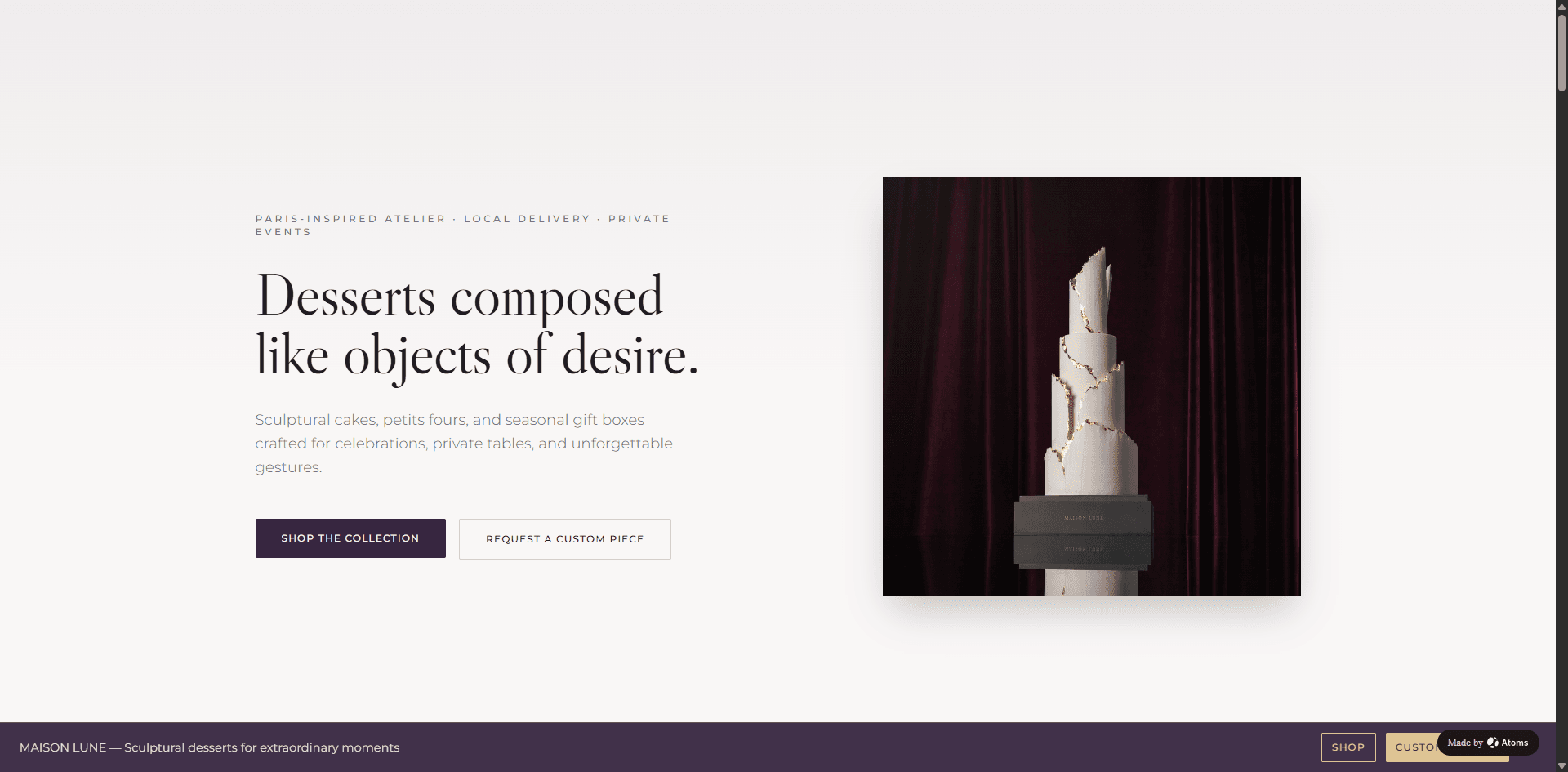
MAISON LUNE combines product ordering with private commissions, wedding desserts, seasonal collections, lead times, storage guidance, and allergen notices.
The design should follow the business model. Do not add a reservation interface to a dessert studio simply because restaurant templates often contain one. Do not present online ordering as connected unless the final button reaches a real, tested ordering flow.
8. Test every guest action before publishing
Run this checklist on desktop and mobile.
Content accuracy
- [ ] Restaurant name, cuisine, address, phone, and hours are correct.
- [ ] Menu items, descriptions, and prices are current.
- [ ] Dietary, allergen, deposit, and cancellation wording is approved.
- [ ] Awards, testimonials, chef biographies, and press references are verifiable.
- [ ] Placeholder content and invented demo facts have been removed.
Conversion paths
- [ ] The main call to action is obvious within the first screen.
- [ ] Reservation buttons reach the intended booking destination.
- [ ] Ordering buttons reach a real ordering flow—not a visual mockup.
- [ ] Forms deliver submissions to the correct destination.
- [ ] Private-event inquiries request only the information the team needs.
- [ ] Phone numbers and email addresses work on mobile.
Mobile and discoverability
- [ ] Menu text is readable without pinching or horizontal scrolling.
- [ ] Navigation, buttons, and forms work at common mobile widths.
- [ ] Images have meaningful alternative text.
- [ ] The page title and main heading describe the restaurant and location naturally.
- [ ] Location and opening-hour information is consistent with the restaurant's verified listings.
- [ ] HTTPS and the final domain work correctly.
9. Launch, learn, and keep the site current
A restaurant site is operational content. Assign ownership for:
- menu and price changes;
- seasonal hours and closures;
- reservation and ordering links;
- event availability;
- photos and press references;
- domain renewal and contact-form delivery.
After launch, watch what guests actually use: menu views, reservation clicks, order clicks, direction requests, phone taps, and private-event inquiries. Those signals can guide the next revision without making unsupported promises about bookings or revenue.
Start from the verified prompt
You now have the planning checklist, page structure, review process, and the original KŌRI prompt.
- View the finished KŌRI example
- Copy and customize the reusable prompt above.
- Build your restaurant website with Atoms
The best first version is not the one with the most sections. It is the one that gives a guest accurate information and one clear next step.
