On this page
A customer writes four paragraphs about a delayed delivery, two feature requests, and a billing error. Another person pastes a project update that mentions a slipped milestone, a blocked task, and a decision that now needs a name attached to it. Both are useful, and both are unusable in that form: you cannot filter a paragraph, count it, or hand it to someone else to act on.
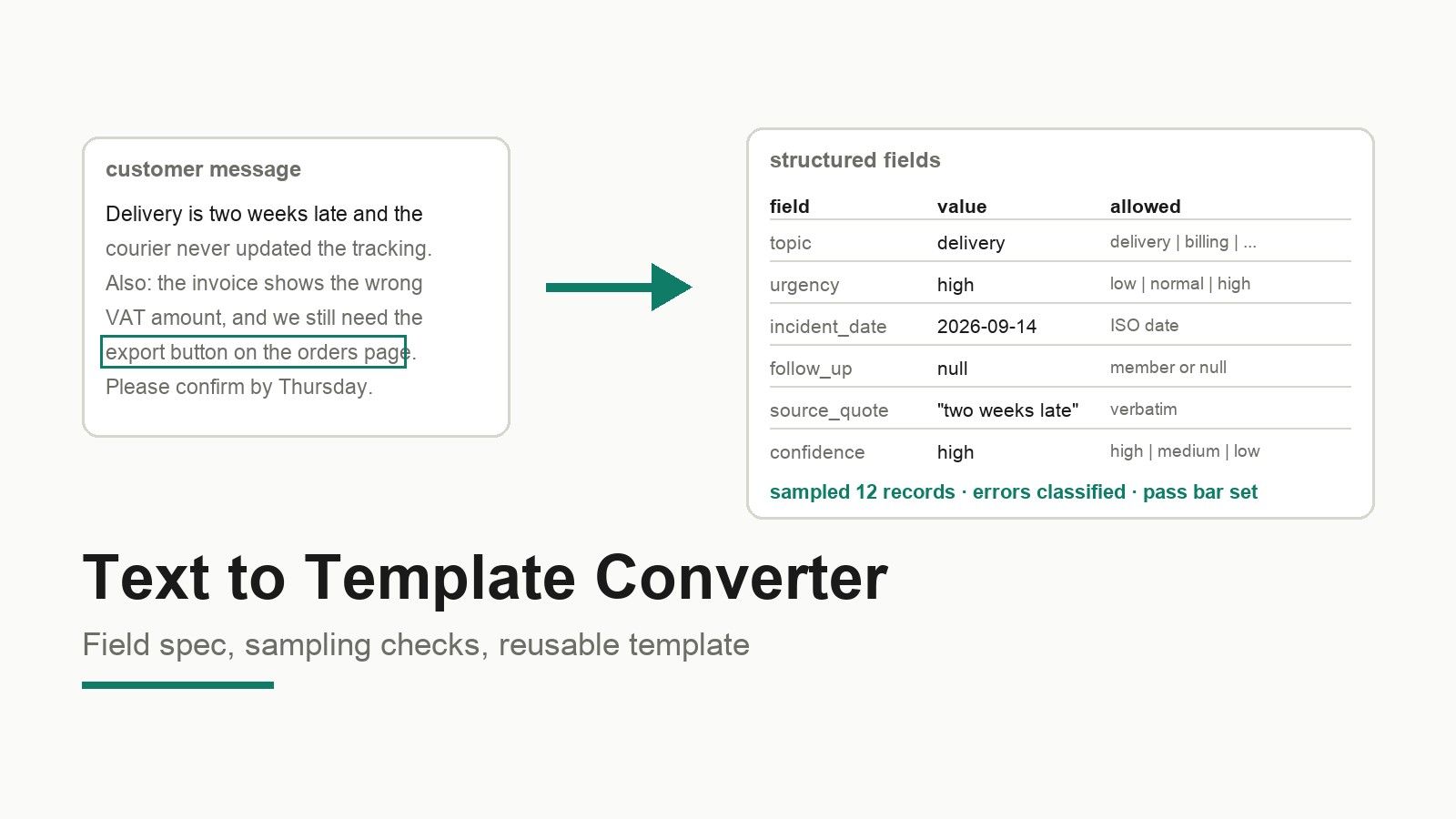
A text to template converter promises to fix that in one click. The honest version is smaller and more useful: you decide the fields, write one template that produces them, and check a sample by hand before you run the batch. This guide gives you the field spec, the prompt and schema template, a sampling checklist with a worked example, and a handover plan, so the text to structured data routine survives its first real week.
What the top of the search results actually offers
Across 1,192 pages in the product help centre, nothing matches template, converter, extract, form, or feedback. The pages that do rank for the near keyword are template product pages: they promise to turn unstructured text into structured data with output types like dates, numbers, booleans, and choices, list use cases such as analysing customer feedback and assigning follow-ups, and open the product with a ready-made prompt.
That is a reasonable starting point and a poor stopping point. Those pages describe what the output can look like, not which fields your business needs, not what a wrong extraction looks like, and not when to stop trusting the batch. Those three questions are the whole job, and they are what this guide is about.
The capability layer is real, and it is generic. Text services from the major clouds will give you sentiment, entity categories, and content classification, and one of them documents a prebuilt entity list plus a custom model option for specialised entities. None of them will tell you whether a "blocked" project update should set your escalation flag: that is your field spec, not their model.
Step 1: Write the field spec before you write a prompt
Treat the template field mapping as the contract between the person who knows the domain and whoever runs the conversion. It is a table with one row per field and six columns: the field name, the type, whether it is required, the allowed values, the wording in the source text that should populate it, and the person who owns getting it right.
| Field | Type | Required | Allowed values | Populated from | Owner |
|---|---|---|---|---|---|
| record_id | text | yes | generated | assigned at import | system |
| source_type | enum | yes | feedback, project_update | which template was used | system |
| customer | text | yes | any account name | sender or first mention | support lead |
| topic | enum | yes | delivery, billing, quality, feature_request, other | main subject of the message | support lead |
| sentiment | enum | no | positive, neutral, negative | tone around the main subject | support lead |
| urgency | enum | yes | low, normal, high | explicit demand, deadline, or escalation language | support lead |
| incident_date | date | no | ISO date | the date the customer refers to | support lead |
| follow_up_owner | text | no | a workspace member | the person named or implied by "we will" | team lead |
| source_quote | text | yes | verbatim fragment | the sentence the judgement came from | support lead |
| confidence | enum | no | high, medium, low | extraction uncertainty | system |
Three rules make this table worth the effort. The allowed values column is the difference between a field you can group by and a field that collects synonyms for a year. The source quote column is what lets a reviewer check the model's judgement without re-reading the message. The owner column is what stops the template from quietly becoming nobody's responsibility.
The type column should be enforced where the data lands, not only described in the document. In the database module here, fields carry a name, a data type, a key status, constraints, and a default value, and you can change a field's name, type, default, required status, or uniqueness afterwards. JSON Schema uses the same idea at the format level: a type keyword declares the data type, enumerated and constant values define the accepted value set, and conditional validation handles the cases that only apply in some combinations.
Step 2: The extraction template
Your template has three parts. Keep them in one file so a reviewer can see all three at once.
Part C is the part teams forget. It encodes the decisions that a template cannot infer from your schema: what to do with a mixed message, when a null is correct, and which words justify an escalation. Every clause in it exists because a human would otherwise have to argue about the same record twice.
If you prefer to build the app first and let it call the model, the same three parts map to a stored prompt, a table schema, and a short validation step before the row is written.
Step 3: Check a sample, and write down what wrong looks like
Take the first twelve records, extract them, and compare each field against your own reading. Do not sample the twelve most typical messages; take twelve consecutive ones, because the boring middle is where systematic errors hide.
| # | Field | Extracted | Your reading | Verdict |
|---|---|---|---|---|
| 1 | topic | billing | billing | match |
| 2 | urgency | high | normal | over-escalation |
| 3 | incident_date | 2026-09-14 | 2026-09-14 | match |
| 4 | follow_up_owner | null | null | match |
| 5 | customer | "Priya" | "Priya Raman" | partial name |
| 6 | sentiment | negative | negative | match |
| 7 | topic | other | delivery | wrong category |
| 8 | source_quote | empty | required | missing evidence |
| 9 | incident_date | "next Tuesday" | null | guessed value |
| 10 | urgency | normal | high | under-escalation |
| 11 | customer | "the client" | null | invented entity |
| 12 | sentiment | positive | neutral | polarity error |
Sort the disagreements into categories before you count them, because the categories tell you which fix to make. Wrong category or polarity means the allowed values are ambiguous and the prompt needs an example. Guessed values mean a house rule is missing. Invented entities and partial names mean the prompt needs an explicit "copy the name exactly" instruction. Missing evidence in the quote column means the extractor is being allowed to skip the audit trail, which you should stop immediately, since that column is what makes every other check cheap.
Then set the bar for running the batch, in writing. A workable default: zero invented entities, zero values outside the allowed lists, no more than one guessed date and one polarity error in twelve, and every record with a source quote. If the sample fails, change the field spec or the house rules and repeat on a fresh twelve. Do not run the full batch and hope to clean it up later, and do not tighten the model's confidence threshold to hide a definition problem: confidence is a property of the extraction, not of your field design.
Step 4: Two shapes worth separating
Customer feedback and project updates look similar in a spreadsheet and need different field specs. Feedback is about a person's experience: who they are, what it was about, how bad it was, and who replies. Project updates are about state: what changed, by when, what is blocked, and what decision is needed. Keep the two mapping tables apart, because the feedback fields above answer a support question and the project fields below answer a delivery question.
For customer feedback, the useful core is customer, topic, sentiment, urgency, incident date, and follow-up owner, with the source quote carrying the reviewer's audit trail. That matches the customer feedback template shape most teams already use for intake, with the difference that the fields are now filled by extraction rather than by a person reading every message.
For project updates, replace sentiment with status and add a milestone and a blocker field. An update that says a milestone slipped needs three facts: the milestone, the new date, and the reason. If the text does not contain the reason, the correct output is null and a follow-up task, not a plausible sentence. This is where extraction earns its place: a project update template that produces consistent status fields turns a paragraph into something you can roll up across twenty projects, which is exactly what the wider template demand for project status reporting is about.
Step 5: Turn it into a small tool, and hand it over
A conversion that lives in one person's chat history dies on the first holiday. Package it as a small internal tool.
- Create one table per record type with the field spec as constraints, so a bad value fails at the boundary instead of at review time.
- Keep the template file versioned next to the field spec, and note the date and the sample result of each version.
- Route the input: a form for typed feedback, a paste box for project updates, and a CSV import for the backlog you already have.
- Give the review step a home: a status column (new, reviewed, rejected) so the queue is visible rather than implied.
- Hand over a one-page runbook: where the template lives, how to run the sample check, the pass criteria, and who owns the field spec.
Two practical limits belong in that runbook. Imports in this stack are capped at 10 MB per CSV file, the columns must match the destination table, and imported rows are added immediately and cannot be automatically undone, so export the existing data before you import and rehearse on a development environment. And a table can be read-only: if a table is not writable, no import will land in it.
When not to automate the extraction
Five categories are cheaper to read by hand than to supervise.
Text that mixes several unrelated topics in one message will produce a record that is wrong in a way nobody notices, because every individual field looks plausible. Records whose meaning depends on a thread you do not have, such as a reply that only says "yes, same again", need context the template cannot see. Any output that triggers a legal or financial commitment, a refund, a contract term, a compliance statement, should stay a human decision with a human signature. Personal data you are not cleared to process in bulk should not be piped through an extraction tool at all. And a one-off batch of twenty messages does not justify a template: the template pays back at the second or third run, not the first.
What is not supported today
There is no documented text-to-template converter in this product, and the help centre has no article on templates, converters, or extraction. Do not promise one to your team.
What does exist is a library of ready-made starting points in a different sense. The use case pages carry template entries, each with a name, a reusable prompt, a chat id, and a deployed app URL, and the public catalogue lists dozens of published pages with those entries attached. That is a prompt you can lift and a running example you can inspect, not an automatic conversion feature. Connector availability also varies by account and release, so the reliable check is the in-product connector catalogue, and if an action you need is not shown for a connector, treat it as unsupported rather than merely hidden.
Applying it with Atoms
Atoms turns a natural-language brief into a working website or web application and provides application infrastructure such as persistent data, authentication, and deployment, which is what a small internal tool like this needs: a form for the input, a table with the field constraints, a review queue, and a published URL for the people who feed it.
Describe the tool rather than the technology: the record types, the fields from your spec, the allowed values, who submits, and who reviews. The database module then holds the typed records and imports the backlog, and the template library gives you a working prompt to start from instead of a blank page. Treat the production checklist as a real step: production settings, integrations, payments, accessibility, security, and performance should still be reviewed before you share the URL, and workspace roles should decide who may edit the field spec versus who may only review records.
Three builds from this round's case material show what a compact, handover-ready output looks like.
Terminal 3D Game Engine A self-contained interactive tool built from a single written brief, the same one-brief-in, one-runnable-output shape this workflow aims at.
Sportswear E-commerce Website A handover-ready site whose content is driven by typed records rather than paragraphs, which is the end state of a finished field spec.
Snacks Online Store A catalogue-style build where every item is a structured record with fixed fields, the shape your extracted rows land in.
None of these were produced from a reader's text; they show the kind of compact deliverable this template is meant to feed.
Conclusion
The template is not the hard part. Write the field spec with allowed values and owners, run the twelve-record sample, classify every disagreement into a fix, set the pass bar in writing, and only then automate the batch. Keep the template and the spec versioned together, and hand over a runbook rather than a chat history. When you are ready to build the small tool that runs it, start from the app builder use case and put the records in a database table with the constraints attached, so a wrong value fails where you can see it.
Frequently asked questions
01Q1: Is there a tool that converts text to a template automatically?
There are template products that generate a starting app and a ready-made prompt, and there are general text services that return entities, sentiment, and categories. Neither knows your field definitions or your review policy, and the product documented here does not include a text-to-template converter. The template in this guide is a prompt, a schema, and a set of house rules that you keep under version control.
02Q2: Which fields should customer feedback become?
Start with customer, topic, sentiment, urgency, incident date, and follow-up owner, plus a source quote and a confidence value. Keep allowed values tight: five topics cover most intake queues, and three urgency levels are easier to keep honest than five. Add a field only when someone will filter, sort, or report on it.
03Q3: Which fields should a project update become?
Project, status, milestone, target date, blocker, decision needed, and next action. Status and milestone are what make a set of updates roll up; blocker and decision needed are what make the update actionable. If the text does not state a date or a reason, record null and raise a follow-up instead of accepting a plausible guess.
04Q4: How many records do I need to check by hand?
Twelve consecutive records is enough to expose definition problems, and far cheaper than auditing the batch afterwards. Categorise disagreements instead of just counting them, then set a pass bar: no invented entities, no values outside the allowed lists, and no more than one date or polarity error per twelve. Change the spec, take a fresh twelve, and only then run the full set.
05Q5: Can I keep the output in a spreadsheet instead of a database?
You can, and it will work for the first month. The limits show up when you need constraints that reject bad values, a review status, and access rules that differ by person. A database table with typed and required fields does that at the point of entry, and CSV import and export keep the spreadsheet route open for existing rows.
06Q6: Who should own the template after handover?
One named owner for the field spec, usually the team lead who answers for the queue, and one for the template file, usually whoever runs it weekly. Reviewers own the source quote column, because that is what lets anyone else verify a judgement. Write all three into the runbook; an unowned template is the reason these projects quietly stop being run.
