On this page
ChatGPT Sites is one of the most visible new entries in AI website building. OpenAI positions Sites as a public-beta way to create, preview, publish, and share interactive websites and lightweight apps from ChatGPT Work or Codex.
The short verdict
Choose ChatGPT Sites for a focused, lightweight Site or internal experience that benefits from ChatGPT context and managed publishing. Choose Atoms when the same idea needs to become a real website or web app with a broader product workflow, persistent backend, authentication, payments, deployment, and continued iteration.
The fairest current conclusion is not that ChatGPT Sites replaces full-stack builders. It is that the products start from different centers:
- ChatGPT Sites makes a bounded interactive experience easy to create and publish.
- Atoms is built to move a product brief through research, architecture, engineering, backend, SEO, and deployment.
Want to run the same test now? Build the Same Project in Atoms with the complete LaunchBoard brief used in this review.
This is the key decision before reading the detailed comparison:
| If you need… | Start with… | Next step |
|---|---|---|
| A quick interactive Site or lightweight internal tool | ChatGPT Sites | Review OpenAI’s current Sites guide |
| A real app with database, authentication, authorization, payments, and deployment | Atoms AI App Builder | Build the Same Project in Atoms |
| A multi-agent workflow across product, engineering, SEO, and analytics | Atoms AI Agents | Start building in Atoms |
| A public-beta experiment connected to ChatGPT context | ChatGPT Sites | Verify plan, region, workspace policy, and limits |
That makes the obvious question “what is ChatGPT Sites?” less useful than a buyer’s question:
If I give ChatGPT Sites and another AI website builder the same product brief, what can each one actually deliver—and where does the workflow stop being a lightweight Site?
This review is designed around that comparison. It uses the same brief, the same acceptance checklist, and the same distinction between a preview, a published site, and a production application.
Test date: August 28, 2026.
Important test-status note: ChatGPT Sites was not available for a live authenticated build in the test environment used for this review. Therefore, this article does not invent generation time, modification rounds, or a ChatGPT Sites result URL. ChatGPT Sites capability statements below are based on OpenAI’s current official documentation and public-beta terms. Atoms-side product capabilities and links are verified from the current Atoms product pages. A hands-on apples-to-apples run should replace the Not tested cells before treating this as a final benchmark.
The same brief for both builders
Build the Same Project in Atoms — paste the complete LaunchBoard prompt below to create a real Atoms project and compare the result against ChatGPT Sites.
Use this prompt in both products without changing the core requirements:
This brief is intentionally harder than a landing-page prompt. It tests whether a builder can move beyond visual generation into authentication, data, authorization, payments, deployment, and maintainability.
Ready to run the same test in Atoms? Build the Same Project in Atoms using the complete prompt above.
What ChatGPT Sites currently promises
OpenAI’s official documentation describes ChatGPT Sites as a way to create, preview, publish, and share interactive websites and lightweight apps. Creation is available through Work on ChatGPT web and through Work or Codex in the ChatGPT desktop app, subject to account, workspace, region, and plan availability.
The documented workflow is conversational:
- Describe the Site or app.
- Add relevant content, files, data, links, or constraints.
- Review a private preview.
- Ask for changes to copy, layout, data, styles, links, forms, or interactive behavior.
- Publish the result to a shareable URL.
- Continue editing the Site from the originating workspace.
OpenAI also documents custom-domain support where available. The user must already own the domain and be able to change its DNS records; Sites does not register the domain. Availability and workspace restrictions matter, especially for Enterprise environments.
That is a useful product promise for lightweight applications. It does not automatically answer whether a Site includes the same backend, payment, authorization, observability, and code-ownership guarantees required by a production SaaS.
ChatGPT Sites vs Atoms: comparison matrix
| Capability | ChatGPT Sites | Atoms | Review status |
|---|---|---|---|
| Generate a website from natural language | Documented | Documented | Capability verified from current product pages |
| Preview before publishing | Documented | Available through the build workflow | ChatGPT live run Not tested |
| Publish a shareable URL | Documented | Available through Atoms deployment workflow | ChatGPT live run Not tested |
| Interactive lightweight app | Documented | Documented | Scope differs; test the actual app |
| Persistent database | Not confirmed as a general Sites guarantee | Atoms Backend supports persistent application data | ChatGPT Sites Not tested |
| Authentication | Not confirmed for every Site | Atoms Backend supports authentication | ChatGPT Sites Not tested |
| Authorization and protected records | Not confirmed in general documentation | Define and test through Atoms Backend workflow | ChatGPT Sites Not tested |
| Stripe payments and webhooks | Not confirmed as a general Sites feature | Stripe integration is available in Atoms workflows | ChatGPT Sites Not tested |
| Server-side business logic | Depends on the Site and connected services | Atoms supports backend and application logic | ChatGPT Sites Not tested |
| Custom domain | Documented where available; DNS required | Supported through Atoms deployment workflow | ChatGPT live run Not tested |
| Hosting | Managed publishing is documented | Managed hosting through Atoms Cloud | Both need project-level verification |
| Code export and escape hatch | Review the current Site and workspace terms | Atoms projects are designed for continued inspection and iteration | ChatGPT export Not tested |
| Monitoring and operational logs | Site-related operational data may be processed for hosting, security, debugging, and policy | Define monitoring and external observability requirements per project | Not a like-for-like guarantee |
The table is deliberately conservative. “Not confirmed” does not mean a feature can never be built with ChatGPT Sites. It means the public documentation reviewed for this article does not establish it as a universal capability of every Site.
The test scorecard
A fair review should separate three outcomes:
- Preview success: the screens look and behave plausibly in a private preview.
- Published-site success: the URL is live and the public workflow works.
- Production-readiness success: identity, data, authorization, payments, server-side logic, deployment, and recovery behave correctly.
| Test | ChatGPT Sites | Atoms | Evidence |
|---|---|---|---|
| Generate the LaunchBoard UI | Not tested | Not tested for this exact brief | No fabricated timing or result URL |
| Record first generation time | Not tested | Not tested for this exact brief | Run both clocks from prompt submission to usable preview |
| Count modification rounds | Not tested | Not tested for this exact brief | Count accepted prompt-driven revisions |
| Sign up and sign in | Not tested | Atoms capability documented; exact brief run Not tested | Test fresh user and returning user |
| Persist a project after refresh | Not tested | Atoms Backend capability documented; exact brief run Not tested | Verify database, not localStorage |
| Enforce workspace authorization | Not tested | Must be explicitly tested in the project | Attempt cross-workspace record access |
| Complete Stripe checkout | Not tested | Stripe integration available; exact brief run Not tested | Test success, failure, retry, and webhook state |
| Publish to a live URL | Not tested | Atoms deployment capability documented | Verify the deployed URL and environment |
| Connect a custom domain | Not tested | Atoms custom-domain workflow available | DNS and production configuration required |
| Inspect code and continue outside chat | Not tested | Atoms supports continued project iteration | Verify source and deployment escape hatch |
This is not a fabricated winner table. It is a test plan with the current evidence boundary visible.
Visual case studies from Atoms
These public Atoms-built projects show the type of output a website builder can produce beyond a generic landing-page mockup:
Public Atoms-built example: Flavo is an interactive storefront with product cards, category filters, cart actions, pricing, and newsletter capture. Open the live result to inspect the interaction—not a benchmark of ChatGPT Sites.
Public Atoms-built example: Mediterranean Coastal Holiday demonstrates a multilingual, image-led travel site with destination navigation, experiences, packages, testimonials, and responsive content structure. The live page is the evidence of the rendered result; it does not independently prove production readiness.
Public Atoms-built example: 3D Photo Gallery demonstrates an interactive visual experience with previous/next navigation, information controls, and presentation-state changes. Inspect the live result before drawing conclusions about a specific build brief.
A real Atoms-built result
Atoms is not only a prompt-to-preview concept. Here is a public Atoms-built storefront created as a concrete visual case study:
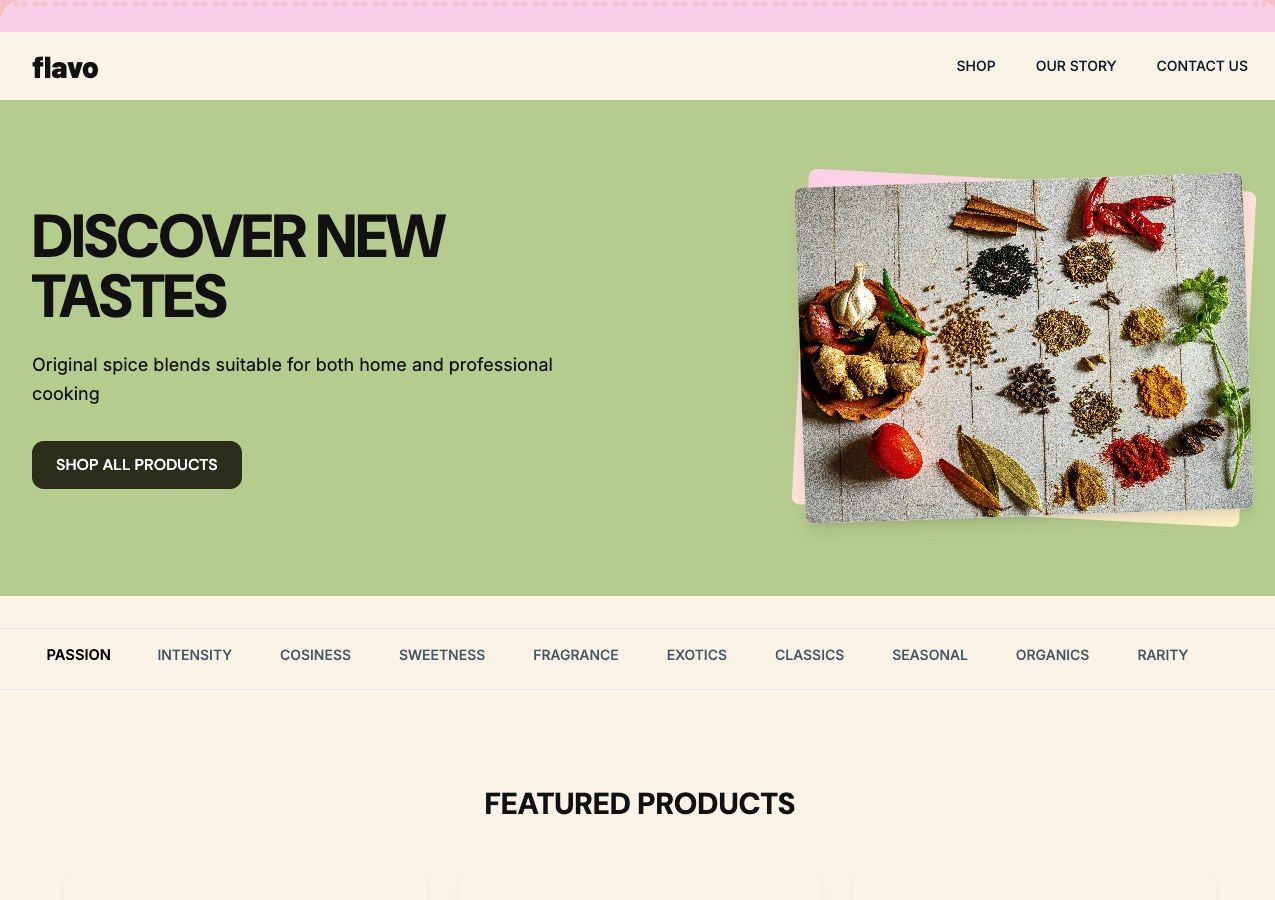
Public Atoms-built result: Flavo combines a branded hero, product discovery, category filters, product cards, prices, cart actions, and newsletter capture. Inspect the live storefront yourself. This is a rendered product example, not an apples-to-apples benchmark against ChatGPT Sites.
Where ChatGPT Sites looks strongest
Based on OpenAI’s official workflow description, ChatGPT Sites is most compelling when the job is close to a lightweight internal or public experience:
- a focused information site;
- an interactive calculator;
- a small workflow;
- a project-specific internal tool;
- a shareable prototype that can become a hosted Site;
- a quick experience built from files, context, and conversation.
The advantage is proximity to the user’s existing ChatGPT context. The user can describe the goal, add supporting material, inspect a preview, and continue the conversation to request changes.
That can reduce the setup cost for a small, bounded experience. It also makes the public-beta scope important: plan availability, workspace controls, publishing settings, data handling, and usage limits should be checked before attaching a business-critical workflow or domain.
Where Atoms is the stronger fit
Atoms is designed for a broader product-building workflow rather than only a lightweight Site surface.
The Atoms workflow connects:
- product definition;
- research;
- architecture;
- engineering;
- SEO;
- growth;
- analytics;
- deployment.
Atoms also provides an application path through Atoms Backend, with persistent data and authentication capabilities, and supports Stripe workflows where payments are required. Atoms Cloud provides managed hosting and deployment infrastructure.
For users who want an app rather than only a page, compare the Atoms AI App Builder. For website-first workflows, see the Atoms AI Website Builder.
The practical advantage is not that every generated project is automatically production-ready. It is that backend, auth, payment, hosting, and iterative product requirements are part of the intended workflow rather than an assumption left for the user to assemble later.
What the same brief should expose
Website output
Check:
- page hierarchy;
- responsive behavior;
- navigation;
- accessible controls;
- empty and loading states;
- copy quality;
- metadata;
- form validation;
- error recovery.
Database output
Check:
- whether records persist after refresh;
- whether multiple users see the correct data;
- whether the schema is inspectable;
- whether migrations are understandable;
- whether test data is isolated from production data.
Authentication and authorization
Check both identity and permission:
- Can a user sign up and return later?
- Can a user access only their own workspace?
- Can a workspace member see shared projects?
- Can a customer reach an admin route by guessing a URL?
- Are checks enforced server-side?
A login screen alone is not authentication architecture.
Payments
Check:
- product and price configuration;
- checkout success;
- declined payment;
- repeated webhook delivery;
- cancellation;
- refund;
- subscription entitlement;
- customer support lookup.
A button that says “Upgrade” is not proof that payment is real.
Deployment and ownership
Check:
- production URL;
- HTTPS;
- custom domain;
- environment variables;
- build failure visibility;
- rollback or recovery;
- source access;
- export or migration path;
- monitoring and logs.
ChatGPT Sites limits to verify before choosing it
The public-beta label is not a footnote. It changes the buying decision.
Before adopting ChatGPT Sites for a real business workflow, verify:
- Whether the account and region can create and publish Sites.
- Whether the workspace administrator permits public publishing.
- What plan-specific usage limits apply.
- Whether custom domains are available for the workspace.
- What storage and access controls apply.
- Whether the Site can connect to the required organization data.
- Whether authentication and authorization are native, connected, or custom.
- Whether payments and webhooks are supported for the exact workflow.
- Whether code can be exported or inspected.
- What happens if the Site is unpublished, the workspace changes, or the beta behavior changes.
Do not interpret an official “create and publish” workflow as a universal guarantee of full-stack application infrastructure.
Decision table: who should use what?
| Your requirement | Better starting point | Why |
|---|---|---|
| Publish a focused lightweight Site quickly | ChatGPT Sites | OpenAI’s documented workflow is optimized for conversational creation and publishing |
| Turn an idea into a website with product iteration | Atoms | Atoms combines AI generation with a broader product workflow |
| Need persistent records and user accounts | Atoms | Atoms Backend is designed for backend data and authentication workflows |
| Need Stripe checkout and application entitlements | Atoms | Stripe integration is part of the Atoms application path; test webhooks explicitly |
| Need a custom domain and managed hosting | Either, after checking availability | Both require project-level verification and domain configuration |
| Need a small internal tool connected to ChatGPT context | ChatGPT Sites may fit | Start with access, privacy, and workspace policy review |
| Need multiple specialist agents across research, architecture, code, SEO, and analytics | Atoms | Atoms uses a multi-agent product-development workflow |
| Need code ownership and a longer-lived application | Atoms, or a verified exportable ChatGPT workflow | Do not decide without inspecting the actual code and escape hatch |
| Need a public beta experiment | ChatGPT Sites | Beta scope can be acceptable when the consequence of change is limited |
| Need a production SaaS | Atoms or a conventional full-stack stack | Require database, auth, authorization, payments, observability, deployment, and recovery evidence |
Reproduce the comparison yourself
Run the same brief in both tools. Record:
Do not compare a polished screenshot from one tool with an unfinished preview from the other. Use the same acceptance checks and count only completed outcomes.
Build the same project in Atoms
Copy this brief into the Atoms AI App Builder or start from Atoms AI Website Builder. Edit the product name, roles, pricing, and data model before sending it.
This is the meaningful comparison: not which tool produces the prettier first screen, but which workflow gets closer to a tested, owned, deployable product.
Build the Same Project in Atoms — use the full LaunchBoard brief, edit the requirements, and start the comparison from a real Atoms project.
Final verdict
ChatGPT Sites is worth testing if the goal is a lightweight interactive Site that benefits from ChatGPT’s conversational context and managed publishing workflow.
Atoms is the stronger starting point when the goal is a website or web app that needs a real product lifecycle: research, architecture, frontend, backend, authentication, persistent data, payments, deployment, and continued iteration.
The fairest current verdict is not “ChatGPT Sites replaces full-stack builders” or “ChatGPT Sites cannot build real software.” The evidence supports a narrower conclusion:
ChatGPT Sites lowers the cost of creating and publishing a bounded interactive experience. Atoms is aimed at moving a product brief through a broader multi-agent, full-stack, and deployment workflow.
A final head-to-head winner requires the same brief to be run in an eligible ChatGPT Sites account and in Atoms on the same date. Until that run is completed, generation time, revision count, backend depth, and final URLs should remain explicitly marked Not tested rather than filled with assumptions.
