On this page
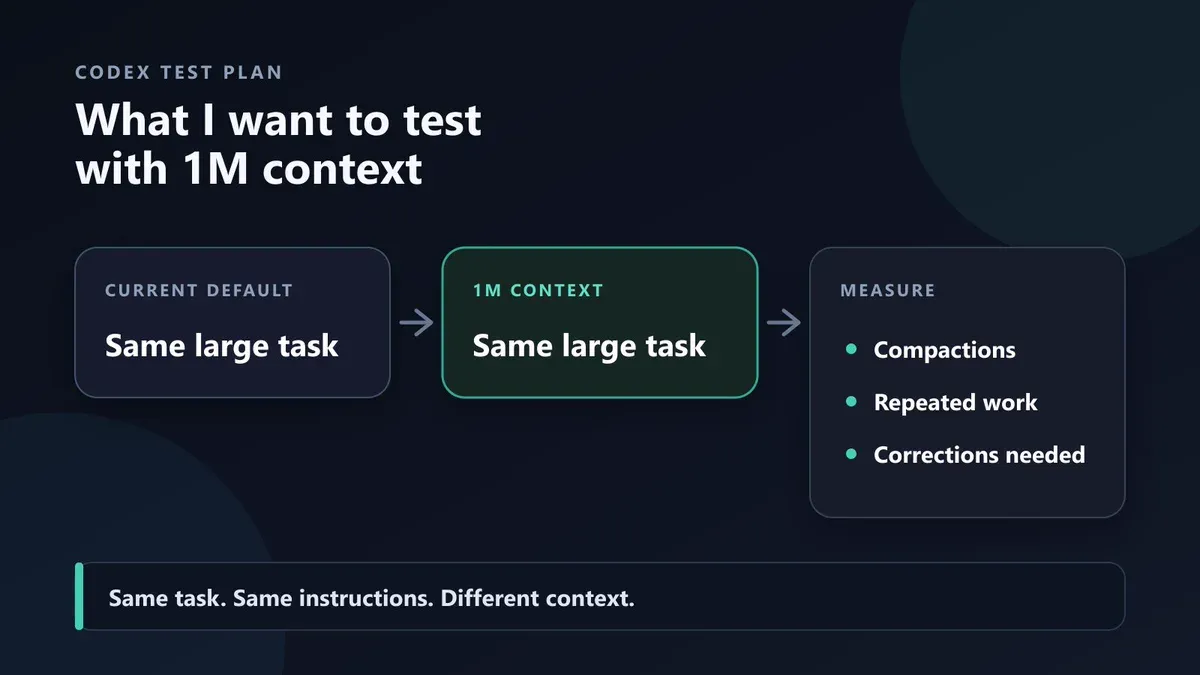
CodeGlitch proposes testing the same large Codex task under the default and one-million-token context, then comparing compactions, repeated work, and corrections. This is a test plan, not a benchmark result — Source
Codex can now run GPT-5.6 Sol with a one-million-token context budget through a simple configuration change. The setting works with Codex sessions authenticated through ChatGPT accounts, not only API-key workflows.
The configuration is short:
Add these keys at the top level of ~/.codex/config.toml, before any [section] headers. Restart Codex and begin a new session after saving the file.
The important part is not the three lines. It is deciding whether your task needs them. OpenAI’s own guidance says Codex defaults are tuned for performance and cost. A larger window retains more raw code, tool output, and conversation history, but it can also increase usage and make the model work through more irrelevant material.
This guide explains the exact setup, what each option controls, when one million tokens are useful, and why automatic compaction is often the better default.
What changed in Codex?
GPT-5.6 Sol already supports a large native context window. OpenAI’s current model page lists a 1,050,000-token context window, up to 128,000 output tokens, and the model ID gpt-5.6-sol.
The gap was at the product layer. Codex did not normally expose the model’s full context budget in a standard session. On August 17, 2026, Codex engineer Tibo documented how users can opt into a one-million-token budget through config.toml or one-off CLI overrides.
His explanation was precise: the larger window lets Codex retain more code, tool output, and conversation history before it summarizes older material. He also warned that the existing default had been tuned carefully for performance and cost.
That distinction matters:
- The model limit is the maximum context GPT-5.6 Sol can accept.
- The Codex session budget determines how much context Codex tries to retain before compacting history.
- The compaction threshold determines when Codex starts summarizing older context to leave room for continued work.
Enabling one million tokens changes the second and third values. It does not make every coding task better.
The three-line Codex configuration
Open ~/.codex/config.toml and add:
These must be top-level keys. Put them before configuration blocks such as [features], [mcp_servers.example], or any other TOML section.
After saving the file:
- Quit and restart the Codex client.
- Start a new session.
- Use
/statusor the relevant session information to confirm the active model and configuration. - Do not assume an existing thread will adopt the new budget cleanly.
What each setting does
model = "gpt-5.6-sol"
This selects GPT-5.6 Sol. OpenAI describes Sol as the flagship GPT-5.6 model for complex reasoning and coding. The API model page lists the gpt-5.6 alias as routing to Sol, but using the explicit model ID makes the local configuration easier to audit.
model_context_window = 1000000
This tells Codex to use a one-million-token context budget for the session. OpenAI’s model documentation lists the underlying model window at 1,050,000 tokens, so the Codex setting stays below the model’s published maximum.
model_auto_compact_token_limit = 900000
This starts automatic history compaction around 900,000 tokens. The remaining headroom gives Codex space to summarize older history and continue operating instead of colliding with the upper limit.
OpenAI’s configuration reference defines this key as the token threshold that triggers automatic history compaction. When it is unset, Codex uses the model or preset default.
Try 1M context for one Codex session
You do not need to change your persistent defaults to test the larger window. Launch one CLI session with configuration overrides:
This is the safer first experiment. If the task finishes without approaching the normal context limit, you have learned that the permanent change may not be necessary.
Use the one-session command when:
- you are testing a new repository;
- you expect a single unusually long investigation;
- you want to compare normal and extended-context behavior;
- you do not want every future Codex task to inherit the larger budget.
When a one-million-token window helps
A large context window is most valuable when relevant information is genuinely distributed across a large working set.
Large repository migrations
A framework upgrade or architectural migration may require Codex to inspect configuration, application code, tests, generated types, build scripts, and historical implementation decisions. A larger context budget can delay the point at which older evidence must be summarized.
Long debugging investigations
Some failures require many cycles of inspection, hypotheses, command output, code changes, and test results. Keeping more of that trail can help Codex avoid repeating disproven ideas.
Multi-package refactors
Changes that cross services, shared libraries, schemas, and client applications can produce a large amount of relevant code and verification output. The larger budget may improve continuity when the dependencies cannot be reduced to a small set of files.
Research-heavy implementation
A task may combine technical documentation, repository code, issue discussions, design constraints, and tool output. Extended context is useful when these sources remain relevant throughout the build.
Tasks with expensive state reconstruction
If summarization removes a subtle requirement, reconstructing it may require another expensive search through the repository or external documentation. Retaining more original evidence can be worthwhile for high-value tasks.
Why you should not enable it by default
“One million tokens” sounds like a pure upgrade. It is not.
More context means more material to process
A large window can retain useful evidence, but it also retains obsolete command output, duplicated files, abandoned plans, and intermediate reasoning. Context capacity and context quality are different metrics.
The model still has to identify what matters. Filling the window with weakly relevant material can reduce precision rather than improve it.
Usage can grow quickly
Long-running Codex sessions repeatedly add code, tool output, and conversation history. Raising the compaction threshold allows more of that material to remain in the active context for longer.
The original discussion included warnings from users about faster usage consumption after moving beyond the normal Codex budget. Treat those posts as community observations, not a universal billing formula. The durable conclusion is simpler: larger active contexts generally consume more tokens and should be enabled deliberately.
The default is intentionally tuned
Tibo explicitly said the Codex default was tuned for performance and cost. A default is not merely an arbitrary restriction; it encodes the provider’s current judgment about when compaction produces a better overall session.
Native support does not guarantee uniform quality
A model can accept one million tokens without using every part of that window equally well. Retrieval accuracy, attention to distant details, and instruction retention can vary as inputs grow.
Do not judge success by whether Codex accepts the prompt. Judge whether it finds the right evidence, preserves requirements, completes the task, and passes verification.
Why automatic compaction matters
Automatic compaction summarizes older material so the session can continue with a smaller active history.
That sounds lossy because it is. The engineering question is whether the removed detail is still useful.
In a long coding session, history accumulates material with different lifetimes:
- project requirements may remain important throughout the task;
- architecture decisions may remain important for hours;
- a failed test result may matter until the bug is fixed;
- raw command output may become irrelevant after its conclusion is recorded;
- rejected plans usually do not need to remain verbatim;
- duplicated file reads provide little additional value.
Good compaction preserves durable facts and discards expired detail. OpenAI researcher Noam Brown described Codex autocompaction as an area where OpenAI invested early to make the transition close to seamless, while still acknowledging that the one-million-token option is available for users who need it.
The practical choice is therefore not “context or compaction.” It is where compaction should begin for this task.
A safer operating strategy
Instead of making one million tokens the permanent default, use a staged approach.
1. Begin with the normal Codex configuration
Let the provider-tuned defaults handle ordinary feature work, bug fixes, reviews, and short investigations.
2. Keep the task focused
Give Codex a clear outcome, relevant repository boundaries, acceptance criteria, and verification commands. Better task framing often provides more value than a larger context window.
3. Watch for evidence loss
Extended context may be justified if Codex repeatedly forgets requirements, reopens disproven hypotheses, or loses dependencies that remain relevant after compaction.
4. Test the one-session override
Run the same class of task with the one-million-token CLI command. Compare completion quality, intervention rate, elapsed time, and usage.
5. Make the setting persistent only when the evidence supports it
If large repository work consistently improves, move the settings to ~/.codex/config.toml. Otherwise, keep the extended budget as a task-specific tool.
What to measure in your own test
A fair comparison needs more than “the session felt smarter.” Track:
- whether the task was completed;
- whether tests and build checks passed;
- how often Codex repeated searches or mistakes;
- whether important requirements survived the session;
- how many manual reminders were needed;
- elapsed time;
- token or credit consumption;
- quality after compaction;
- final review effort.
The larger window wins only when it improves the result enough to justify the additional cost and complexity.
Where Atoms fits
The Codex configuration is useful for developers operating directly in a repository. But many users want the outcome—a working product—without managing a local agent configuration, API keys, context thresholds, deployment, and hosting separately.
Atoms provides a different workflow. You describe the app or website you want, choose an available model such as GPT, and let an AI team move through product planning, implementation, review, and deployment. Atoms has already made GPT-5.6 available in its model workflow, so builders can use the model for full product creation rather than only a local Codex session.
Use Codex’s extended context when you need deep control over a large existing repository. Use Atoms when you want to move from an idea or product brief to a deployable application with less setup.
Frequently asked questions
01Does GPT-5.6 Sol support one million tokens?
Yes. OpenAI’s current model page lists a 1,050,000-token context window for GPT-5.6 Sol. The Codex configuration shown here sets a one-million-token session budget.
02Where is the Codex configuration file?
The user-level file is ~/.codex/config.toml. Put the three model keys at the top level, before any [section] headers.
03Do I need an API key?
The August 17 announcement says the configuration works for Codex usage through ChatGPT accounts as well as API-key workflows. Availability can still depend on the current Codex client, account plan, and rollout state.
04Do I need to restart Codex?
Yes. Save the configuration, restart the Codex client, and start a new session.
05Why compact at 900,000 instead of 1,000,000 tokens?
Compacting at approximately 900,000 tokens leaves headroom for the summary, new instructions, tool output, and continued work before the model limit is reached.
06Will one million tokens make Codex better?
Not automatically. It can help when relevant evidence exceeds the normal session budget. It can hurt when the additional context is noisy, stale, duplicated, or expensive to process.
07Should I enable the setting permanently?
Start with the one-session CLI override. Make it permanent only if representative tasks show better completion quality or fewer context-loss failures at an acceptable usage cost.
