On this page
Gemini Omni 1.1 Flash is Google’s August 27, 2026 update to its conversational video-generation and editing model. The release matters because it targets the part of AI video workflows that still consumes the most time: extending a scene, controlling how one shot becomes another, iterating cheaply, and finishing only the selected result at high resolution.
Google describes the update as production-ready for developers and makes it available through APIs. The headline capabilities are:
- scene extension with improved visual continuity;
- start- and end-frame control for interpolation and camera transitions;
- low-cost 360p drafts for rapid iteration;
- 720p, 1080p, and up to 4K finishing;
- conversational generation and editing through the Gemini video workflow;
- same-day availability in Google Flow.
The short answer
Gemini Omni 1.1 Flash is most interesting for teams that need to iterate on video structure—not only generate one clip from one prompt. Scene extension, first/last-frame control, draft resolution, and final-resolution choices turn the model into a more controllable production workflow.
Atoms does not currently claim Gemini Omni 1.1 Flash as an available model in its public model picker. This article therefore does not pretend that the model can be selected in Atoms today.
Atoms does have video-creation capabilities through Video Mode and AI-agent workflows. If your goal is to turn a product or campaign brief into video concepts, prompts, assets, previews, edits, and a broader launch workflow, use the main Atoms creation entry:
Gemini Omni 1.1 Flash at a glance
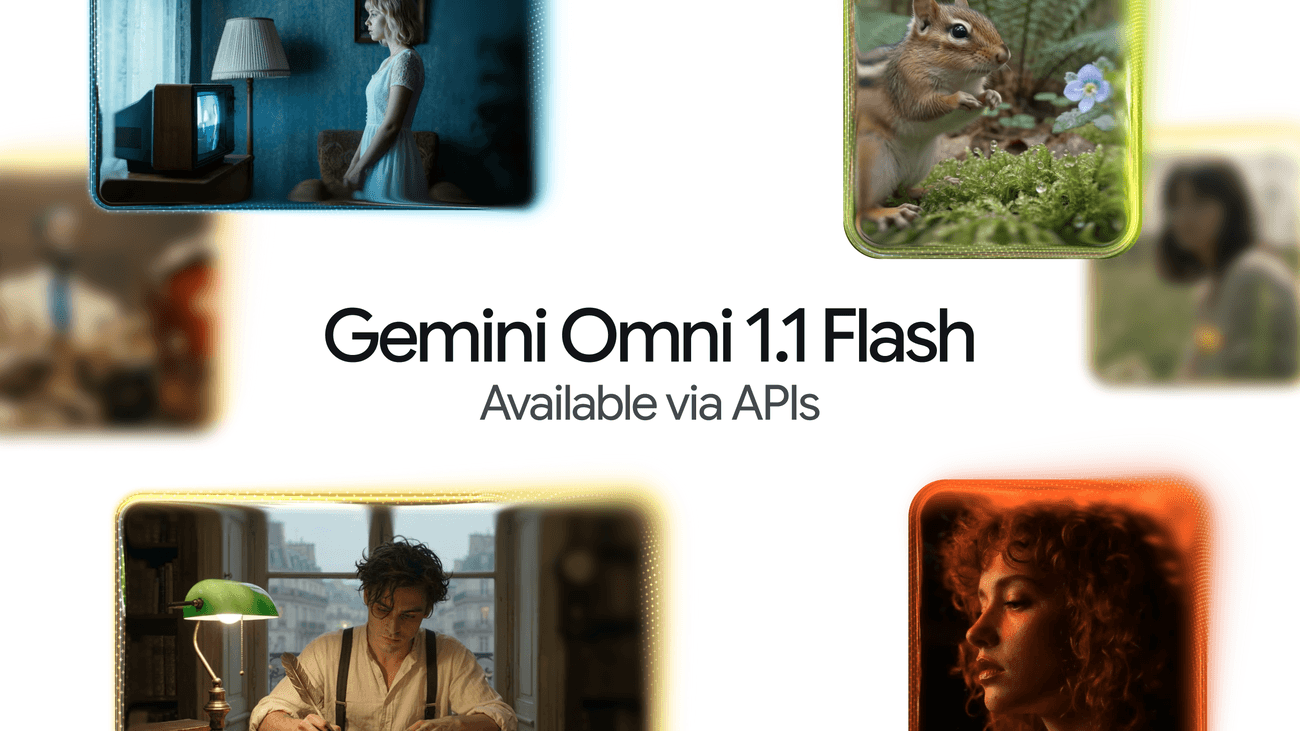
Google’s official launch artwork announces Gemini Omni 1.1 Flash API availability. The collage is promotional artwork, not a benchmark or proof that the displayed images were generated by the model. — Source: Google
| Question | Current answer |
|---|---|
| What is it? | Google’s updated multimodal video-generation and editing model |
| Release date | August 27, 2026 |
| Main workflow | Generate, edit, extend, interpolate, and finish video |
| Scene extension | Google says clips can be extended with improved consistency and narrative flow |
| First/last frames | Supported for controlled transitions and camera movement |
| Draft mode | 360p for faster, lower-cost iteration |
| Final resolution | 720p, 1080p, or up to 4K depending on selected output |
| API access | Documented by Google; verify project, region, quota, and billing |
| Google Flow | Google says the model became available in Flow on release day |
| Atoms availability | Not currently verified in the public Atoms model picker |
What changed in Gemini Omni 1.1 Flash
Scene extension
Scene extension is the most strategically important capability in this release. A production video rarely arrives as one perfect generation. Creators need to continue a shot, preserve its look, move the narrative forward, and keep the motion believable.
Google says Gemini Omni 1.1 Flash can extend scenes with improved visual consistency and narrative flow. Third-party launch coverage describes extension workflows reaching approximately 40 seconds, but exact limits should be checked against the current API and request mode.
A useful scene-extension prompt includes:
The key is to describe what must remain invariant as clearly as what should change.
First- and last-frame interpolation
Start/end-frame control gives creators a stronger way to define the destination of a shot. Instead of asking the model to invent the complete transition, the creator provides the opening state and ending state.
This is useful for:
- product transformations;
- controlled camera moves;
- logo or title reveals;
- before-and-after sequences;
- storyboard keyframes;
- character entrance or exit;
- transition shots between scenes.
Prompt structure:
The frames constrain composition, but they do not guarantee perfect object permanence. Review the transition frame by frame.
360p drafts
The 360p option is not a quality headline; it is a workflow feature.
Google’s pricing image positions 360p as the cheapest Gemini Omni 1.1 Flash output mode. This makes it useful for testing:
- prompt direction;
- motion design;
- shot length;
- camera movement;
- blocking;
- scene continuity;
- dialogue timing;
- extension boundaries.
The efficient pattern is:
Do not spend 4K pricing on an unresolved prompt.
4K finishing
Up to 4K output is valuable when the selected shot needs:
- large displays;
- detailed product close-ups;
- high-resolution campaign masters;
- reframing and cropping;
- post-production stabilization;
- compositing;
- premium presentation.
It does not mean every 4K result contains genuine high-frequency detail equal to captured footage. Inspect faces, text, materials, small objects, motion blur, and temporal consistency at full resolution.
Gemini Omni 1.1 Flash pricing
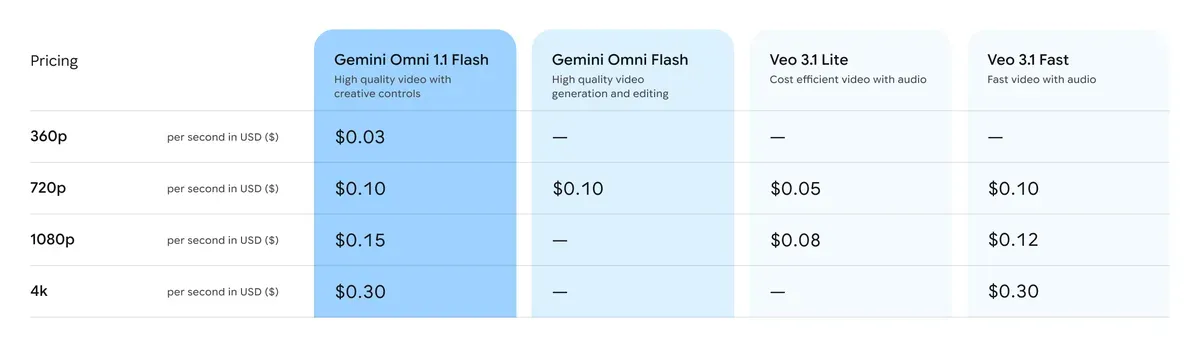
Google’s displayed pricing table lists rates per generated second in USD. Prices and availability can change; verify the current Gemini API pricing page before production use. — Source: Google
Google’s launch table lists:
| Resolution | Gemini Omni 1.1 Flash |
|---|---|
| 360p | $0.03 per second |
| 720p | $0.10 per second |
| 1080p | $0.15 per second |
| 4K | $0.30 per second |
Example output-only estimates based on the displayed rates:
| Output | Estimated listed cost |
|---|---|
| 10 seconds at 360p | $0.30 |
| 10 seconds at 720p | $1.00 |
| 10 seconds at 1080p | $1.50 |
| 10 seconds at 4K | $3.00 |
| 40 seconds at 360p | $1.20 |
| 40 seconds at 4K | $12.00 |
These are simple duration multiplications, not complete project-cost estimates. Retries, failed generations, input charges, platform differences, taxes, and enterprise terms can change the final bill.
Gemini Omni 1.1 Flash API
Google’s current developer documentation presents Gemini Omni Flash as a video-generation and editing model available through Gemini developer workflows, including conversational refinement through the Interactions API.
Before implementation, verify:
- current model ID;
- GA or preview status on the chosen platform;
- regional availability;
- quota;
- resolution-specific pricing;
- input and output formats;
- maximum scene-extension context;
- safety filters;
- storage and retention;
- asynchronous operation and polling behavior;
- deprecation date for older preview endpoints.
Do not copy an unofficial model ID into production code without checking Google’s current documentation.
A conceptual API workflow is:
The exact request schema can change. Use the current Google SDK or REST reference rather than a static snippet from a launch-day article.
How to use Gemini Omni 1.1 Flash
Use Google Flow
For creators, Flow is the most direct Google product surface mentioned in the launch. A practical workflow is:
- Create or import the starting media.
- Generate a low-resolution direction test.
- Edit through natural-language instructions.
- Add start/end frames where composition matters.
- Extend scenes only after the visual identity is stable.
- Render selected clips at the target resolution.
- Check continuity and audio before export.
Use the Gemini API
For developers, use the API when video generation belongs inside a product or automated workflow. Good applications include:
- automated advertising variants;
- product visualization;
- storyboards and animatics;
- video extension tools;
- keyframe-based transitions;
- campaign-content pipelines;
- creator applications;
- media-assistant agents.
Production code should record:
- prompt version;
- input-asset hashes;
- model ID;
- output resolution;
- generation time;
- operation ID;
- safety result;
- estimated cost;
- human review outcome.
Prompt recipes
Scene extension prompt
Product-video prompt
First/last-frame transition prompt
Fast-draft prompt
Gemini Omni 1.1 Flash vs Seedance 2.0
There is no single trustworthy launch-day benchmark that makes this a universal winner comparison. Choose by workflow.
| Requirement | Gemini Omni 1.1 Flash | Seedance 2.0 |
|---|---|---|
| Conversational video editing | Core Gemini Omni positioning | Depends on product implementation |
| Scene extension | Major 1.1 feature | Verify current Seedance workflow |
| First/last-frame interpolation | Explicitly highlighted by Google | Verify current keyframe controls |
| 360p low-cost drafting | Official pricing tier | Compare available preview modes |
| Up to 4K finishing | Officially highlighted | Verify current output-resolution limits |
| Google Flow integration | Yes | No |
| Gemini API workflow | Yes | No |
| Native storytelling and multimodal references | Strong Omni workflow | A key Seedance strength in current releases |
| Best choice | Google ecosystem, extension, controlled interpolation | Reference-heavy storytelling and Seedance production workflows |
If the exact target is Seedance 2.0 rather than Seedance 2.5, verify the model/version available in the product being tested. Do not compare capabilities across different Seedance versions as if they are one model.
For broader Seedance production guidance, see Seedance 2.5 Prompt Cookbook and Seedance 2.5 Review.
Community and launch signals
The release quickly generated discussion beyond Google’s announcement:
- the Hacker News launch thread attracted substantial discussion;
- Product Hunt listings and alternatives appeared around the release;
- independent coverage from Gigazine, Dataconomy, API-focused publications, and creative-tool companies followed within roughly a day;
- users began discussing and testing extension and control workflows.
These signals establish interest, not model quality. Upvotes and comments do not prove that scene extension works reliably across identities, camera movement, text, hands, products, or long narratives.
The most useful community reports will include:
- original input media;
- exact prompt;
- model ID;
- output resolution;
- generation time;
- retry count;
- complete output;
- editing or post-production steps.
Build video campaigns with Atoms Video Agents
Gemini Omni 1.1 Flash is not currently verified in the public Atoms model picker, so Atoms should not imply native model access.
Atoms can still help with the larger video-production job. Its Video Mode and multi-agent workflow can support work such as:
- turning a product goal into a campaign brief;
- researching the audience and competitive visual language;
- writing video concepts and shot lists;
- preparing generation prompts;
- organizing reference assets;
- generating, previewing, and editing eligible video outputs;
- connecting the video to a landing page, app, SEO plan, or advertising workflow.
Atoms is not an official Google Gemini Omni integration unless the product picker explicitly confirms availability. The CTA is therefore about the production workflow, not pretending to provide this exact model.
Use this editable brief:
Frequently asked questions
01What is Gemini Omni 1.1 Flash?
It is Google’s updated multimodal model for conversational video generation and editing, released August 27, 2026.
02Does Gemini Omni 1.1 Flash support 4K?
Google’s launch announcement and pricing table include a 4K output tier. Verify current API and product availability before committing a production workflow.
03How much does Gemini Omni 1.1 Flash cost?
Google’s launch table lists $0.03/second at 360p, $0.10/second at 720p, $0.15/second at 1080p, and $0.30/second at 4K. Check the current pricing page for changes and billing conditions.
04What is scene extension?
Scene extension continues an existing video while trying to preserve subjects, setting, motion, audio, and narrative continuity.
05What are first and last frames used for?
They constrain the opening and ending compositions of a generated transition, reducing uncertainty about where the camera or subject should end.
06Is Gemini Omni 1.1 Flash available in Google Flow?
Google says it became available in Flow with the release. Workspace, region, plan, and rollout restrictions may apply.
07Can I use Gemini Omni 1.1 Flash through an API?
Google documents API availability. Confirm the current model ID, platform, quota, and status in Google’s official developer documentation.
08Is Gemini Omni 1.1 Flash available in Atoms?
Not currently verified in the public Atoms model picker. This article does not claim native availability.
09What can Atoms Video Agents help with?
Atoms can help structure a video-production workflow—from research and briefs through prompts, assets, eligible generation/editing, landing pages, and launch content. Available video models and features should be checked in the current product.
Final verdict
Gemini Omni 1.1 Flash is a meaningful update because it adds control where AI video teams need it: extending scenes, defining transitions, iterating cheaply, and finishing at the resolution the job requires.
The strongest reasons to evaluate it are not abstract quality claims. They are concrete workflow features:
Use Google Flow for a creator-oriented path and the Gemini API for programmable video products. Use Atoms Video Agents when the job is broader than one model call and needs research, creative planning, prompts, assets, landing pages, and a coordinated launch workflow.
