 Atoms Team
On this page
 Running Google Ads usually means managing too many moving parts at once: campaign setup, keywords, ad copy, targeting, bidding, tracking, and reporting.
Adrian brings that workflow into Atoms.
Adrian is Atoms’ AI-powered Ads Agent for automated Google Ads campaigns. It turns your product and landing page context into a live campaign with ad copy, campaign planning, conversion tracking, and performance monitoring in one flow.
How Adrian Works
Adrian is built to automate the core parts of campaign execution:
- Generate search ad copy
- Plan campaigns around product context
- Support targeting, budget, and bidding setup
- Configure conversion tracking
- Monitor campaign performance
- Surface optimization opportunities over time
The goal is simple: less manual setup, faster experimentation, and a cleaner path from launch to performance data.
Adrian Builds Campaigns From Your Product Context
Most ads tools start with a blank form: product name, value proposition, target audience, keywords, landing page, budget, bidding strategy. Twelve fields before you've made a single decision.
Adrian starts by reading your project. Your PRD, your code, your published URL, your design system — all of it is already in the workspace. By the time you @-mention Adrian in chat, the campaign plan is already drafted: a name, a target region, a daily budget, a bidding strategy, suggested keywords, and a full set of headlines and descriptions tuned to your actual landing page.
You confirm or edit. You don't fill out a brief.
What's in it for you?
- No re-describing your product. Adrian extracts product context from the same files Alex used to build the app. The work you already did becomes the input to the campaign.
- Compliant ad copy by default. Headlines and descriptions are generated against Google Ads policy (character limits, banned phrasing, claim grounding) so they don't get rejected at submission.
- Inline editing, not re-prompting. Want to tweak the budget, swap a region, rewrite a single headline, or change the bidding strategy? Adrian exposes precise edit tools — change one thing without regenerating the whole plan.
One-Click Launch on Google Ads
Adrian is not a draft generator. It launches real campaigns on Google Ads.
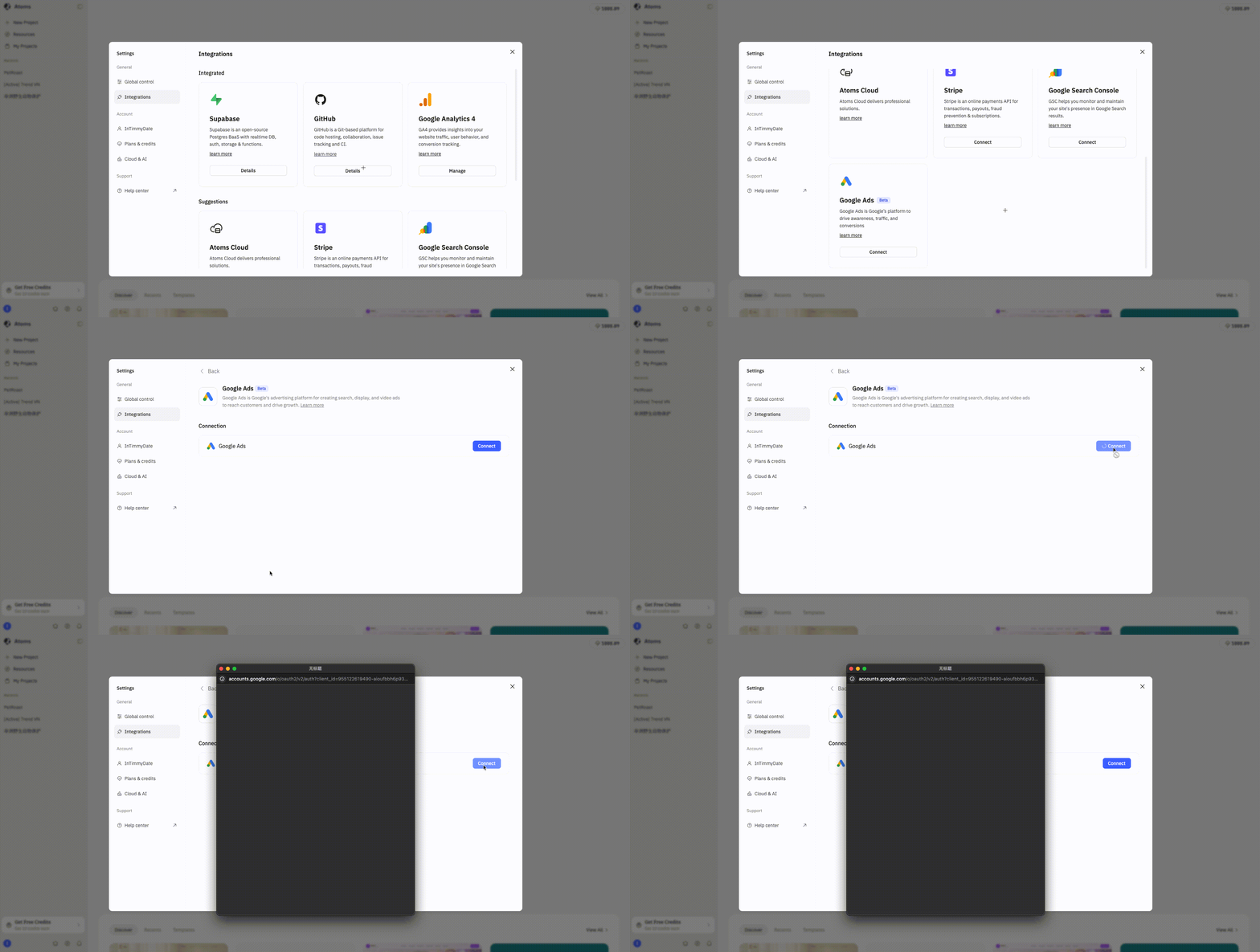
Before the first launch, Adrian walks you through a one-time Connect Google Ads authorization — the same OAuth pattern Atoms uses for Atoms Cloud and other integrations. Once connected, Adrian handles the rest:
- Readiness check — verifies your app is published, your Google Ads account is authorized, and your conversion tracking is in place. If anything is missing, Adrian tells you exactly what to fix and how.
- Campaign creation — builds the campaign, ad group, keywords, ads, and sitelinks in your Google Ads account in a single API call.
- Conversion tracking handoff — detects the goals in your project (signups, purchases, lead forms), creates the matching conversion actions in Google Ads, and asks Alex to install the gtag snippet in your code. You don't copy-paste anything.
- Enable or stage — choose whether ads start serving immediately or stay paused for review.
What's in it for you?
- Ship the app and the ads in the same session. No context-switching to ads.google.com, no manual UTM setup, no waiting on a marketing teammate.
- Conversion tracking that actually fires. Most founders skip gtag because the install instructions are scary. Adrian + Alex install it for you, so the dashboard you check tomorrow shows real numbers.
- Multi-campaign by design. Each Adrian request creates a new, separately-budgeted campaign — A/B different angles, regions, or audiences without overwriting your previous work.
@Adrian: On-Demand Performance Analysis
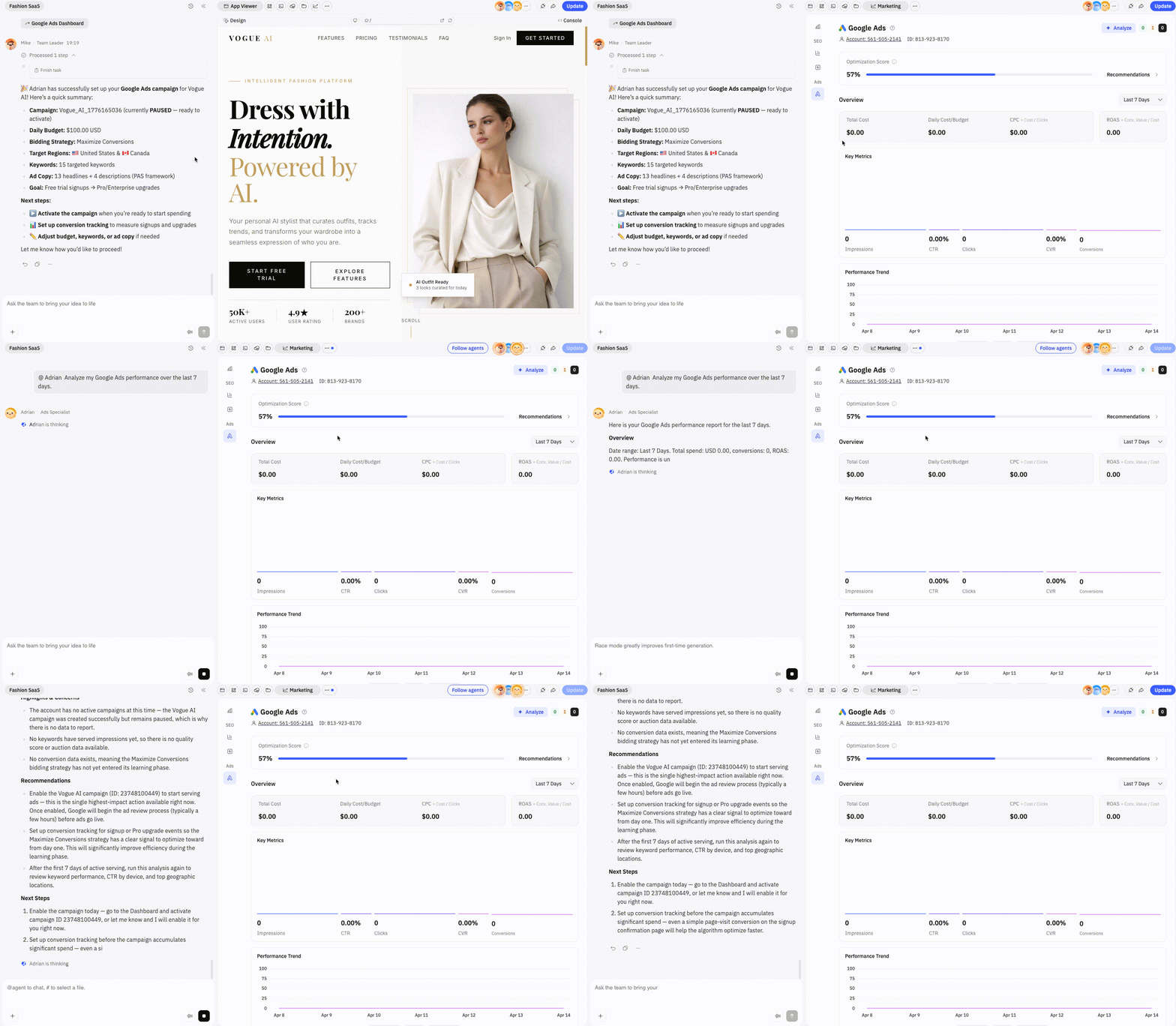
Once your campaigns are running, Adrian doesn't disappear. From the Google Ads dashboard inside Atoms, click Analyze with Adrian — or @-mention Adrian in any chat — and the agent pulls fresh metrics, summarizes what's working, flags what isn't, and proposes the next move.
You can scope the analysis to a specific campaign or your whole account, over the last day, week, fortnight, month, or month-to-date. The output isn't a wall of numbers — it's a recommendation: pause this ad group, raise this budget, try this new keyword, fix this landing page mismatch.
What's in it for you?
- Stop guessing about diagnostics. "Why are my ads not converting?" gets a real answer that references your actual data.
- Iterate from inside the build loop. Performance insights flow back into the same chat where you change the product — a slow landing page becomes a Visual Editor tweak, a weak headline becomes a one-line edit.
Measurement and Optimization
Best Practices
Adrian works best when used as a testing engine, not just a launch button.
Start with a controlled budget. Use early data to refine messaging and targeting. Make sure conversion tracking is accurate before increasing spend.
That approach gives you better signal quality and makes optimization decisions much more reliable.
What to Measure
Adrian helps you track the core metrics that matter:
- Total Conversion Value shows the total business value generated by conversions.
- ROAS shows how much revenue you generate for each dollar spent.
- CPC shows how much each click costs.
- CPA shows how much each conversion costs.
Together, these metrics give you a practical view of campaign efficiency and business impact.
Early Results
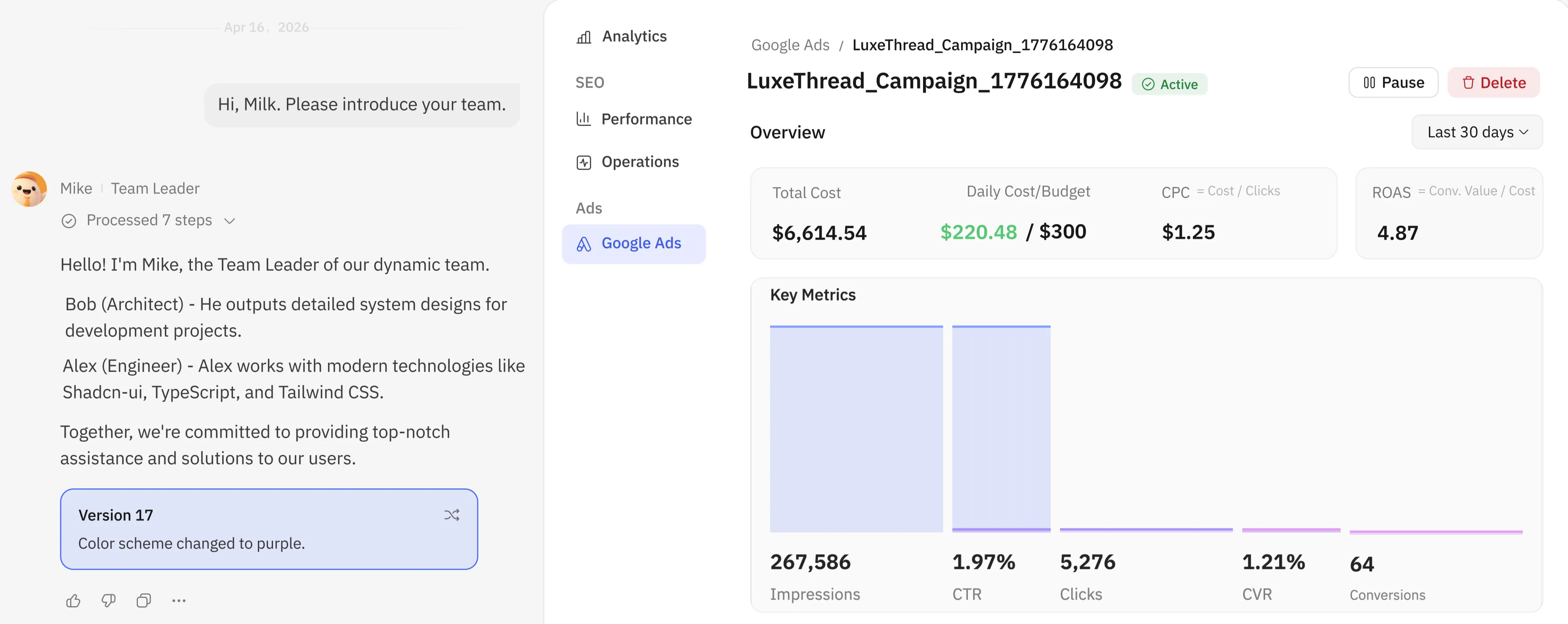
In Atoms’ internal testing over the last 30 days, Adrian delivered a 4.87 ROAS on $6,614.54 in spend, with CPC at just $1.25 and an average daily cost of $220.48 against a $300 budget.
These results are not meant to be a universal benchmark, but in this test Adrian’s ROAS significantly outperformed multiple human-run agencies, highlighting its potential to launch faster, learn faster, and optimize from real performance data.
A Quick Start Guide
Step 1 — Connect Google Ads
Open Settings → Integrations → Google Ads and click Connect. Sign in with the Google account that owns (or will own) your ads account. This is one-time setup.
Step 2 — Mention @Adrian in chat
In any project chat, type @Adrian and describe what you want to promote. A simple prompt is enough — Adrian fills in the rest from your project:
@Adrian launch a search campaign for my landing page in the US, $20/day
Adrian responds with a complete campaign plan you can review, edit inline, and approve.
Step 3 — Approve, launch, monitor
Confirm the plan, choose whether to enable immediately or stage paused, and Adrian creates the campaign on Google Ads. From the Google Ads block in your chat, you can pause, resume, edit budget, or ask Adrian to analyze performance — all without leaving Atoms.
From Building to Selling, in One Workflow
Atoms already turned "I have an idea" into "I have an app." With Adrian, "I have an app" becomes "I have customers" — without leaving the workspace, hiring an agency, or learning a new tool.
Adrian joins Alex (your engineer), Sarah (your SEO specialist), and the rest of the Atoms agent team. Each one is a specialist that does the work most founders skip — and each one talks to the others, so the campaign Adrian launches reflects the product Alex built and the pages Sarah ranked.
Visit atoms.dev and ask Adrian to launch your first campaign today.
A little more clarity
Frequently asked questions
01What is Adrian?
Adrian is Atoms' AI Ads Specialist — an agent that creates, launches, and analyzes Google Ads campaigns directly from your Atoms workspace. It reads your project's PRD, code, and published URL to pre-fill campaign settings, then handles ad-copy generation, Google Ads API submission, and conversion tracking setup.
02Do I need a Google Ads account?
Yes — Adrian launches campaigns on your own Google Ads account via the official API. The first time you use Adrian, you'll be prompted to authorize Atoms with a one-click OAuth flow. You stay in full control of billing and account ownership.
03How is this different from other AI ad copy tools?
Most AI ad tools generate text from a brief you write. Adrian skips the brief — it extracts product context from the app you've already built in Atoms, so the copy, keywords, and landing page settings are grounded in your real product, not in a paragraph you typed.
04Who pays for the ads?
You do, directly to Google. Adrian creates and manages the campaigns, but ad spend is billed by Google to the payment method on your Google Ads account. Atoms does not mark up or resell ad inventory.
05Can Adrian set up conversion tracking for me?
Yes. Adrian detects conversion goals in your project (signups, purchases, contact forms), creates matching conversion actions in Google Ads, and asks Alex to install the gtag snippet in your code automatically. You don't need to touch the tracking script.
06What languages and regions does Adrian support?
Adrian can target any country supported by Google Ads and generate copy in the languages your Atoms workspace is configured for. The agent UI itself is fully localized.
07Can I edit a campaign Adrian created?
Yes. Ask Adrian in chat — "raise the budget to $30/day," "add Canada to the regions," "rewrite headline 2" — and Adrian applies the change via the Google Ads API. You can also pause, resume, or delete campaigns from the Google Ads block in your chat.
Share this article
 Posts
Posts 