Most AI “app builders” stop where the hard work actually begins.
They can generate a landing page, a React front-end, and possibly a simple prototype. But when you ask for user accounts, orders, payments, dashboards, or anything that smells like a real business, you quickly hit a wall: there is no backend. You are expected to plug in your own database, authentication, storage, and payment system, and then keep all of it running.
Atoms Backend exists to bridge that gap. It provides a fully managed backend layer: authentication, database, storage, payments, and deployment. Atoms’ multi-agent system can automatically provision and configure these services and generate the APIs your app needs.
This article explains what Atoms Backend is, why it matters, and how it fits into the current landscape of backend platforms and AI tooling. The goal is to give you a clear, grounded understanding of what Atoms Backend enables—and where it gives AI agents the stable, predictable backend surface they need to build real applications.
1. What is Atoms Backend
Atoms Backend (atoms.dev) is the infrastructure and logic layer that turns an AI-generated app into a running, stateful web application with login, database, payments, and deployment built in.
There are two key pieces:
1.1 Atoms Infra
A shared backend infrastructure for all Atoms-generated apps, providing:
- Authentication (wrapped as an OIDC client so apps get standard login flows)
- A managed relational database
- Object storage
- Serverless compute and deployment
- Payment integration
- Internal SDKs to glue all of this together
For example, the database tier is built on a serverless, cloud-hosted relational database. In this kind of architecture, compute and storage are split, databases can scale to zero, and features like branching make environment management more practical for application builders.
Object storage is built on a cloud object storage service designed for high durability and availability. This kind of storage is well suited for serving product images, user uploads, and other unstructured data.

1.2 Atoms Agents’ Backend Capability
The same multi-agent system that talks to you in chat can:
- Request backend resources from Atoms Infra (auth clients, databases, storage buckets)
- Propose data models for your app in a structured way
- Generate and evolve backend APIs based on those models
- Coordinate deployments to preview and production environments
The result is that when you toggle “Atoms Backend” inside Atoms and describe your application, you are not just getting a skeleton front end. You are asking a team of agents to:
- Design the data model
- Provision backend infrastructure
- Generate the core CRUD APIs
- Stitch everything together into a working full-stack app
- Deploy it to a serverless environment where you can actually use and test it
You never see an environment variable, a database connection string, or a bucket policy unless you want to.
2. Why a built-in backend matters
There are already powerful backend platforms available. Why bake one into Atoms instead of simply telling users to connect to them?
There are three pragmatic reasons.
2.1 Reducing friction for non-backend users
Reading Supabase’s own overview of their platform, you see a clear focus on developers who are comfortable with SQL and Postgres, and who want the flexibility of open-source tooling (Supabase vs Firebase). That is precisely the right target for a backend platform. Supabase provides the infrastructure; Atoms aims to offer you a team of agents that operate that infrastructure on your behalf.
Atoms, however, need to serve users who:
- May never have opened a cloud console
- Do not want to learn SQL to get an MVP
- See “database” and “OIDC provider” as black boxes they would rather not think about
A built-in backend removes this step entirely and provides a usable application without ever leaving the Atoms interface.
2.2 Giving the agents something they can rely on
Atoms's multi-agent system is not just a chat UI. It is a set of specialized roles (research, product, architecture, engineering, analysis) that coordinate around your request.
Those agents require a stable and predictable backend surface to target. If every user brought a different combination of services and SDKs, the amount of reasoning needed to integrate everything would explode, and error rates would skyrocket.
By converging on an internal backend with a known shape, Atoms can:
- Encode patterns once and reuse them across apps
- Make incremental improvements to reliability and ergonomics without breaking user projects
- Keep the complexity on the platform side instead of pushing it onto each user
2.3 Handling production concerns by default
Look at how modern cloud database and storage platforms describe their own goals:
- Serverless relational databases are designed with autoscaling, database branching, and instant point-in-time recovery.
- Cloud object storage services emphasize high durability, availability, and seamless integration with the wider ecosystem for storing and serving object data.
These are not marketing phrases; they are concrete answers to reliability, cost, and operational questions that arise the moment an application must handle real users.
Atoms Backend is designed to bake similar production concerns in from the start:
- Logins and sessions are handled via a standard OIDC flow
- Data is stored in a managed object-relational database
- Static assets and uploads live in a durable, Internet-facing object store
- Deployments go to a serverless runtime that can scale with traffic
You are not being asked to bolt these pieces on after the fact.
3. What Atoms Backend gives you, concretely
3.1 Unified authentication
Every app generated with Atoms Backend comes with:
- A login and registration flow
- A standard token-based session model
- A way to protect operations so that only authenticated users can perform them
Atoms wraps its platform identity system using the OpenID Connect (OIDC) protocol, which is the same standard used by many identity providers and independent implementations. OIDC is built on top of OAuth 2.0 and is designed specifically to verify user identity and carry user information in a token.
You do not need to implement this protocol yourself; you benefit from a well-understood standard rather than ad hoc login flows.
3.2 Object-Relational Database
Atoms Backend uses an object-relational database as the source of truth for your app. Modern cloud database platforms illustrate this pattern: an object-relational database is exposed as a serverless service with autoscaling and branching, but remains the same predictable database under the hood.
For you, this means:
- You can work with structured data and relationships.
- You can trust transactional semantics (e.g., orders and order items are created together).
- You can inspect the database as needed using standard tools.
Atoms handles database provisioning, connection management, and the mapping between your app’s data model and the underlying tables.
3.3 Object storage for files and media
Product images, profile pictures, uploaded receipts, game artwork — none of these belong in a database. They belong in an object store.
Atoms Backend uses a managed cloud object storage system:
- Large amounts of unstructured data
- High durability and availability
- Standard object storage APIs and tooling
- Easy integration with CDNs and direct browser access
Atoms handles:
- Bucket creation
- Object naming
- Access control
- URL generation
You see this as “upload and display files” functionality, not as a separate infrastructure project.
3.4 Payment integration
Atoms Backend integrates payments via Stripe, abstracted behind:
- A simple "connect Stripe" flow within your project
- Payment API endpoints that your app can call to initiate and confirm transactions
- A test mode using Stripe’s test card numbers so you can validate flows safely
Stripe’s own documentation describes its focus on programmable payments and a well-defined HTTP API. Atoms is not re-implementing Stripe; it calls Stripe under the hood and provides a smoother path from “I need to charge for this” to a working transaction in your app.
3.5 Serverless deployment pipeline
Finally, all of this code needs to run somewhere.
Atoms deploys your generated app (front end + backend APIs) to a serverless runtime where you package code into a function or image, the platform spins up instances as needed, and you are billed based on usage rather than reserved capacity.
Atoms hides the function packaging and deployment mechanics and exposes:
- Automatic deployments to a preview environment after the agents complete a development cycle
- Manual promotion to a production environment with its own database and domain configuration
- Basic status tracking and logs at the application level
You do not need to manage instances, containers, or pipelines yourself.
4. Using Atoms Backend in real scenarios
To make this more concrete, let’s walk through these typical product scenarios. Each of these has a live example URL that can be used for visual demos and case studies.
4.1 Scenario 1: “Tiny Jungle” – indoor plant e-commerce for small apartments
E-commerce website:
You run an independent brand called Tiny Jungle, focused on low-maintenance foliage plants for small rental apartments. Your customers are 20–35-year-old urban professionals with little gardening experience who want their homes to feel more alive.
What they care about is very specific:
- Whether a plant is genuinely easy to care for
- Whether it fits their actual light conditions
- How the plants work together to shape the overall feel of a small space
- Simple, trustworthy care guides and some kind of safety net (“if it dies, we’ll replace it”)
You don’t just need “a generic shop”. You need:
- A product catalog that highlights light requirements, difficulty level, and space fit (e.g., “north-facing bedroom”, “tiny balcony”)
- A “Plant Match Wizard” that asks a few questions about light, room size, and preferred vibe, then recommends a small set of suitable plants or bundles
- Clear, structured care guides attached to each product, plus post-purchase reminders
- A guarantee workflow (“kill-proof guarantee”) that helps customers feel safe trying plants for the first time
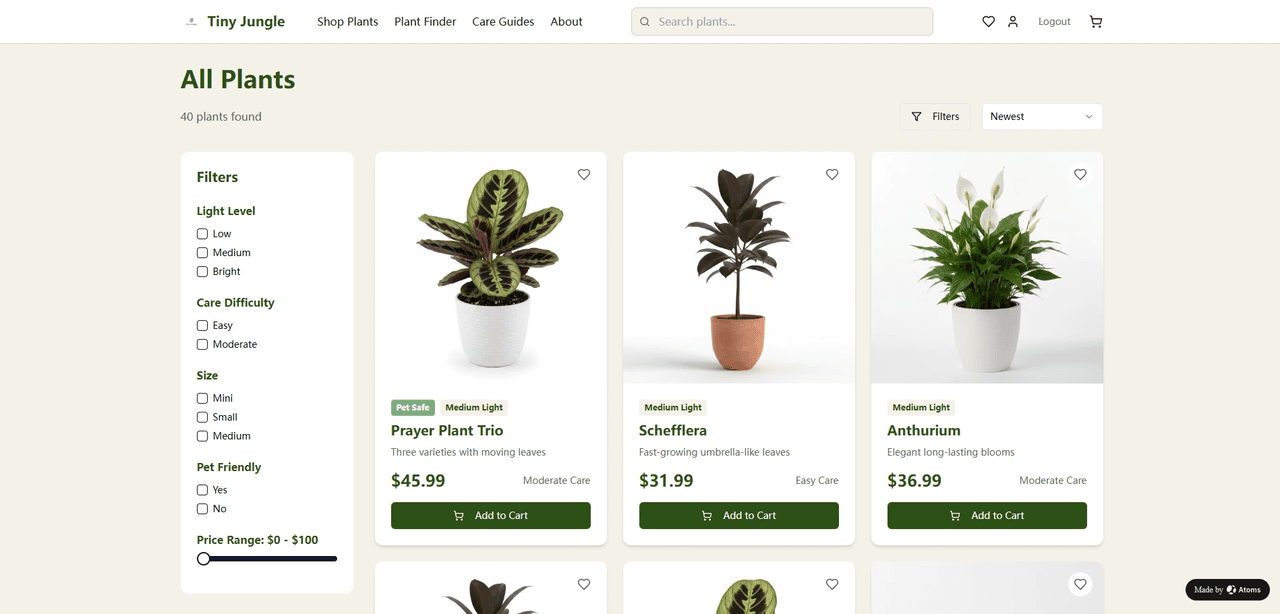
With Atoms Backend:
- You enable Atoms Backend and describe Tiny Jungle in plain language: who you serve, how small the spaces are, what “low-maintenance” means, how the guarantee should work.
- The agents: 2.1. Design a schema for plants, bundles, light conditions, customer profiles, carts, orders, and guarantee claims. 2.2. Generate CRUD APIs for managing products, recommendations, and orders. 2.3. Implement a “Plant Match Wizard” flow based on your questions and rules. 2.4. Integrate payments so users can check out and see their order history. 2.5. Tie in simple post-purchase care touchpoints (e.g., “Day 3: how is your plant doing?”).
- Atoms deploys a working preview of the Tiny Jungle store to a serverless environment.
- You walk through the full experience in preview: try the wizard, place test orders, trigger guarantee flows.
- When it behaves the way you want, you publish and configure your own domain, so Tiny Jungle feels like a standalone brand, not a template store.
4.2 Scenario 2: “WorkNest Stays” – booking stays for remote workers and digital nomads
Hotel booking platform:
You are building a platform called WorkNest Stays for digital nomads and remote workers. The pitch is not “the cheapest room in town”, but “a place you can actually work from for weeks”.
Your inventory spans hotels, serviced apartments, and boutique guesthouses in major cities. What matters isn’t the minibar; it’s:
- Whether the Wi-Fi is fast and stable
- Whether there’s a real desk and ergonomic chair
- How quiet the room is at typical working hours
- The quality of lighting and video-call suitability
- What’s around the area: cafés, coworking spaces, gyms, and safe late-night options
You need more than a standard booking site. You need to:
- Model properties and units with work-specific attributes (desk type, noise level, outlet availability, Wi-Fi test results)
- Let users filter and sort primarily on “suitability for work”, not just price and distance
- Capture longer stays, flexible pricing (weekly/monthly), and appropriate cancellation policies
- Help users quickly decide if a place is truly “work-friendly” through tags, photos, and structured reviews
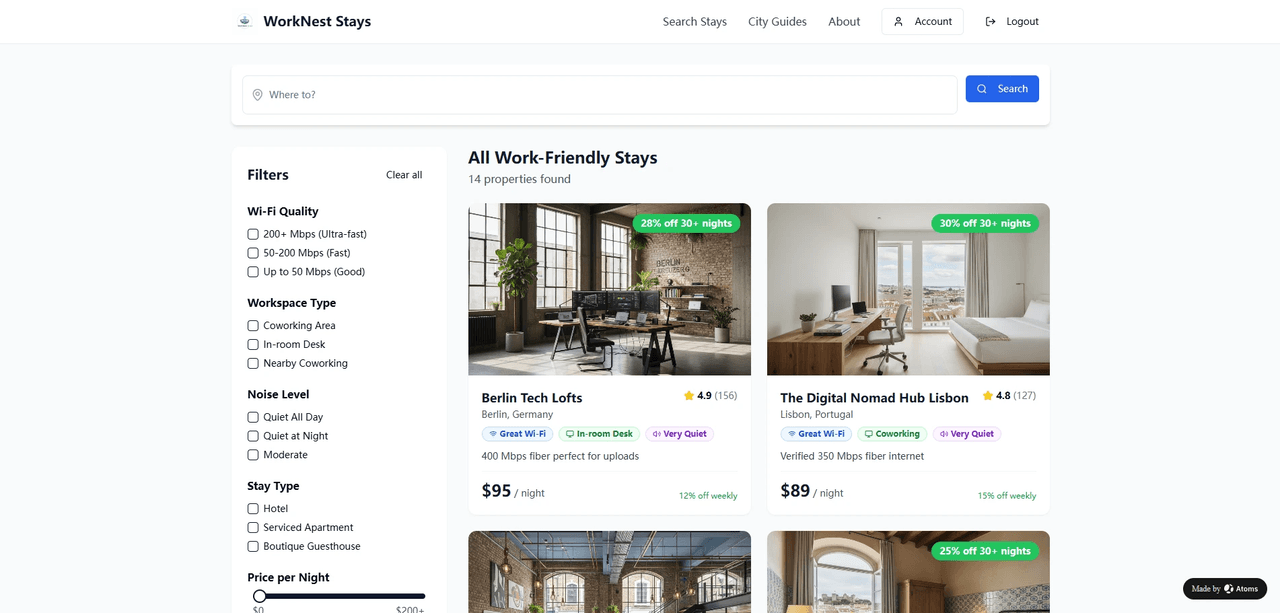
With Atoms Backend:
- You describe WorkNest Stays and what “work-ready” means: minimum Wi-Fi speed, desk expectations, quiet hours, how long stays usually last.
- The agents: 2.1. Propose a data model for properties, units, availability, bookings, and work-readiness attributes (Wi-Fi, desk, noise, nearby amenities). 2.2. Generate APIs to search and filter by date range and those attributes. 2.3. Implement booking logic that: 2.3.1. Checks availability for the requested dates 2.3.2. Holds or confirms inventory 2.3.3. Associates bookings with authenticated users 2.3.4. Supports longer stays and appropriate pricing rules
- Atoms deploys the frontend and backend together, so you can: 3.1. Search for stays as a remote worker (e.g., “two weeks, quiet, very fast Wi-Fi”). 3.2. Make test bookings. 3.3. View, modify, and manage reservations.
- You refine the tags, scoring rules, and messaging based on how actual searches and bookings behave in preview, then publish when you are satisfied.
5. How Atoms Backend compares to other approaches
Atoms Backend does not exist in a vacuum. It sits in a landscape where you have several realistic alternatives.
The goal here is not to declare winners, but to provide you with a framework for determining when Atoms Backend is a good fit and when you might prefer an alternative.
5.1 DIY: assembling your own serverless stack
You can absolutely build the equivalent of Atoms Backend yourself. Many teams do.
A typical modern stack for a new product might combine:
- A serverless relational database provider to get autoscaling and database branching
- A cloud object store for media assets
- An auth provider that speaks OIDC (or a custom implementation on top of OAuth 2.0)
- Stripe for payments
- A serverless function platform or container platform for backend logic
- A framework like Next.js/Remix for the frontend
This approach is highly flexible. You choose each component. You can tune every layer to your needs.
The tradeoffs are:
- You must design and maintain the integration points yourself.
- Every new micro-feature requires interaction with multiple systems.
- You need engineering time to keep the system updated, secure, and observable.
If you are building a large, long-lived platform with a dedicated engineering team, this path has clear advantages. Atoms can still play a role as a prototyping environment, but you may eventually migrate critical systems to a fully custom stack.
5.2 BaaS platforms: Supabase, Firebase, and others
Backend-as-a-Service platforms like Firebase and Supabase aim to provide a backend without requiring you to manage raw infrastructure.
Firebase utilizes a document-oriented NoSQL database and APIs designed for real-time and mobile clients. Supabase, by contrast, builds on Postgres and exposes SQL, row-level security, and auto-generated REST/GraphQL APIs.
Strengths of these platforms include:
- Mature tooling and dashboards
- Large communities and ecosystem integrations
- Flexibility to combine with any frontend framework
- Options to self-host (in Supabase’s case) for more control
The remaining work for you is:
- Designing the schema
- Writing access policies
- Implementing backend logic for non-trivial flows
- Keeping the frontend and backend in sync
Atoms Backend functions as a specialized BaaS seamlessly integrated with Atoms’s agent system. Unlike traditional platforms, there’s no need to access a separate dashboard to define tables or set policies. These tasks are managed directly through interactions with the agents. While platforms like Supabase provide the infrastructure, Atoms Backend offers a dynamic team of agents to manage and enhance that infrastructure for you. This approach simplifies operations and ensures the continuous evolution of your backend system.
That is both its advantage and its constraint:
- Advantage: minimal configuration, extremely low friction for non-backend users.
- Constraint: less flexibility than a general-purpose BaaS for teams that want to fine-tune every database and policy themselves.
5.3 Website builders and low-code tools
Traditional website builders and low-code platforms, such as Wix, Webflow, and others, focus on visual page construction and, increasingly, on basic “backend” features like forms, lists, and membership.
They are often the fastest way to get:
- Marketing sites
- Simple content-driven applications
- Basic e-commerce flows
However, when you need:
- Complex data relationships
- Custom payment logic
- Multi-tenant behavior
- Deep integrations with other systems
You either hit platform limits or end up embedding custom code anyway.
Atoms Backend is designed for users who want the speed of an AI-assisted builder, but also expect a real database, real APIs, and the ability to evolve the product beyond static content.
6. Getting started with Atoms Backend
From a user’s perspective, working with Atoms Backend is intentionally simple.
- Enable Atoms Backend
- Inside Atoms (atoms.dev), turn on the backend switch for your project. This tells the agent team to use the internal backend.
- Describe your application in natural language.
- Who the app is for
- What core flows must exist (e.g., “users can sign up, browse products, and check out”)
- Any constraints and edge cases you already know about
- Iterate with the agents on requirements
- What counts as a “booking”?
- How are discounts applied?
- What roles exist in the system?
- Wait for the initial version to deploy
- Test and refine
- Try the main flows
- Check that the data being stored matches your expectations
- Request changes (“Add a discount code field”, “Store passport info for hotel guests”, etc.)
- Each change triggers a new version build.
- Connect payments (if needed)
- Use the provided Stripe Connect instructions
- Run a few test transactions with Stripe’s test card numbers
- Confirm that orders and balances appear as expected
- Publish to production and add a domain
- Use the Publish action to deploy to a production environment. The current database schema is also synced to production, and you can optionally choose which data to sync.
- Configure your domain in Atoms’ settings so your app is reachable under your own URL
Atoms Backend is available on plans with sufficient backend resources. If a project cannot be deployed due to limits, Atoms explains why instead of failing silently.
7. Frequently asked questions
7.1 Can I inspect or customize the data model that Atoms Backend uses?
Yes. Atoms Backend is not a black box in the sense of “no one knows what tables exist”. You can:
- View the entities (e.g., products, orders, bookings) and their fields from the Database Block.
- Request changes to those structures via the chat interface (“Add a discount_percentage field to orders”).
- For advanced users, connect analytics tools or run queries against the database where appropriate.
What you do not have to do is write the initial schema or the migration scripts yourself.
7.2 How does Atoms Backend handle security and access control?
Atoms is designed around a standard authentication layer (OIDC-style logins) and a consistent authorization approach. By default:
- APIs require a valid authenticated user.
- Operations that change data are restricted to appropriate roles.
- Sensitive fields are not exposed to other users.
If you have specific access control requirements, you can describe them (“Only admins can refund orders”, “Users can only see their own bookings”), and the agents will encode them into the backend logic and API layer.
7.3 Can I move away from Atoms Backend later if I outgrow it?
Atoms Backend uses an object-relational database (Postgres) and standard HTTP APIs under the hood. That makes migration more feasible than if you were locked into a proprietary data store with opaque formats.
A realistic path is:
- Build and validate your idea with Atoms Backend.
- Once you reach a certain scale or complexity, decide whether to:
- Continue on Atoms and let it handle the ops surface, or
- When you reach a particular scale, you can contact us and we can provide on-demand infrastructure support instead of the default, preconfigured setup.
7.4 What happens if my app becomes popular? Will the backend cope?
Atoms Backend’s underlying components are chosen for their ability to scale with traffic without manual intervention, similar in philosophy to modern serverless databases and cloud object storage platforms.
However, no system scales infinitely without design changes. If your application grows to the point where:
- Data volumes become very large
- Traffic patterns become extreme
- Compliance or residency requirements become complex
then architectural adjustments may be needed. Atoms’ role is to:
- Give you a strong starting point
- Handle scaling for typical usage
- Provide a path to more specialized setups when the time comes
7.5 Is Atoms Backend suitable for internal tools, not just public SaaS?
Yes. In fact, internal tools are also an excellent fit:
- You still benefit from authentication, database, storage, and deployment.
- You may not need payments at all.
- You can move quickly without worrying about a polished external UI.
Examples include:
- A content operations dashboard
- A partner portal
- A simple CRM or lead tracker
- A task management system for internal teams
Atoms Backend handles the same concerns: access, persistence, and deployment, regardless of whether your users are public customers or internal staff.
Contents
1. What is Atoms Backend
2. Why a built-in backend matters
3. What Atoms Backend gives you, concretely
4. Using Atoms Backend in real scenarios
5. How Atoms Backend compares to other approaches
6. Getting started with Atoms Backend
7. Frequently asked questions
 Posts
Posts 