
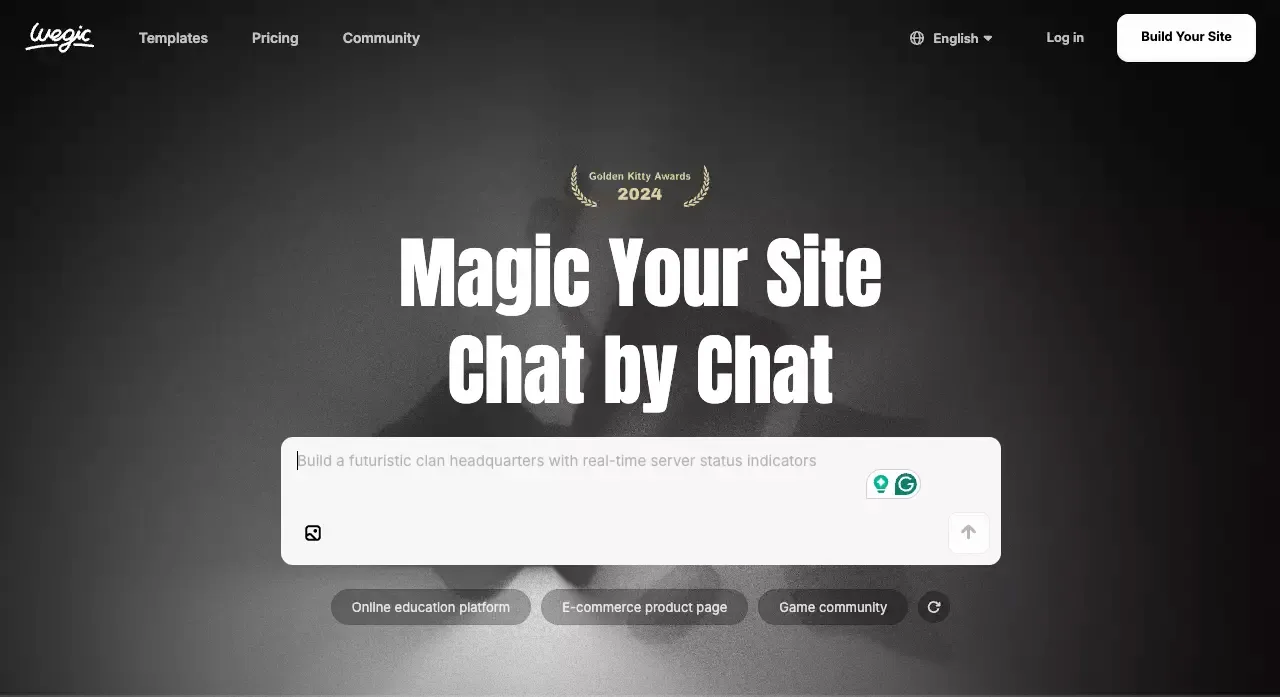
 Wegic is one of those AI tools that makes a strong first impression.
You describe your business, the AI gives you a website, and within minutes you can see something that looks much closer to “publishable” than a blank canvas ever does. That is the pitch, and to be fair, it is a good one.
But after the first wow moment, the real question shows up:
Is Wegic actually good enough to use beyond the first draft?
After reviewing its current positioning, feature set, pricing structure, and public user feedback, my take is simple:
- Wegic is a good fit for fast website creation
- Wegic is not the best fit for product-style builds
- It works best when speed matters more than control
That is the short version. The longer version is where things get more interesting.
Quick Verdict
TL;DR
Wegic is a solid AI website builder for people who want to go from idea to live site quickly. It is especially appealing for non-technical users, simple business sites, and landing pages.
It becomes less convincing once your project needs deeper customization, more precise control, or anything that starts looking like an app instead of a website.
Best for
- Freelancers
- Creators
- Consultants
- Small businesses
- Early-stage founders who need a landing page fast
- Users who want to build by chatting instead of designing manually
Not ideal for
- SaaS founders building a real product
- Teams that need backend logic
- Projects with complex user flows
- Users who want tight design control
- People looking for an app builder rather than a website builder
Overall verdict in one sentence
Wegic is good at getting simple websites live fast, but it feels limited once your needs move beyond that.
What Is Wegic?
Wegic’s core positioning
Wegic is an AI website builder built around conversation. Instead of starting with a traditional editor, you describe what you want and let the AI generate and revise the site.
That sounds familiar now because many AI builders say something similar. The difference is that Wegic leans hard into the chat-first experience. It is not trying to look like a classic website builder with a few AI buttons added on top. The conversation is the product.
How the chat-based website builder works
The basic flow is straightforward:
- Tell Wegic what kind of website you want
- Let it generate the first version
- Refine the result with more prompts
- Preview the site
- Publish when it looks good enough
You can also use voice input, comments, and visual references to guide changes. That lowers the barrier for beginners. You do not need to know layout systems, front-end terminology, or how to work through a complicated editor just to get started.
What makes Wegic different from traditional website builders
Traditional builders usually start with templates, blocks, menus, and settings. Wegic starts with intent.
That is a real advantage for people who hate the setup stage. It removes the “too many choices” problem. You are not picking from fifty themes and then trying to force one into your use case. You are starting from a goal.
The downside is obvious too: when the AI does not interpret your request the way you want, editing can feel less precise than direct manipulation.
Getting Started with Wegic
Onboarding and first setup
Wegic’s onboarding is easy to understand. You can describe your business, your audience, and the style you want, then let the system generate the first pass.
This is where Wegic feels strongest. It reduces hesitation. A lot of people do not fail because building a website is impossible. They fail because the first hour is annoying. Wegic shortens that first hour.
Creating your first website with prompts
The first draft is usually the easiest part of any AI builder. Wegic is no exception.
You give it a prompt. It turns that prompt into a site structure, sections, and initial copy. For simple websites, that is often enough to get momentum. If your goal is “I need something live this week,” that matters more than perfect control.
Editing, regenerating, and refining pages
This is the part that separates a fun demo from a usable product.
Wegic lets you keep adjusting the site through conversation, but AI-led editing has a built-in trade-off:
- It feels fast when the AI understands you
- It feels frustrating when you want a precise change
- It works better for broad direction than pixel-level control
That is why Wegic feels more natural for brochure sites than for tightly designed brand sites. It helps you move. It does not always help you fine-tune.
Publishing and connecting a custom domain
Publishing is part of Wegic’s appeal. The whole tool is designed around getting a website online quickly, not just producing a mockup.
That said, serious usage usually means wanting a custom domain, and that is where free experimentation starts turning into paid usage. For casual testing, that is fine. For buyers comparing tools, it is worth noticing early.
Wegic Features
AI website generation
This is the main reason to consider Wegic at all.
Its strongest feature is not one specific tool. It is the overall ability to turn a rough idea into a usable site draft without much setup.
That makes it attractive for:
- launch pages
- service business websites
- simple portfolios
- event pages
- campaign microsites
- quick MVP-style marketing sites
Templates, layout, and visual customization
Wegic does offer ways to shape layout and style, but it is not a “control everything in detail” tool.
That is not necessarily a flaw. It depends on what you need.
If your priority is:
- speed
- ease of use
- low friction
- minimal setup
then Wegic’s approach feels efficient.
If your priority is:
- tight visual control
- highly custom layout systems
- brand-heavy design refinement
- exact placement and interaction behavior
then you may feel boxed in.
Hosting, publishing, and multilingual support
Wegic is clearly built around the idea of fast publishing. It handles hosting and gives users a quick path from prompt to live site.
For small teams and solo operators, that convenience matters. Most people shopping for an AI website builder are not looking for more infrastructure decisions. They want fewer.
SEO tools and analytics support
Wegic includes basic SEO-related support, which is enough for many small websites. You can set up standard search-facing elements and get a site published without doing everything by hand.
Still, this is one of those areas where marketing language can sound bigger than the real advantage.
My view is simple:
- Wegic is fine for basic website SEO needs
- Wegic is not automatically a strong choice for heavy SEO programs
- the quality of your content and structure still matters more than the AI label
If your business depends on serious content scale, technical SEO control, and long-term organic growth, you should look beyond the surface promise and evaluate the rendering model, editing flexibility, and site structure more closely.
What Wegic can’t do well yet
Wegic feels less compelling when the project stops being “a website” and starts becoming “a product.”
That includes things like:
- user accounts
- data-heavy workflows
- dashboard logic
- application-style navigation
- backend-dependent actions
- more advanced product behavior
This is where the category matters. A website builder can stretch a little. It cannot become a full product platform just because AI is involved.
Wegic Pricing
Free plan overview
Wegic does let users try the product with limited access, which is helpful for early exploration. You can get a feel for the workflow before committing.
That said, “free” here is best understood as trial-level discovery, not full practical usage.
Paid plans and what changes
At the time of writing, the paid structure is centered around plan tiers and credits.
Here is the simple way to think about it:
| Plan | Best For | What You’re Really Paying For |
|---|---|---|
| Free / trial-level access | Testing the workflow | Exploration, not full usage |
| Starter | Users who want more serious building | More generation and export flexibility |
| Premium | Users who want the full website experience | Custom domain support, more credits, broader usage |
Credits, usage limits, and hidden upgrade pressure
This is where many AI tools quietly change from “fun” to “expensive.”
Wegic’s pricing is not just about the monthly tier. It is also about how often you need to generate, revise, or export. Credit systems are easy to ignore at first, but they shape the experience more than most buyers expect.
That does not make Wegic a bad deal. It just means you should judge it by total working cost, not by the first price you see.
Is Wegic good value for money?
It depends on the job.
If Wegic helps you launch a useful site in a few hours instead of paying a freelancer or wrestling with a more manual tool, it can absolutely be worth it.
If you keep pushing against its limits and needing more control, then the value drops fast. At that point, the tool is saving less time than it promised.
What Wegic Is Actually Good At
Fast landing pages and simple business websites
This is Wegic’s sweet spot.
If you need a homepage, services page, about page, contact page, and a clean structure that looks modern enough to publish, Wegic makes sense.
It is especially suited to users who say things like:
- “I need something live fast”
- “I do not want to hire a designer yet”
- “I just want a clean site without learning a builder”
- “I need a site, not a whole product stack”
Beginner-friendly website creation
Wegic is easy to recommend to beginners because it reduces intimidation.
The product does not expect you to think like a designer or a developer. That alone is a real strength. Simplicity is underrated.
Speed over complexity
Wegic is best when you value motion over precision.
That is not a criticism. In many business situations, the fastest decent site beats the perfect site that never ships.
Where Wegic Falls Short
Limited control for advanced customization
This is the main weakness.
Once you want detailed control, highly specific layouts, or exact editing behavior, a chat-led workflow can start to feel indirect. You are asking the tool to interpret your intent rather than making the change yourself.
For some users, that still feels easier. For others, it becomes the bottleneck.
Not ideal for full product building
Wegic is much easier to like when you judge it as a website builder.
It is much harder to recommend if you are trying to stretch it into product territory. That is not really what it is built for, and you can feel that boundary pretty quickly.
Weak fit for complex workflows or app logic
If your project includes logic, backend behavior, user flows, or data relationships, Wegic stops being the obvious choice.
This is exactly where a broader app and website builder becomes more relevant.
For example, if you are building something closer to a real startup product than a simple brochure site, a tool like Atoms is a more natural fit. Atoms is not framed as “just make me a site fast.” It is built around generating websites and apps together, with backend website, logic, and deployment in the same flow.
That difference matters more than surface-level feature lists.
Wegic Pros and Cons
Main advantages
- Very easy to start
- Strong first-draft speed
- Friendly for non-technical users
- Useful for simple website use cases
- Fast path from idea to published site
- Better fit for launch pages than traditional builders with steep setup
Main disadvantages
- Limited precision when editing
- Can feel restrictive for advanced users
- Credit-based usage needs watching
- Not the right tool for product-heavy builds
- Less convincing when your project needs backend logic or app structure
Who Should Use Wegic?
Best for freelancers, creators, and small businesses
Wegic makes the most sense for people who need a web presence, not a software product.
That includes:
- solo consultants
- creators
- agencies making quick client sites
- local businesses
- founders testing messaging with a startup's first landing page
- anyone who values speed over deep customization
Good for MVP-style websites, not full apps
This distinction is important.
A lot of founders say they need an “MVP,” but what they really need is a launch page. Wegic can help with that.
But if your MVP is something users actually interact with as a product, then you are already beyond Wegic’s strongest use case.
Who should probably look elsewhere
You should probably skip Wegic if you need:
- a working app, not just a website
- backend and frontend together
- user auth and real product flows
- more design control
- a longer-term build system instead of a fast generator
Best Alternatives to Wegic
Atoms: best if you need more than a website
This is the cleanest alternative to mention because it solves a different level of problem.
Wegic is a better choice when your goal is simple: get a website online quickly.
Atoms AI becomes the better choice when your goal is broader: build the website, the flows behind it, and the product logic around it.
That makes Atoms a stronger fit for:
- startup founders building real products
- teams that need app and website together
- projects with backend requirements
- product ideas that go beyond static pages
- users who want a path from idea to working software, not just a marketing site
Put simply:
Choose Wegic if you only need a fast website
Wegic wins on simplicity. It is easier to explain, easier to start, and better aligned with users who just want a website without much setup.
Choose Atoms if you need a website plus app logic, backend, and deployment
Atoms is the more natural choice when the “website” is only one part of the system. If the project includes application flows, backend structure, or a real product roadmap, an AI app builder fits that use case better.
Best choice for founders building a real product, not just a brochure site
This is where the difference becomes clear.
A brochure site helps you explain something. A product helps users do something.
Wegic is stronger in the first category. Atoms is stronger in the second.
Framer or Wix: better for stronger visual control
If your main concern is design control, editing precision, or a more mature site-builder interface, a Framer review is worth comparing alongside traditional tools with stronger visual editing.
Wegic is easier to start. That does not always mean it is easier to finish exactly the way you want.
Durable or similar tools: better for pure speed-first setup
If you are only comparing “which AI builder gets me online fastest,” then Wegic is in a valid competitive set.
At that point, the question is less about capability and more about whether you like the editing model, the pricing feel, and the amount of control you have after generation.
Which alternative is best for your use case?
Use this quick filter:
| Your Goal | Better Choice |
|---|---|
| Launch a simple business website fast | Wegic |
| Build a SaaS landing page with minimal setup | Wegic |
| Get more visual control over design | Framer / Wix |
| Ship something closer to a real app or product | Atoms |
| Build website and backend together | Atoms |
If you want a more product-heavy comparison, a Bubble review is usually more relevant than a pure website-builder comparison.
Wegic Review: Final Verdict
When Wegic is worth trying
Wegic is worth trying if:
- you want a website fast
- you are non-technical
- you do not want to learn a complex builder
- your site is relatively simple
- you care more about launch speed than fine control
In those cases, Wegic is doing something useful. It cuts through setup friction and gets you moving.
When Wegic is too limited
Wegic becomes too limited when:
- your project needs app logic
- your design needs are highly specific
- your workflow depends on precision
- you expect deep flexibility
- you need a product platform, not just a website tool
My final recommendation
Wegic is a good AI website builder for the right kind of user.
It is not a universal solution, and that is okay.
If you need a fast site and want the lowest-friction path to publishing, Wegic is worth a look.
If you already know your project is bigger than a website, skip the middle step and choose something built for that level of complexity. That is where Atoms AI starts to make more sense, because it fits the broader “build the product, not just the page” use case more naturally.
FAQ
Does Wegic have a free plan?
You can explore Wegic with limited access before committing, but practical usage quickly moves into paid territory.
Is Wegic good for SEO?
It is good enough for many small websites, especially if your goal is to publish quickly and cover the basics. It is not the strongest choice for teams that want deep SEO control as a primary growth channel.
Can you export code from Wegic?
Wegic supports code export for paid users, which makes it more flexible than some closed AI builders. That said, export is still part of the paid value layer, not the free one.
Is Wegic only for websites, or can it build apps too?
Wegic is much better understood as a website builder. If your project is app-like, data-driven, or backend-heavy, you will probably be better served by a platform like Atoms AI.
