On this page
The best AI coding agent is the one that can complete your kind of change and leave evidence you can review. Start with Cursor for editor-centered work, Claude Code for a terminal-led workflow, Atoms for coordinated web-product building, Codex for local work or delegated cloud tasks, GitHub Copilot cloud agent for branch-to-pull-request work, and Replit Agent for app creation in its environment. None of these AI coding agents removes the need for engineering review.
Starting from a new product brief rather than a maintenance ticket? Explore a scoped web-app build in Atoms while keeping the acceptance criteria explicit.
Compare agents by the work they can safely finish
A coding agent combines a model with tools and an execution loop: it can inspect context, change files, run commands, and use feedback to continue. Code completion offers suggestions; an agent attempts a task. The distinction matters because a larger delegated task also creates a larger review obligation.
Compare candidates on the same criteria:
- Context: Can the agent find the code, requirements, and dependencies relevant to the change?
- Execution: Can it perform the required edits and run the right tools in an appropriate environment?
- Verification: Does it show what was tested, what failed, and what remains unverified?
- Control: Can you restrict access, inspect changes, and stop or reverse the work?
- Workflow fit: Does its handoff match how your team reviews and releases software?
The recommendations below are based on documented capabilities, not a hands-on performance ranking. No numerical benchmark or claim of universal superiority is assigned. “Best” means a promising fit for a particular workflow that you still need to evaluate.
Six AI coding agents and their trade-offs
The shortlist includes repository-oriented agents and explicitly labeled app-building platforms. They overlap in code generation, but they do not start from the same artifact or offer an identical operating workflow. Atoms appears third because this roundup includes it as a web-product workflow, not because it is asserted to be the best fit for every repository task.
| Tool | Recommended fit | Documented work and handoff | Your main evaluation question |
|---|---|---|---|
| Cursor Agent | Editor-centered repository changes | Search/read files, edit code, run commands, inspect the result | Can it make a focused change without unrelated edits? |
| Claude Code | Terminal-led development tasks | Work across files and tools, run commands, use Git, and verify changes | Does it use the project's actual tests and conventions? |
| Atoms | Coordinated website and web-product building | Product planning, generation, preview, iteration, and code export/GitHub sync | Does the product satisfy its acceptance criteria beyond the preview? |
| Codex | Local repository work or delegated cloud tasks | Local tools and review, or configured cloud environments with diff/PR handoff | Is the environment reproducible and the result reviewable? |
| GitHub Copilot cloud agent | Branch-to-PR work on a repository | Research, planning, iterative branch changes, diff review, and PR creation | Does the task arrive with evidence a reviewer can trust? |
| Replit Agent | Building applications within Replit | Natural-language requests and agent-led implementation | Does the completed app meet functional and operating requirements? |
1. Cursor Agent: for an editor-centered workflow
Cursor's Agent documentation describes codebase search, file reading and editing, terminal commands, and browser tools. It also describes local checkpoints that are separate from Git.
Consider it when you want to keep the repository and its changes close to your everyday editing workflow. A useful first task is a small bug with a clear reproduction, a known module, and an existing test command.
Ask for an explanation of the relevant code path before accepting a broad patch. Review whether the change stays within scope and whether the agent actually ran the relevant checks. Keep durable project history in Git; local agent checkpoints are not a replacement for normal version control.
2. Claude Code: for terminal-led development
Claude Code documents working across files, running commands, building features, fixing bugs, running tests, and using Git. It is available through several surfaces, including terminal, IDE, desktop, and web—not only a command-line interface.
The terminal-led workflow is a reasonable fit when your team's build, test, and inspection tools already live there. Give the agent the project's actual commands and constraints rather than a generic request to “clean up the repo.”
Check that it follows existing architecture and does not repair a failing test by weakening the behavior you wanted to protect. Tool access creates an opportunity to verify; it does not establish that the verification was sufficient.
3. Atoms: for coordinated web-product building
Atoms supports website and web-app creation from natural-language instructions, with multiple specialized agents coordinating product-building work. Its official site describes preview and visual iteration, backend capabilities, code export, and GitHub synchronization.
Consider it when the task starts as a product brief: a landing page, a scoped internal tool, or a new web-app flow. The relevant advantage to evaluate is how the product moves from requirements through a usable implementation—not whether it wins an unsupported comparison on an arbitrary repository benchmark.
For example, describe a workshop reservation prototype, exclude payments from the first version, and ask for a working visitor-to-organizer journey. Verify persistence, access rules, and failure states before expanding the scope.
Atoms' specialized AI-agent workflow is different from simply adding an assistant to an IDE. That difference does not establish that it can or cannot handle every repository task; test your required workflow directly. Production engineering review remains necessary.
4. Codex: for local work and delegated cloud tasks
Codex CLI can inspect a local repository, edit files, run installed tools, and perform dedicated code reviews with configurable permissions. Codex cloud runs tasks in isolated, configured environments and provides a summary and diff for review, with a pull-request handoff when ready.
Choose the local workflow when the necessary context and tools are on your machine. Evaluate the cloud workflow when you want a task to run in a dedicated environment and return a reviewable result.
For cloud work, configure the repository's dependencies, tools, environment variables, and setup steps. If the agent cannot run a required service or test, require it to report that limitation. A clean summary is not a substitute for an actual test result or a reproducible environment.
5. GitHub Copilot cloud agent: for branch-to-PR work
GitHub's cloud-agent documentation describes researching a repository, creating an implementation plan, making changes on a branch, iterating through review, and creating a pull request.
This is a useful workflow to evaluate when a task can be expressed as a bounded repository change and the team's normal review boundary is a PR. The cloud agent is the focus here; do not assume every statement applies identically to an IDE's interactive agent mode.
The work still needs an owner. Check the proposed diff, test evidence, dependency changes, and any unverified behavior before merging. If the ticket is ambiguous, clarify its acceptance criteria before delegating it rather than expecting the agent to resolve business policy on its own.
6. Replit Agent: for building an app in its environment
Replit Agent describes an app-building workflow where users provide natural-language instructions and the agent handles implementation. Evaluate it when the application and development environment are both part of the task.
For a small internal tool, specify one complete journey: entering a record, storing it, and viewing the correct result. Inspect the actual record and access behavior, not just the visible form.
Before giving the application real users or sensitive data, verify its runtime, data handling, deployment, and maintenance requirements. This is an app-environment recommendation, not a claim that Replit automatically meets every existing repository or infrastructure requirement.
Run an evaluation on one real repository task
Use a representative task whose expected behavior is clear. A small, realistic failure often teaches you more than a large feature with vague acceptance criteria.
Here is an illustrative ticket you can adapt to a repository you are authorized to test:
A user can submit the same workshop reservation twice by repeating the request. Reproduce the issue with sample data. Propose the smallest change that enforces the agreed duplicate-handling rule without blocking valid reservations. Use the existing architecture and test framework. Add a regression test, run relevant checks, and summarize changed files, test results, and remaining risks. Do not deploy, add unrelated dependencies, or change the database schema without review.
Agree on the duplicate rule before the run. The same email might legitimately reserve different sessions, so “reject every repeated email” may be the wrong solution.
Establish a baseline
Create a clean branch or isolated copy, record the current behavior, and run the relevant tests yourself. Note pre-existing failures so the evaluation does not confuse them with newly introduced problems.
Give each candidate the same task, constraints, sample data, and environment information. If an agent needs a different setup, record that setup work as part of the evaluation rather than hiding it.
Require evidence, not a completion claim
| Criterion | Evidence to collect | Reject or investigate when |
|---|---|---|
| Correctness | Reproduction before the fix and the expected behavior after it | The original failure still occurs |
| Regression coverage | A meaningful test of the agreed duplicate rule | The test checks a different rule or simply mirrors the patch |
| Scope control | A focused diff and explanation of changed files | Unrelated rewrites or unnecessary dependencies appear |
| Verification honesty | Actual commands, results, and unrun checks | The summary claims tests passed without evidence |
| Review effort | Reviewer time, corrections, and unresolved questions | Understanding the patch costs more than the task justifies |
| Recoverability | A clear change history and rollback path | The result cannot be isolated or reversed safely |
Record time to an accepted change, not just time to the first patch. Also record tool usage, rejected attempts, and reviewer corrections. These are proposed evaluation measures, not claimed results for the tools in this article.
Adapt the trial for a new-product builder
If you are evaluating Atoms from a new product brief, use a product-level acceptance task instead of pretending it is the same test as patching an established repository. Ask for the workshop reservation flow, then inspect the same behavior: valid records persist, duplicate handling matches the rule, and unauthorized visitors cannot read organizer-only data.
Build that bounded prototype in Atoms and record the evidence you can inspect. If the required behavior remains uncertain, narrow the prototype or arrange a developer review; do not count uncertainty as a pass.
Set boundaries before you delegate
Grant only the access the task needs and keep consequential actions behind a clear review boundary. This applies to every agent in the shortlist, regardless of how polished its interface looks.
Before the run:
- Use a branch or isolated environment and a recovery point.
- Prefer sample or redacted data over production customer records.
- Check the provider's current data-handling, retention, and access terms for proprietary code.
- Restrict secrets, network access, filesystem scope, and connected services appropriately.
- Specify whether the agent may install dependencies, change schemas, or modify infrastructure.
- Require explicit review before deploying, merging, or making production changes.
After the run, inspect permission boundaries, migrations, dependency changes, and newly exposed endpoints. Passing tests only proves what those tests cover. It does not settle security, privacy, or business correctness outside that coverage.
For sensitive work, use a qualified reviewer who can challenge both the implementation and the tests. An agent's confidence is not an approval signal.
Choose for the team, not just the demo
Standardize the safety and evidence requirements before standardizing on one tool. A consistent review contract can matter more than forcing every developer into the same interface.
Use this decision sequence:
- Match the starting artifact. Existing repository, bounded PR task, or new product brief?
- Confirm the execution environment. Can the required tools and services actually run?
- Run the representative trial. Keep requirements and acceptance criteria stable.
- Compare accepted results. Include review effort, rejected attempts, and setup cost.
- Expand cautiously. Grant broader tasks only after the narrower workflow is reliable enough for your risk level.
If your team allows multiple tools, keep shared rules for secrets, permissions, tests, and release approval. Re-evaluate when the codebase, tool capabilities, or usage economics change.
For Atoms, check current plans and credit terms against the product-building work you expect to repeat. For every candidate, compare total task cost rather than treating the subscription price as the whole budget.
Bonus: How Atoms supports this workflow
Atoms is an AI product-building platform that turns natural-language requirements into editable websites or web applications. It supports generation, editing, and preview, so you can move from an idea to a testable product while your team retains responsibility for pre-launch review.
- Build and iterate on the core product. Describe the page, app, or interaction you need in natural language, then inspect the generated result. Ask for focused changes to layout, content, and behavior instead of restarting the project for every revision. Keep the brief narrow enough that you can verify each important path. Use the preview as a working checkpoint, not as proof that security or business rules are complete.
- Create and place visual assets in context. Atoms supports AI image generation as part of product-building workflows, so a candidate visual can be evaluated inside the page or app where it will appear. Check crop, contrast, hierarchy, and readability at the destination size. Keep critical interface copy editable rather than relying on generated lettering. Use a specialist editor when you need precise retouching or print controls.
- Coordinate a larger build without losing ownership. Atoms provides coordinated specialist agents for product-building tasks and supports code export or GitHub synchronization for handoff. Define what the first version includes, what remains out of scope, and which checks must pass before launch. Review integrations, permissions, data handling, and deployment independently. Generated work still requires an accountable human owner.
Case: A Game World Prototype
This showcase entry is included as a concise capability example. It is not a benchmark, customer-result claim, or substitute for reviewing the project yourself.
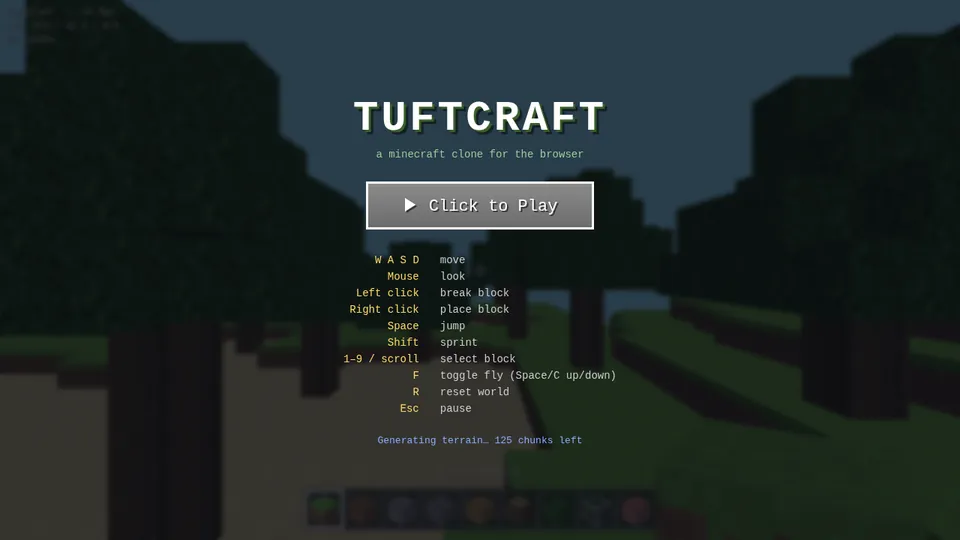
Case: A 3D Landscape Experience
This showcase entry is included as a concise capability example. It is not a benchmark, customer-result claim, or substitute for reviewing the project yourself.

A little more clarity
Frequently asked questions
01Q1: Which are the best AI agents for coding beginners can use?
For a new web product, a prompt-first workflow such as Atoms can reduce how much code you need to write manually. Keep the first project small enough to test yourself, and get engineering help for sensitive functions. A simpler interface does not remove the need to understand what the app does.
02Q2: Can these tools help me code AI agents?
They can assist with implementing software for an agent application when the chosen tool supports your stack and workflow. Defining tool permissions, evaluation cases, failure handling, and data boundaries remains part of the engineering task. A coding agent and the agent application you are building are different systems.
03Q3: Can a coding agent replace a developer?
Do not treat a generated patch as a replacement for engineering ownership. Someone must define the desired behavior, evaluate trade-offs, review changes, and operate the system after release. The appropriate level of supervision depends on the task and its consequences.
04Q4: Is Atoms the same as an IDE coding agent?
No. Atoms centers on coordinated product-building workflows for websites and web apps, while an IDE agent centers on development work in a code environment. Their capabilities can overlap, but the starting artifact and review workflow differ. Choose the one that fits the work you intend to delegate.
Related links: explore Atoms AI agents and current Atoms plans. Start with one bounded task and keep the acceptance decision in human hands.
Sources and availability
Research cutoff: September 7, 2026. Capability references: Cursor, Claude Code, Codex CLI, Codex cloud, GitHub Copilot cloud agent, Replit Agent, and Atoms. Recheck execution surfaces, access controls, plan terms, and handoff capabilities when they change. No fixed prices or performance benchmark results are asserted.
Share this article
 Posts
Posts 