
 Claude now requires identity verification for some users.
No worries. Atoms gives you unlimited access to GLM-5 and GLM-5.1 directly on atoms.dev. No Claude login, no ID check, no workflow interruption.
Choose GLM in Atoms and keep building.
Why this matters
For developers, speed matters.
Claude is still powerful, but Claude-first workflows now depend on Claude account access, verification rules, and platform limits.
GLM-5 and GLM-5.1 give builders another serious option.
According to Z.AI, GLM-5.1 is designed for agentic engineering, long-horizon coding, complex task execution, and real-world software development workflows. It supports a 200K context window and up to 128K output tokens, making it suitable for larger app-building and coding tasks.
GLM-5 and GLM-5.1 are built for serious coding
GLM-5 and GLM-5.1 are not just low-cost alternatives. They are strong coding models for builders who care about performance, long context, and cost efficiency.
Z.AI reports that GLM-5.1 reaches 58.4 on SWE-Bench Pro, outperforming several mainstream frontier models in its published benchmark comparison.
That matters because modern AI coding is not only about writing short snippets. Real builders need models that can:
- understand larger project context
- generate frontend and backend logic
- follow multi-step instructions
- debug and revise code
- support repeated product iteration
- handle long coding tasks without losing direction
GLM-5.1 is especially attractive for these workflows because it combines strong coding performance with much lower token cost.
GLM vs mainstream coding models
| Model | Context / Output | Coding strength | API pricing, per 1M tokens |
|---|---|---|---|
| GLM-5.1 | 200K / 128K | Strong agentic coding; 58.4 on SWE-Bench Pro in Z.AI benchmark | $1.40 input / $4.40 output |
| GLM-5 | Built for agentic engineering workflows | Lower-cost GLM option for coding and app-building tasks | $1.00 input / $3.20 output |
| Claude Sonnet 4.5 | Strong coding model | Popular for coding agents and complex development workflows | $3.00 input / $15.00 output |
| Claude Opus 4.5 | Frontier coding model | Strong real-world software engineering performance | $5.00 input / $25.00 output |
| GPT-5.4 | Frontier OpenAI model | Designed for complex multi-step professional work | $2.50 input / $15.00 output |
| GPT-5 | 400K / 128K | Strong coding and agentic task model | $1.25 input / $10.00 output |
| Gemini 3.1 Pro Preview | 1M / 64K | Strong long-context and reasoning model | $2.00 input / $12.00 output under 200K tokens; higher above 200K |
Z.AI pricing lists GLM-5.1 at $1.40 input and $4.40 output per 1M tokens, while GLM-5 is listed at $1.00 input and $3.20 output per 1M tokens.
For coding, output cost matters a lot. App generation, UI iteration, refactoring, debugging, and backend changes can create large amounts of output tokens. A model with lower output pricing is much more practical for high-frequency development.
That is where GLM has a clear advantage.
Why GLM is a better fit for high-frequency builders
If you only ask a few prompts a day, model pricing may not feel important.
But if you are building real products with AI, cost adds up quickly.
A serious app-building workflow can involve:
- generating a full landing page
- building reusable components
- creating database logic
- adding authentication
- debugging UI states
- rewriting product copy
- improving responsive layouts
- adding payments or dashboards
- fixing deployment issues
- iterating again and again
This is exactly where GLM-5 and GLM-5.1 become valuable.
They give builders strong coding capability at a much more efficient cost structure, especially when output tokens are heavy.
How to choose GLM models in Atoms
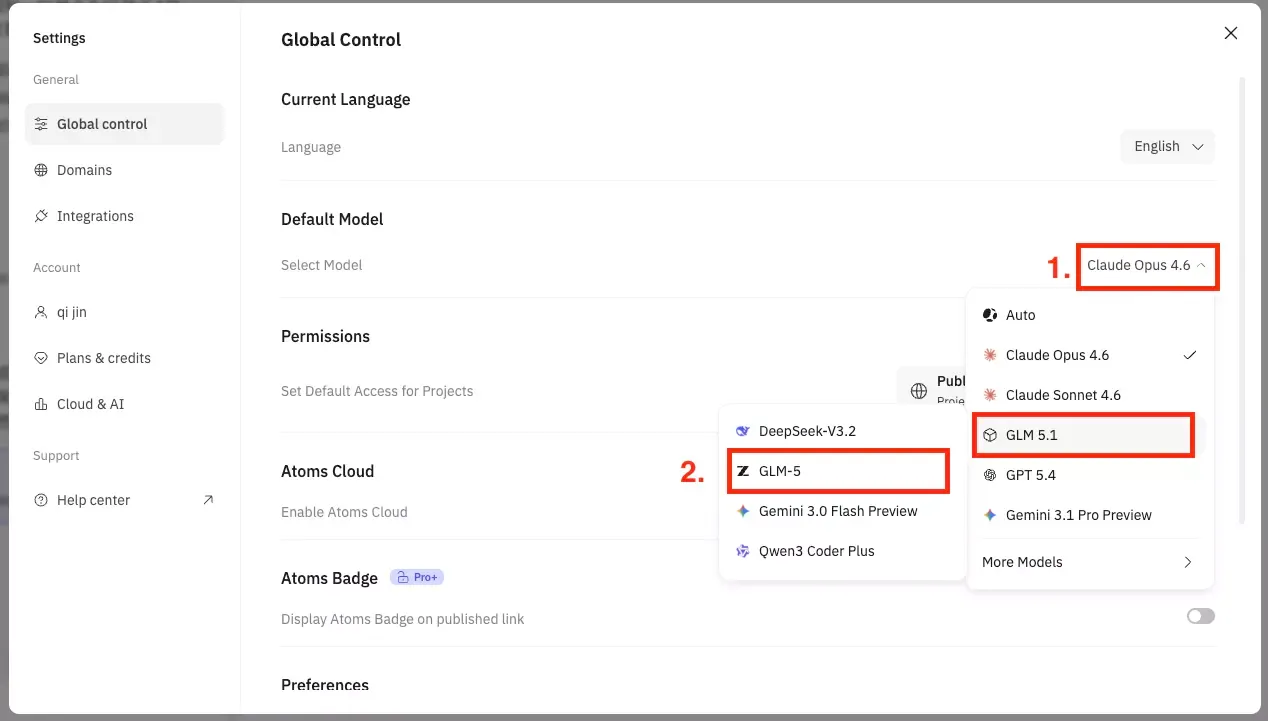
Step 1. Log in to Atoms.dev and click Settings in the bottom-left corner.
Step 2. Find Default Model, then open the dropdown list.
Step 3. Select the GLM model you want to use and start building.
Build faster with GLM inside Atoms
With GLM inside Atoms, you do not need to open Claude, pass identity verification, copy code between tools, or manage deployment somewhere else. You can start from a prompt, generate an app, refine the UI, improve backend logic, debug issues, and keep iterating in one place with an AI coding assistant.
For founders, indie hackers, product teams, and developers, that means less time managing model access and more time shipping. The same workflow can support vibe coding, AI prototype generation, or building a product launch page with AI without jumping between tools.
No Claude login.
No ID check.
No tool switching.
Choose GLM-5 or GLM-5.1 in Atoms and keep building in an AI code editor.
FAQs
Can I use GLM-5 and GLM-5.1 on Atoms?
Yes. Atoms supports both GLM-5 and GLM-5.1, so you can choose GLM models directly inside the Atoms workflow and use them for app building, coding, debugging, and product iteration.
Why use GLM-5.1 for AI coding?
GLM-5.1 is designed for agentic engineering, long-context reasoning, and complex coding workflows. It is a strong fit for tasks like generating app logic, improving UI, debugging issues, and iterating on larger projects.
How is GLM different from Claude for coding?
Claude is still a strong coding model, but some Claude workflows now come with more access friction, including identity verification for certain users. GLM-5 and GLM-5.1 give builders another option with strong coding performance, lower cost, and direct access inside Atoms.
Is GLM-5.1 good for full-stack app building?
Yes. GLM-5.1 is well suited for full-stack app-building workflows because it can handle longer context, multi-step instructions, code generation, debugging, and repeated iteration.
Why should I use GLM inside Atoms instead of a separate coding tool?
Using GLM inside Atoms keeps the workflow simpler. You can start from a prompt, generate an app, refine the UI, improve backend logic, debug issues, and keep iterating without switching between multiple tools.
Who should use GLM on Atoms?
GLM on Atoms is a good fit for founders, indie hackers, developers, product teams, and builders who want to move from idea to working app quickly without managing multiple AI coding tools.
How do I start using GLM on Atoms?
Open Atoms, go to Settings, choose GLM-5 or GLM-5.1 as your default model, describe what you want to build, and start iterating from the same workspace.
 Posts
Posts 